
Hybrid identity sync to Microsoft 365 only works cleanly when your on-premises users have a UPN that matches a verified, routable domain. If your AD still has people signing in as jane.doe@company.local, Entra ID Connect will helpfully rewrite their cloud login to jane.doe@company.onmicrosoft.com — not what your end users expect, and a long-term mess to undo.
The fix is to add the routable suffix to your forest, then flip every user’s userPrincipalName from the legacy .local form to the production domain. PowerShell handles the bulk part in two short blocks; the GUI handles the one-time forest configuration. This walkthrough covers both.
Why the .local UPN is a problem
Anything that isn’t a routable, internet-resolvable domain (.local, .lan, .corp, or any DNS suffix you don’t actually own) cannot be a sign-in name in Microsoft 365. Entra ID Connect detects the unverified suffix and silently substitutes the tenant’s .onmicrosoft.com initial domain at sync time. The result is users who think they should sign in as jane.doe@infotechninja.com but actually sign in as jane.doe@infotechninja.onmicrosoft.com, with no obvious way to know that’s happening.
The correct setup is: add your verified public domain (e.g. infotechninja.com) as an alternative UPN suffix in AD, then mass-update every user’s UPN to use it.
Add the UPN suffix in the GUI
One-time per forest. You only need this on a single DC; it propagates to the rest via replication.
- Press Win + R, type
domain.msc, and click OK — or open Active Directory Domains and Trusts from Administrative Tools.
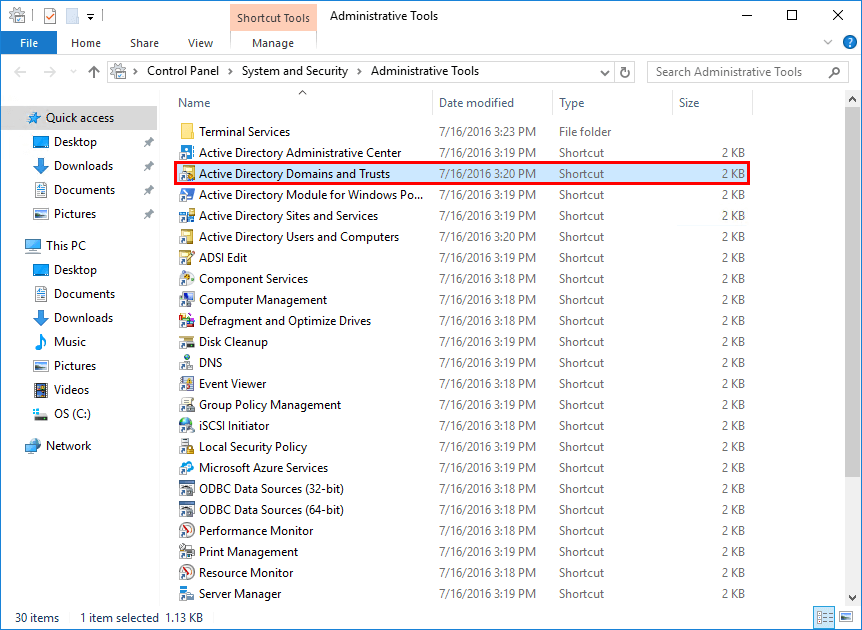
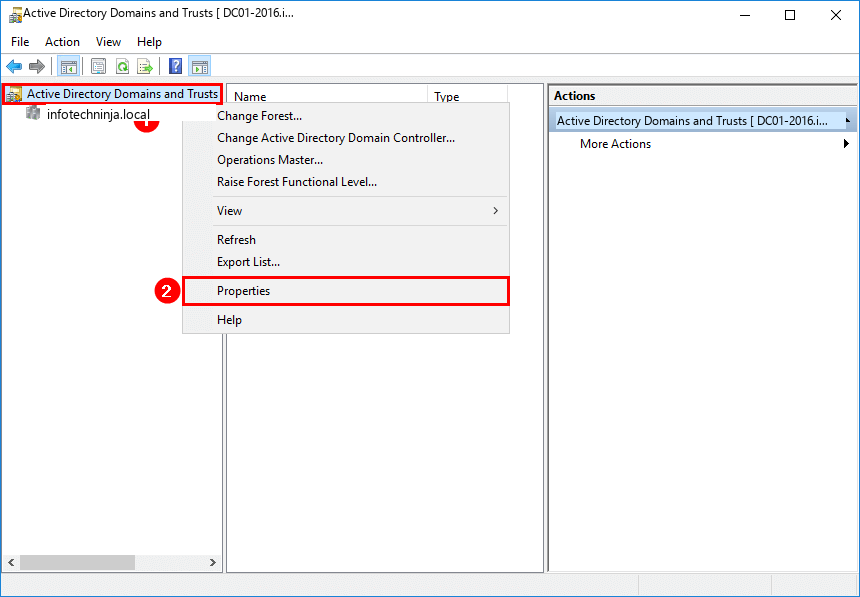
domain.msc.- In the console, right-click the Active Directory Domains and Trusts root node (not your domain — the very top of the tree), and choose Properties.
- On the UPN Suffixes tab, type your verified domain (e.g.
infotechninja.com) into Alternative UPN Suffixes, click Add, then OK.
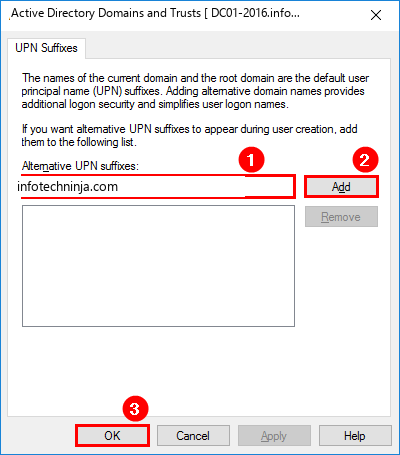
The new suffix is now available for any AD user account.
Same thing in PowerShell
If you’d rather skip the GUI — or you’re scripting this against multiple forests — the ActiveDirectory module covers it in two commands. Run an elevated PowerShell on a DC (or anywhere with RSAT installed).
List the existing UPN suffixes — should be empty if you’ve never added one:
PS C:\> Get-ADForest | Format-List UPNSuffixes

UPNSuffixes : {}
Add the new suffix:
PS C:\> Get-ADForest | Set-ADForest -UPNSuffixes @{add="infotechninja.com"}Confirm it landed:
PS C:\> Get-ADForest | Format-List UPNSuffixes

UPNSuffixes : {infotechninja.com}
Bulk-rewrite UPNs across the whole directory
With the new suffix available, every user that’s currently on the old one needs to be flipped. List them first so you know what you’re about to change:
PS C:\> Get-ADUser -Filter * | Sort-Object Name | Format-Table Name, UserPrincipalName

Name           UserPrincipalName
----           -----------------
Administrator  administrator@infotechninja.local
Amanda Morgan  Amanda.Morgan@infotechninja.local
Amelia Nash    Amelia.Nash@infotechninja.local
Now do the swap. Two commands — first capture the targets, then loop and replace just the suffix portion:
PS C:\> $LocalUsers = Get-ADUser -Filter {UserPrincipalName -like '*infotechninja.local'} `
            -Properties UserPrincipalName -ResultSetSize $null

PS C:\> $LocalUsers | foreach {
            $newUpn = $_.UserPrincipalName.Replace("infotechninja.local","infotechninja.com")
            $_ | Set-ADUser -UserPrincipalName $newUpn
        }
The .Replace() only touches the suffix — the local-part of every UPN (the bit before the @) is preserved. Verify:
PS C:\> Get-ADUser -Filter * | Sort-Object Name | Format-Table Name, UserPrincipalName

Name           UserPrincipalName
----           -----------------
Administrator  administrator@infotechninja.com
Amanda Morgan  Amanda.Morgan@infotechninja.com
Amelia Nash    Amelia.Nash@infotechninja.com
If you ever need to roll back (you shouldn’t need to, but…) run the same loop with the arguments to .Replace() swapped. Don’t remove the old suffix from the forest until you’re sure no users still depend on it.
Sanity check — this should return zero rows once the rewrite is complete:
PS C:\> Get-ADUser -Filter {UserPrincipalName -like '*local'} | Sort-Object Name | Format-Table Name, UserPrincipalNameScope the change to a single OU
Sometimes you’re not ready to flip the whole directory in one go — maybe a department is the M365 pilot and the rest is still on-prem-only. The -SearchBase parameter limits the rewrite to a single OU subtree.
List the users in the target OU first:
PS C:\> Get-ADUser -Filter * `
            -SearchBase "OU=Finance,OU=Users,OU=Company,DC=infotechninja,DC=local" |
        Format-Table Name, UserPrincipalName

Name              UserPrincipalName
----              -----------------
Madeleine Fisher  Madeleine.Fisher@infotechninja.local
Sebastian Nolan   Sebastian.Nolan@infotechninja.local
Irene Springer    Irene.Springer@infotechninja.local
Amelia Nash       Amelia.Nash@infotechninja.local
Jasmina Wilson    Jasmina.Wilson@infotechninja.local
Then run the same two-command pattern with the OU scope applied:
PS C:\> $LocalUsers = Get-ADUser -Filter {UserPrincipalName -like '*infotechninja.local'} `
            -SearchBase "OU=Finance,OU=Users,OU=Company,DC=infotechninja,DC=local" `
            -Properties UserPrincipalName -ResultSetSize $null

PS C:\> $LocalUsers | foreach {
            $newUpn = $_.UserPrincipalName.Replace("infotechninja.local","infotechninja.com")
            $_ | Set-ADUser -UserPrincipalName $newUpn
        }
Verify the OU:
PS C:\> Get-ADUser -Filter * `
            -SearchBase "OU=Finance,OU=Users,OU=Company,DC=infotechninja,DC=local" |
        Format-Table Name, UserPrincipalName

Name              UserPrincipalName
----              -----------------
Madeleine Fisher  Madeleine.Fisher@infotechninja.com
Sebastian Nolan   Sebastian.Nolan@infotechninja.com
Irene Springer    Irene.Springer@infotechninja.com
Amelia Nash       Amelia.Nash@infotechninja.com
Jasmina Wilson    Jasmina.Wilson@infotechninja.com
Same OU-scoped sanity check — should return nothing:
PS C:\> Get-ADUser -Filter {UserPrincipalName -like '*local'} `
            -SearchBase "OU=Finance,OU=Users,OU=Company,DC=infotechninja,DC=local" |
        Sort-Object Name | Format-Table Name, UserPrincipalName
What to watch out for
A few non-obvious gotchas:
- SAMAccountName is unaffected. Down-level logins (legacy apps, old domain controllers, NTLM) keep working with the old
DOMAIN\userform. Only the UPN changes. - If you’re already syncing to Entra ID, wait one delta-sync cycle after the UPN rewrite, then verify each user’s cloud UPN matches the new on-prem UPN before announcing the change to end users.
- Email login flows usually use UPN. Anyone who had bookmarked or memorized the
.localform will be confused on the next sign-in — communicate the change ahead of time. - Don’t remove the old
.localsuffix untilGet-ADUser -Filter {UserPrincipalName -like '*old.local'}returns zero rows. Removing the suffix from the forest while users still hold it leaves them unable to sign in.
Where this fits
This is the foundation step before standing up Entra ID Connect for the first time, and the cleanup step after inheriting an AD that was originally built before anyone had thought about cloud sync. For the broader Entra hybrid identity story, see configuring AD additional domain names and the Hybrid Identity pathway. Once UPNs are clean, the next obvious move is enabling MFA and conditional-access policies for the synced accounts in the cloud.