
This is the part where everything we built in Parts 1–4 finally becomes an Availability Group. Two SQL nodes, a Windows Failover Cluster, AlwaysOn enabled, demodb in FULL recovery with a backup taken — we now hand all of that to the New Availability Group Wizard in SSMS and let it stitch them together.
The wizard does a lot in one shot:
- Creates the AG container in WSFC (a clustered role)
- Sets up endpoints on port 5022 on each node for replication traffic
- Backs up demodb on SQL-NODE-01, copies to a shared path, restores on SQL-NODE-02
- Joins the secondary to the AG and starts log shipping
- Creates the listener — a virtual network name + IP in DNS that follows the current primary
You only run the wizard on SQL-NODE-01. Everything happens to SQL-NODE-02 over the wire.
Launch the AG wizard
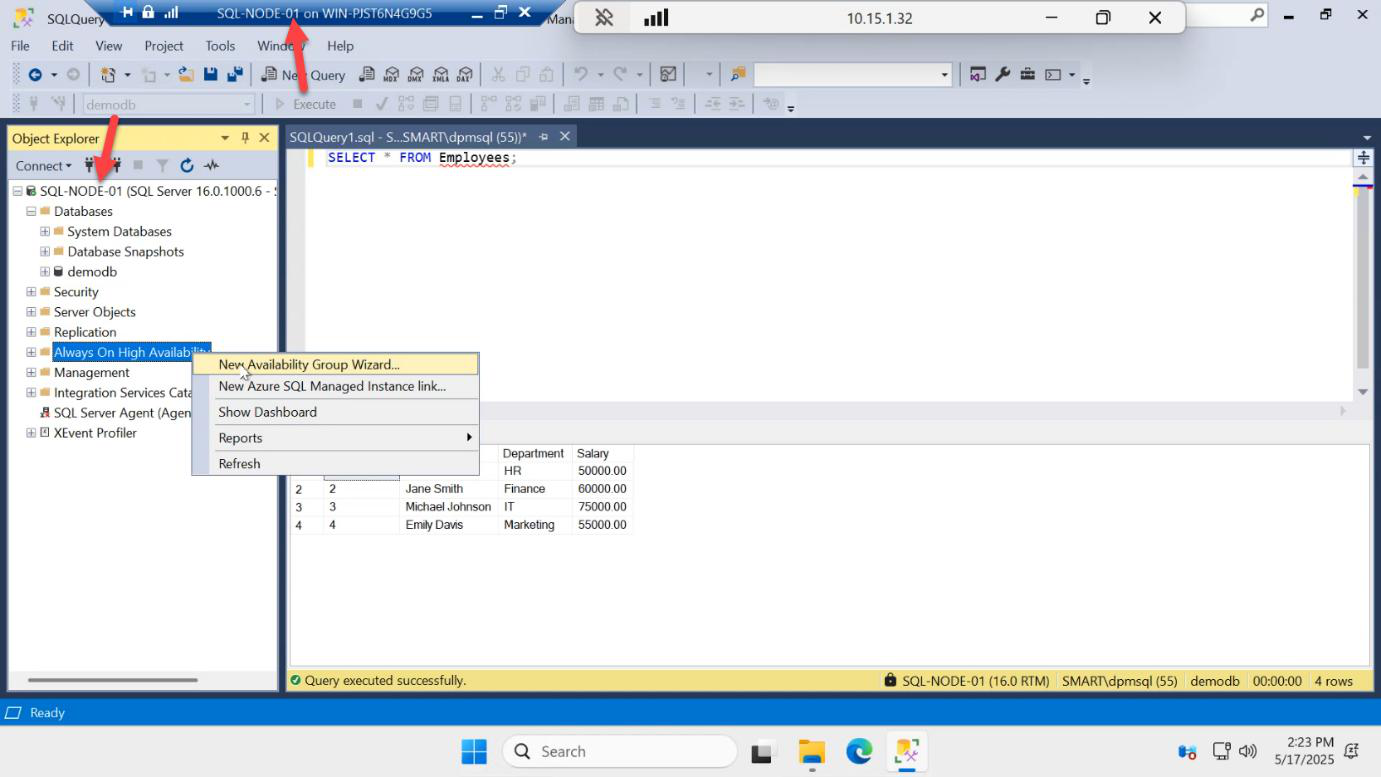
On SQL-NODE-01, in SSMS Object Explorer, expand the server > Always On High Availability > right-click Availability Groups > New Availability Group Wizard…
If the menu item is missing or greyed: AlwaysOn isn’t enabled on this instance. Go back to Part 4.
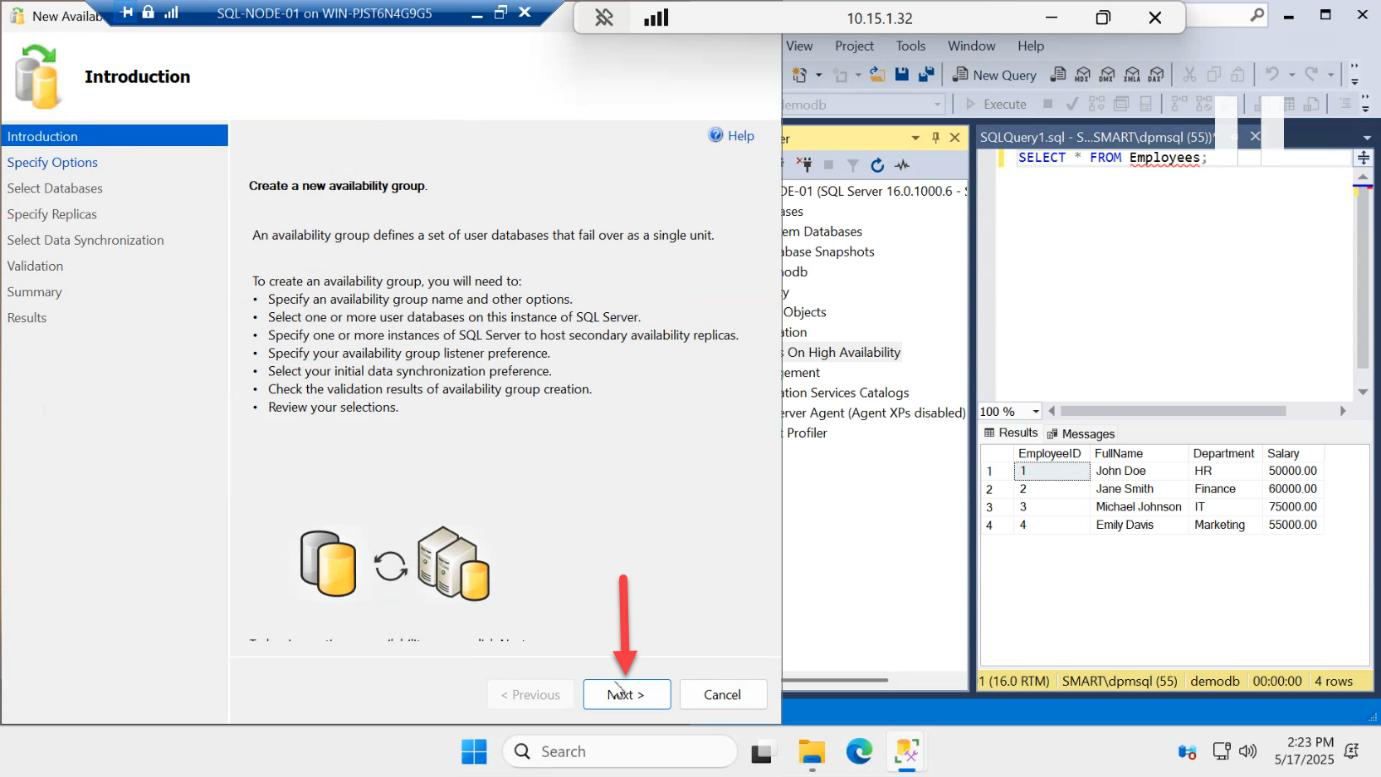
Welcome page > Next.
Name the AG
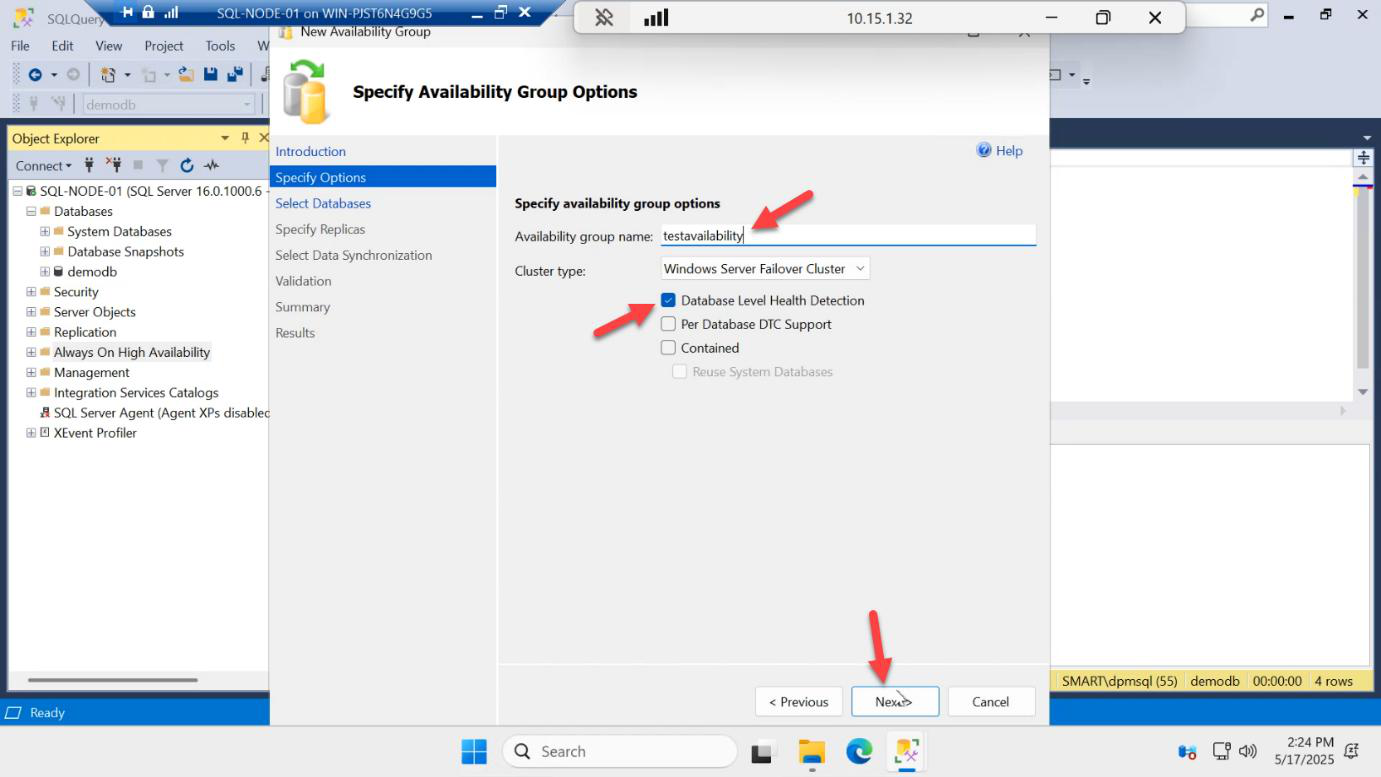
AG-DEMO. Cluster type: Windows Server Failover Cluster (default). Database health detection options — defaults are fine. Next.Specify Options:
- Availability Group Name:
AG-DEMO— under 15 chars, becomes a CNO in AD - Cluster Type: Windows Server Failover Cluster (default; the alternative is EXTERNAL/NONE for cross-platform but that’s a different topology)
- Database Health Detection: leave the defaults — you can tune these later
Next.
Select the database
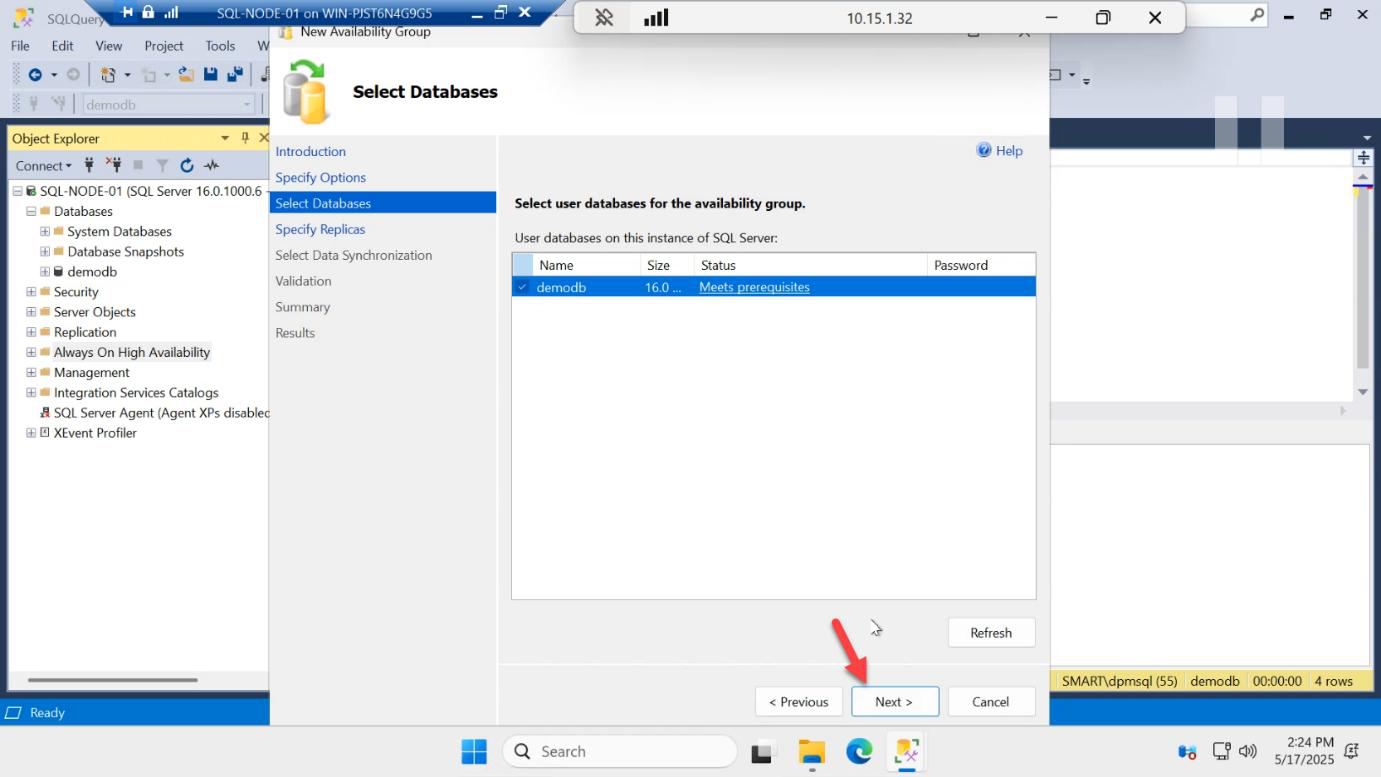
demodb. Status should show Meets prerequisites. If it shows otherwise, the most likely cause is no full backup or wrong recovery model — go back to Part 4.Tick demodb. Status: Meets prerequisites.
If status is anything else, the wizard tells you exactly what’s missing — usually one of:
- Not in FULL recovery model
- No full backup taken
- Database is read-only
- Database is system database
Fix any blocker, click Refresh in the wizard, retry. Next.
Add the secondary replica
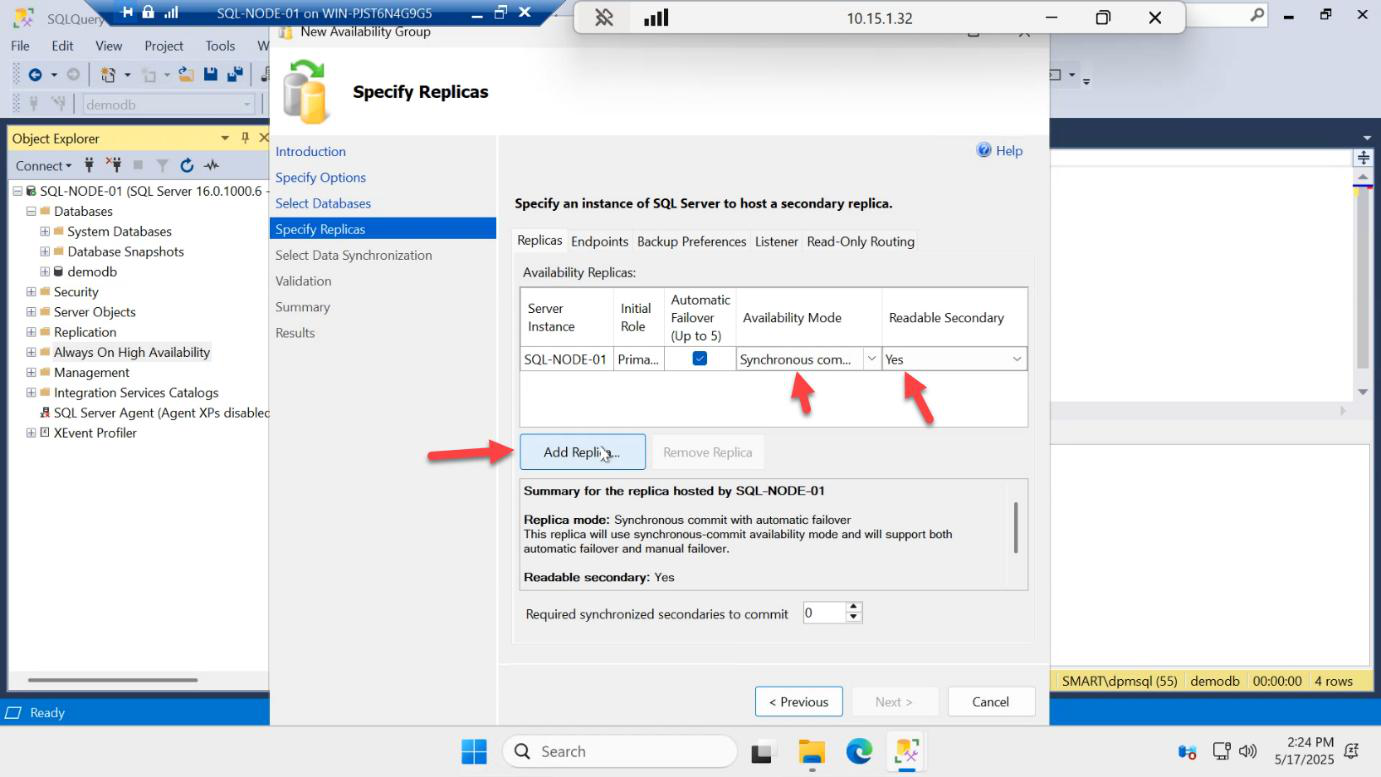
Replicas tab. SQL-NODE-01 is automatically added as the initial primary. Note Readable Secondary = Yes — that column is only meaningful once we add the secondary, and only Yes works on Enterprise/Evaluation.
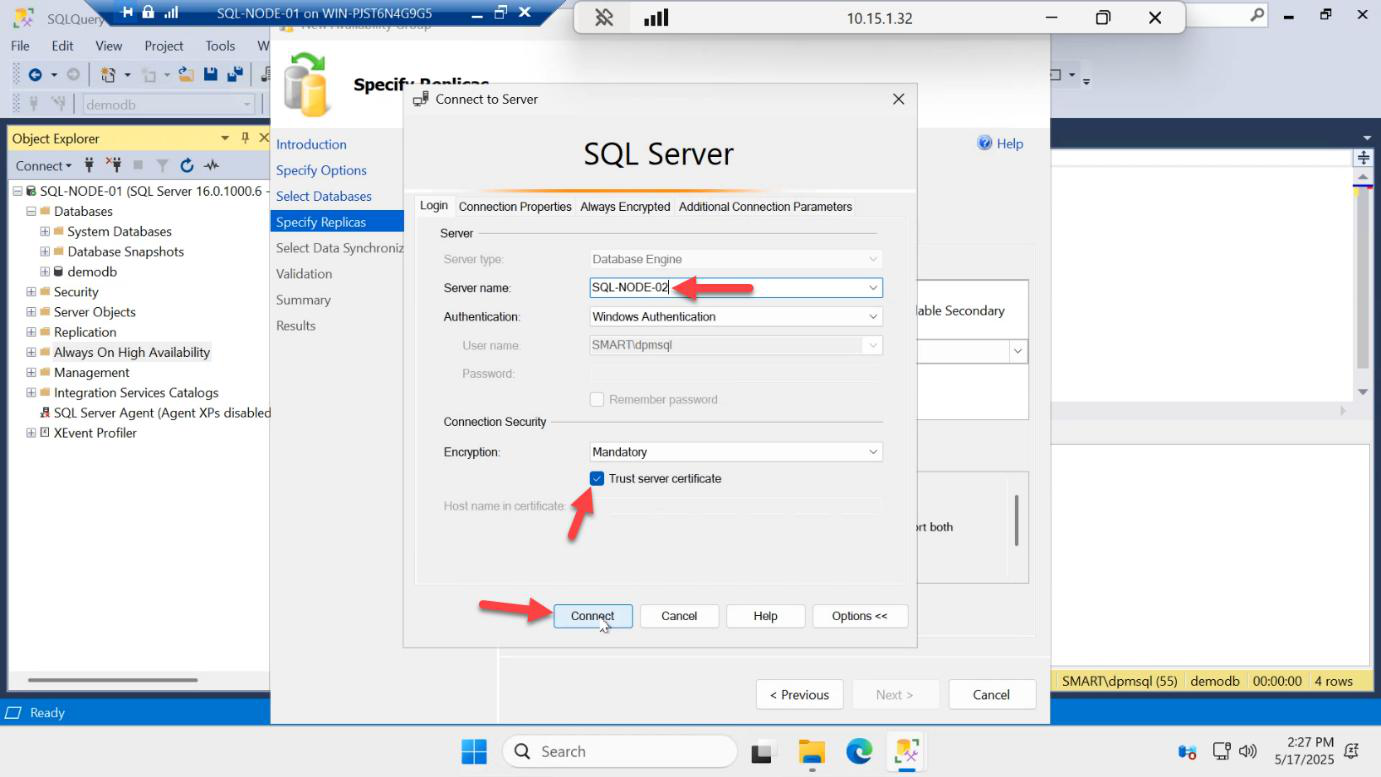
SQL-NODE-02 > Connect.Add Replica… > in the Connect to Server dialog, type SQL-NODE-02 > Connect (Windows authentication, same domain account).
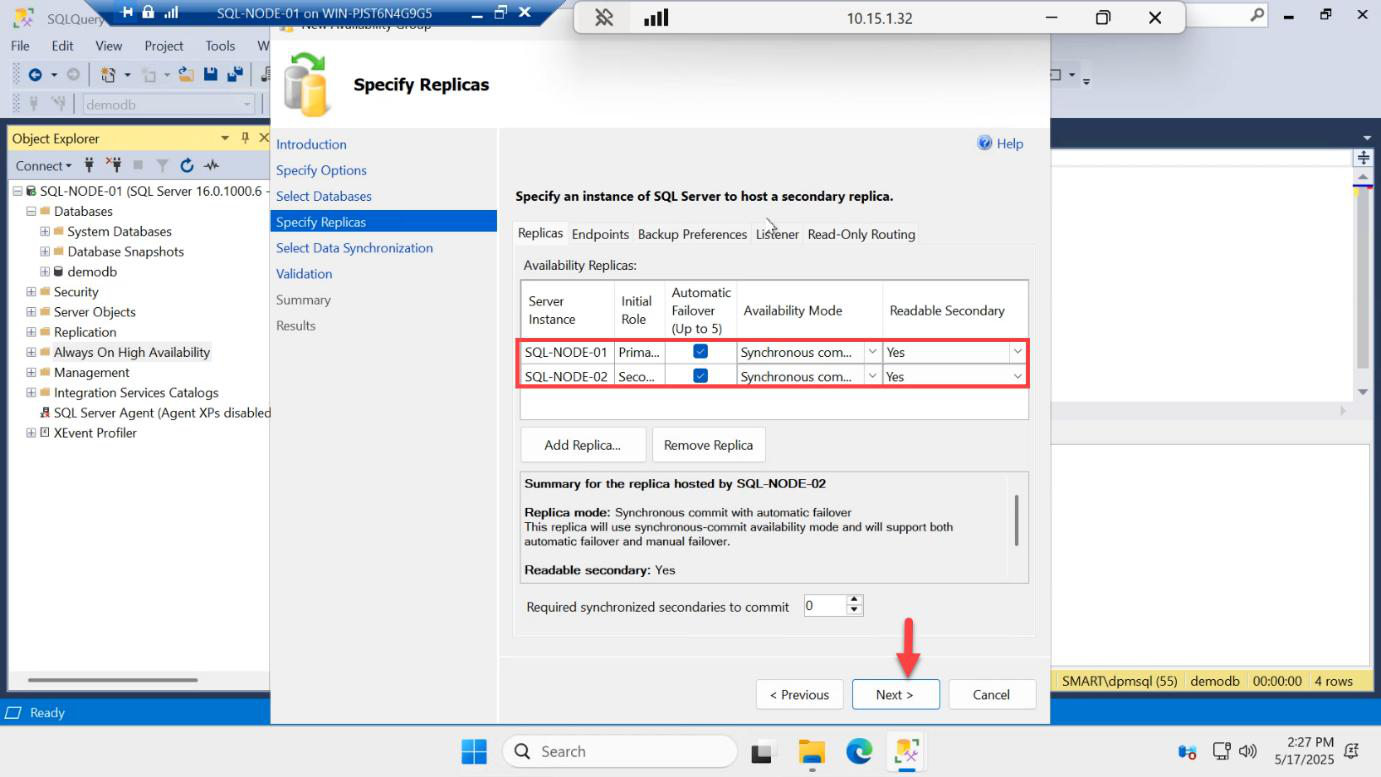
Both replicas now in the list. Set the per-replica options:
- Availability Mode: Synchronous commit — primary waits for secondary to harden the log before committing. Zero data loss, slightly higher latency.
- Failover Mode: Automatic — the cluster will fail over without operator intervention.
- Readable Secondary: Yes — allows reads on the secondary (Enterprise feature).
Asynchronous commit + manual failover is the typical DR pattern when the secondary is in a different datacentre with WAN latency. For our same-site lab, sync + auto.
Configure the listener
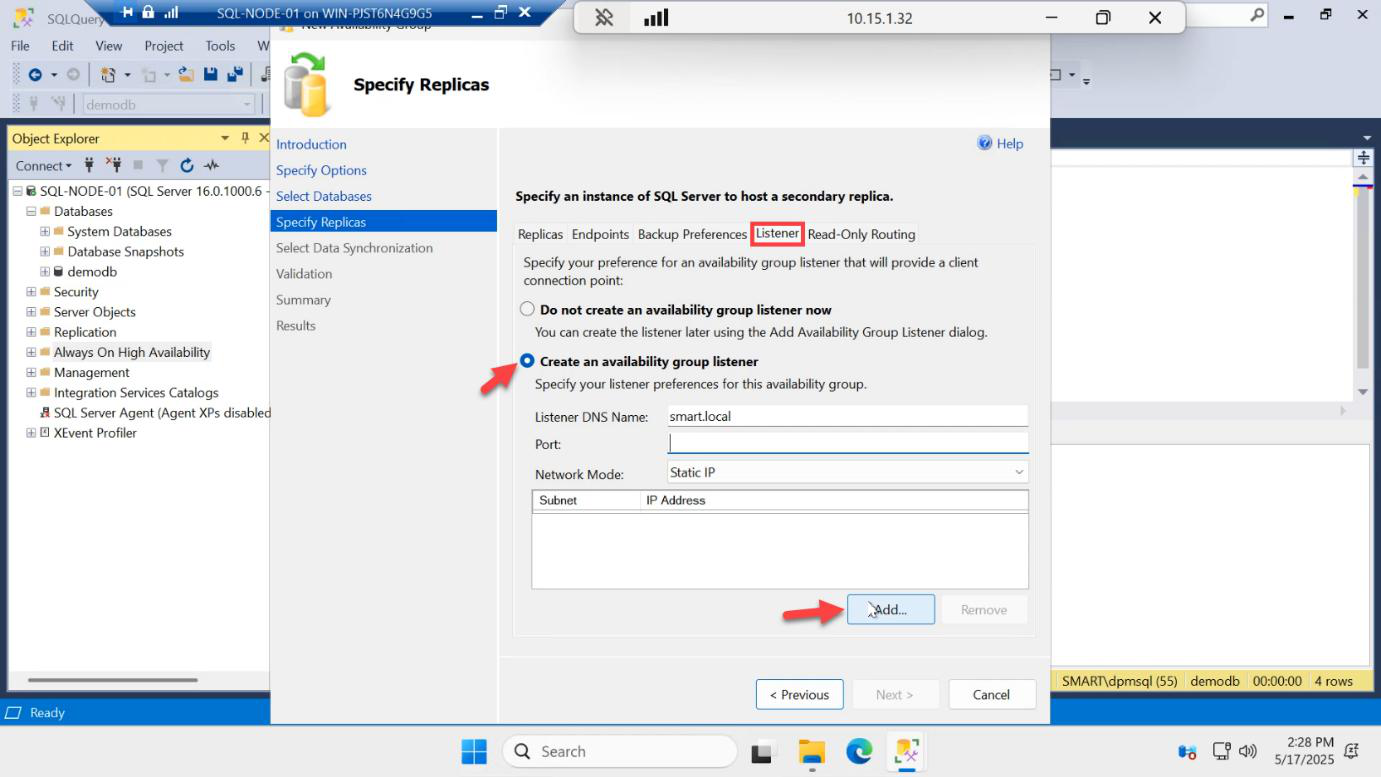
Switch to the Listener tab > Create an availability group listener > Add…
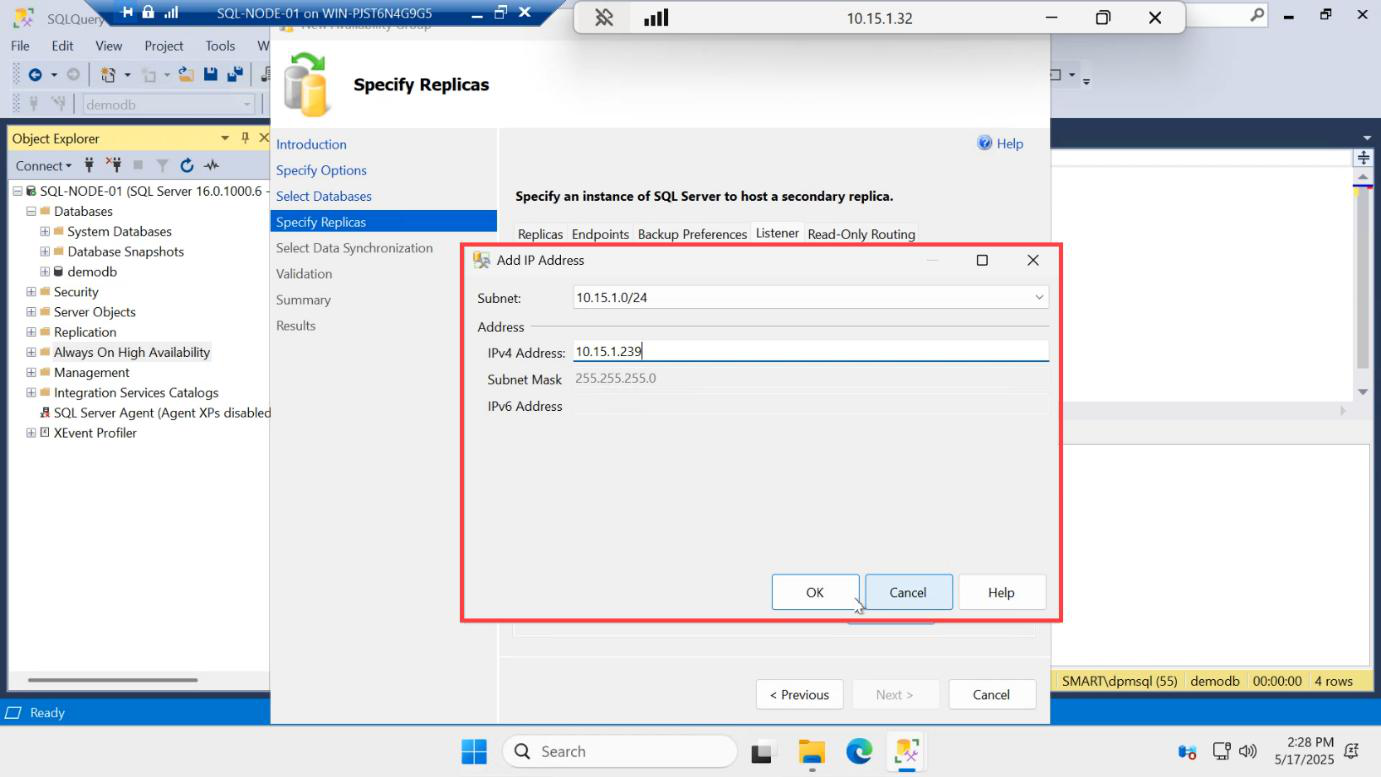
192.168.1.60) — not the same as the cluster IP from Part 3, not the same as either node IP. OK.Listener IP: pick a free IP in the same subnet as the SQL nodes — e.g. 192.168.1.60. This is a NEW IP:
- Not the cluster IP (192.168.1.50 from Part 3)
- Not SQL-NODE-01 (192.168.1.21)
- Not SQL-NODE-02 (192.168.1.22)
OK.
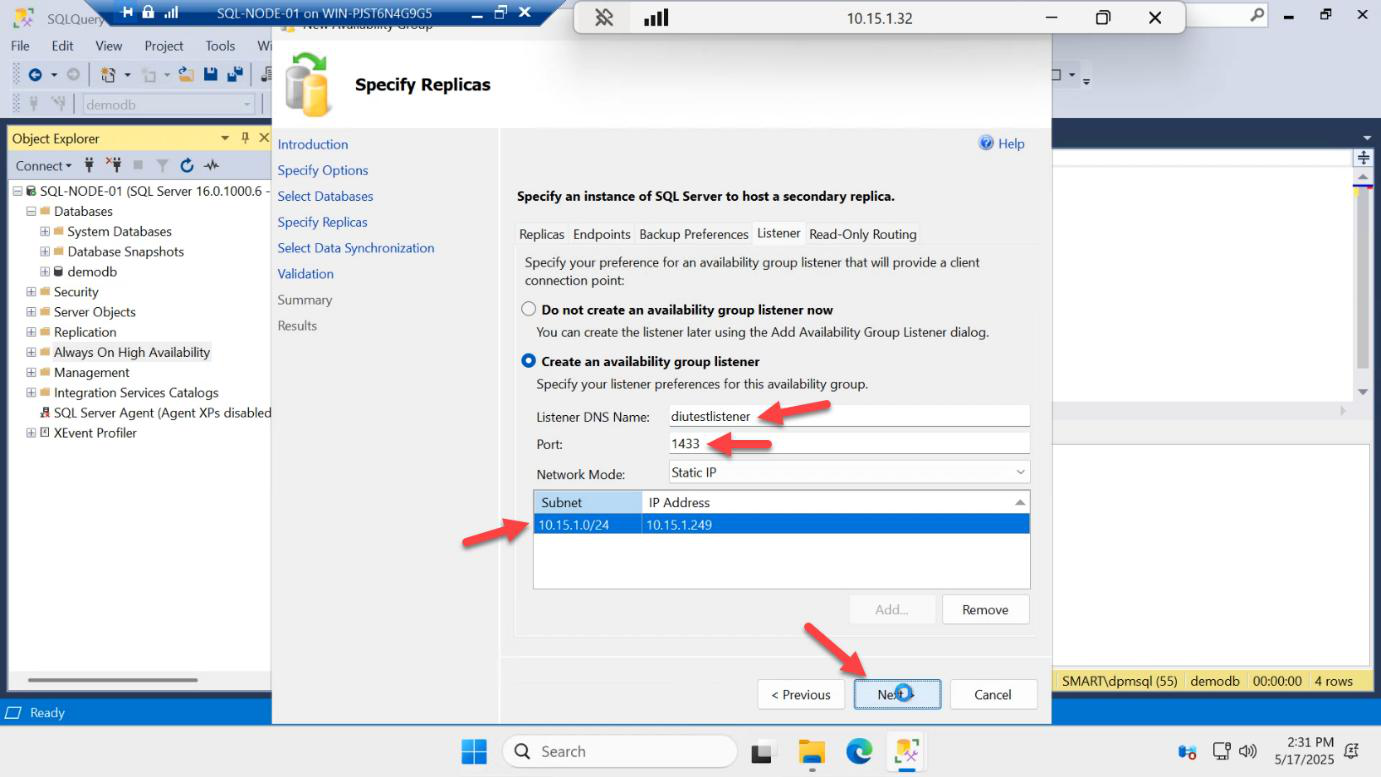
AG-LISTENER. Port: 1433. This is the VNN applications connect to. Next.Back on the Listener tab:
- Listener DNS Name:
AG-LISTENER— this becomes a DNS A record + a CNO in AD - Port: 1433 (the standard SQL port; apps don’t need to know about a non-standard port)
- Network mode: Static IP (already configured above)
Next.
The listener is the whole point of the AG from an application’s perspective. App connects to AG-LISTENER,1433; the cluster + DNS routes to whichever node is currently primary; on failover the listener IP follows the new primary. Apps never need to know about SQL-NODE-01 vs SQL-NODE-02.
Initial data sync
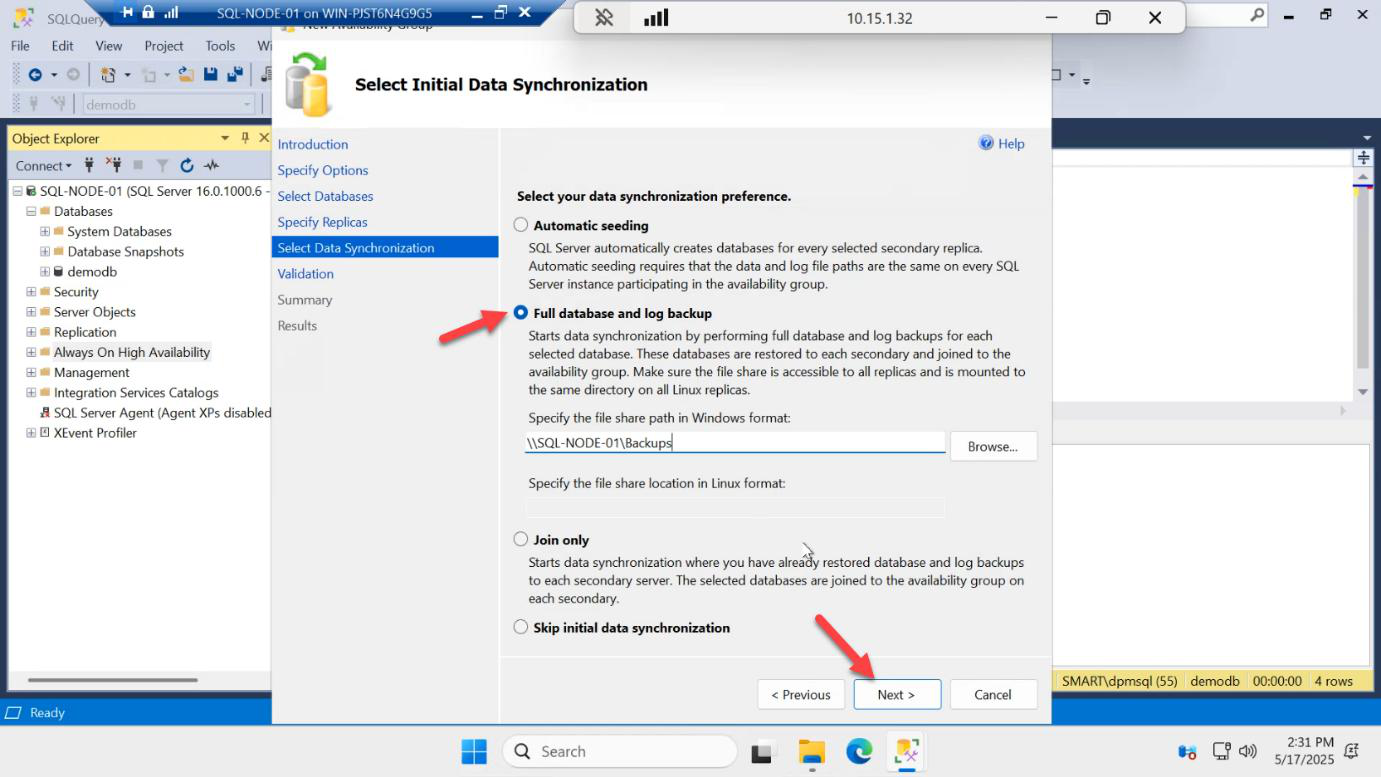
\\DC01\quorum (the same share you used for cluster witness, granted RW to the SQL service account). Next.Initial Data Synchronization options:
- Full database and log backup (default) — SQL takes a fresh backup, drops it on the share, restores on the secondary. Best for small/medium databases.
- Automatic seeding — SQL streams pages directly node-to-node over the endpoint. Faster for larger DBs, no share needed.
- Skip initial sync — you handle backup/restore manually before joining.
For our small demodb, Full backup mode is fine. Backup share: \\DC01\quorum (re-use the witness share from Part 3, since the SQL service account already has Full Control). Next.
Validation
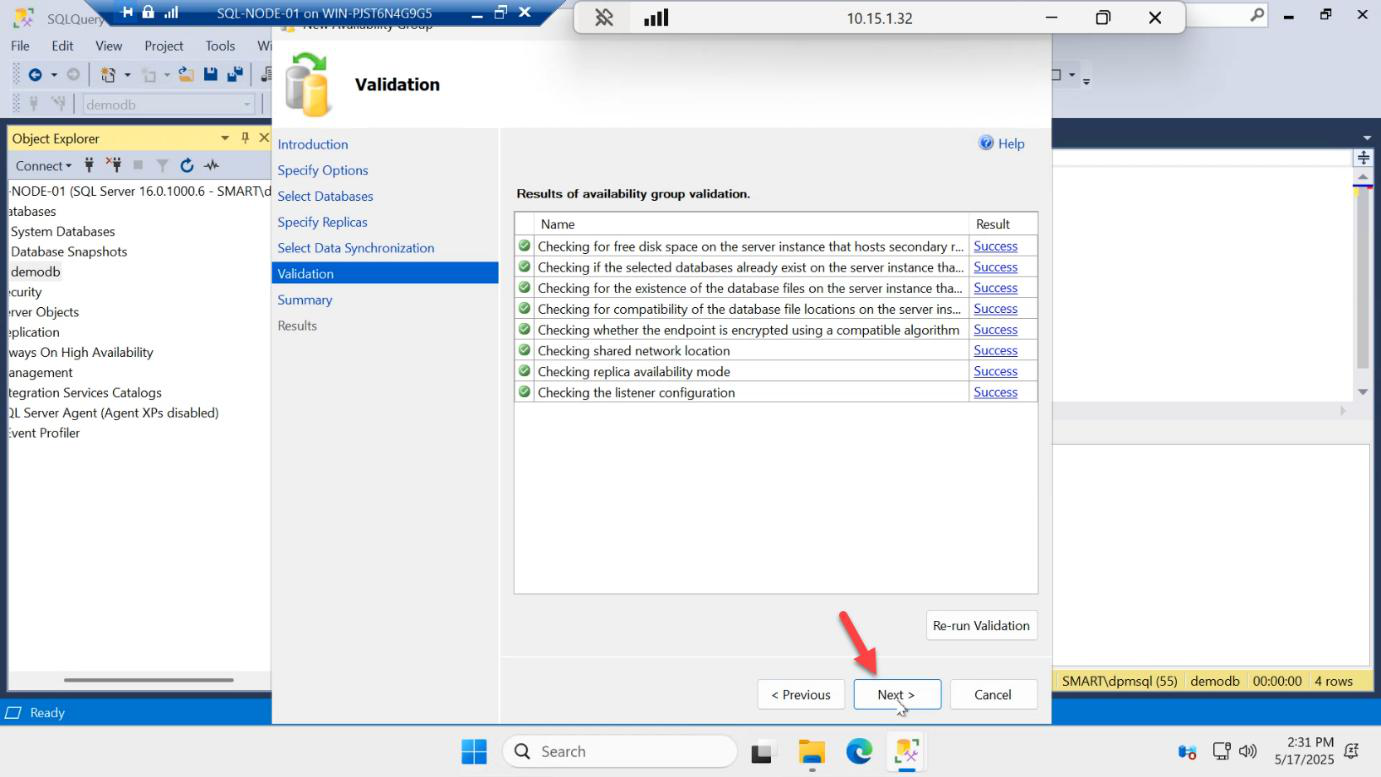
The wizard runs final validation: endpoint health, account permissions, share write access, etc. Every row must be green. Common failures:
- Service account doesn’t have RW to backup share — fix permissions on \\DC01\quorum
- Endpoint mismatch — firewall blocking 5022 between nodes
- Listener IP already in use — ping it; pick a different one
Next.
Create the AG
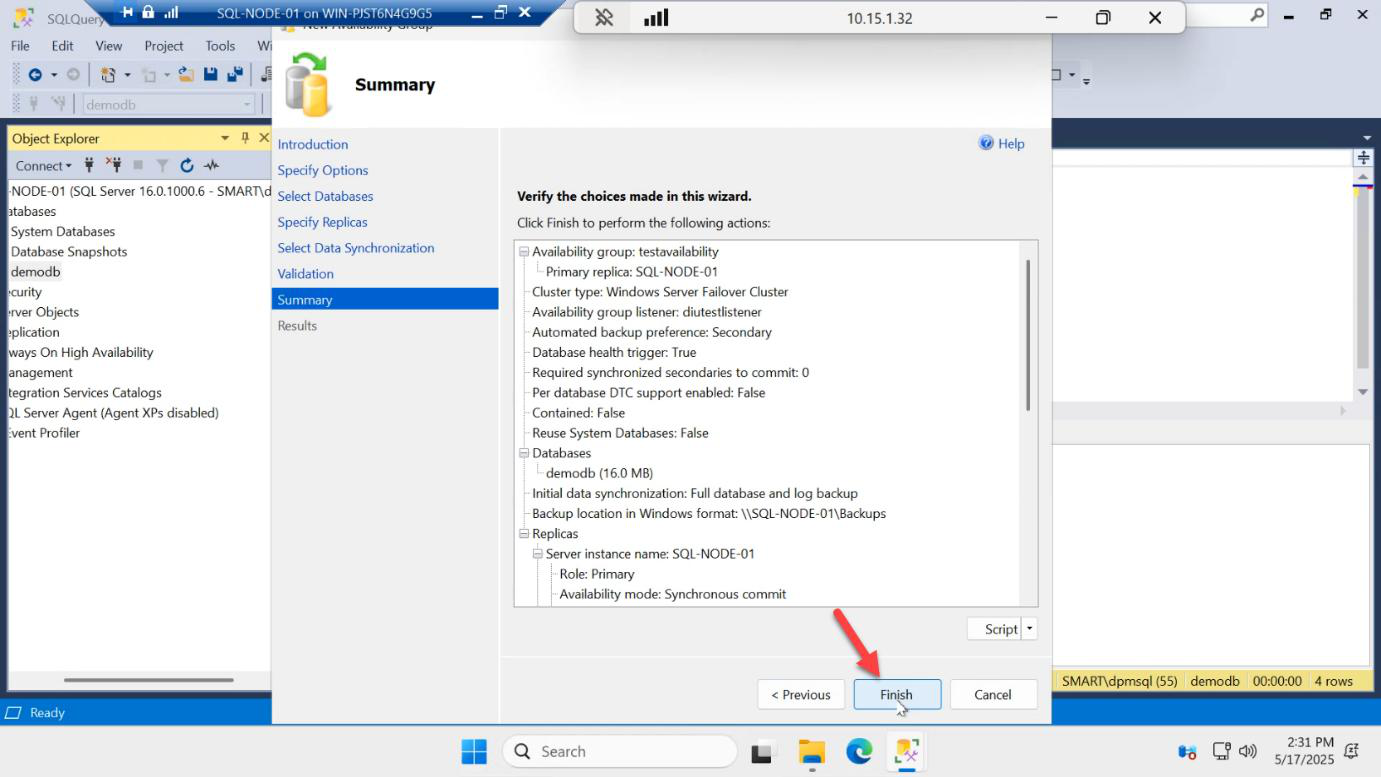
Summary > Finish. SQL does its work for ~30 seconds:
- Creates the AG cluster role in WSFC
- Configures endpoints on TCP 5022 on both nodes
- Takes a fresh full backup of demodb to
\\DC01\quorum\demodb.bak - Restores it on SQL-NODE-02 with NORECOVERY
- Joins demodb to the AG on SQL-NODE-02
- Starts log shipping over the endpoint
- Creates the listener AD object + DNS record + cluster IP resource
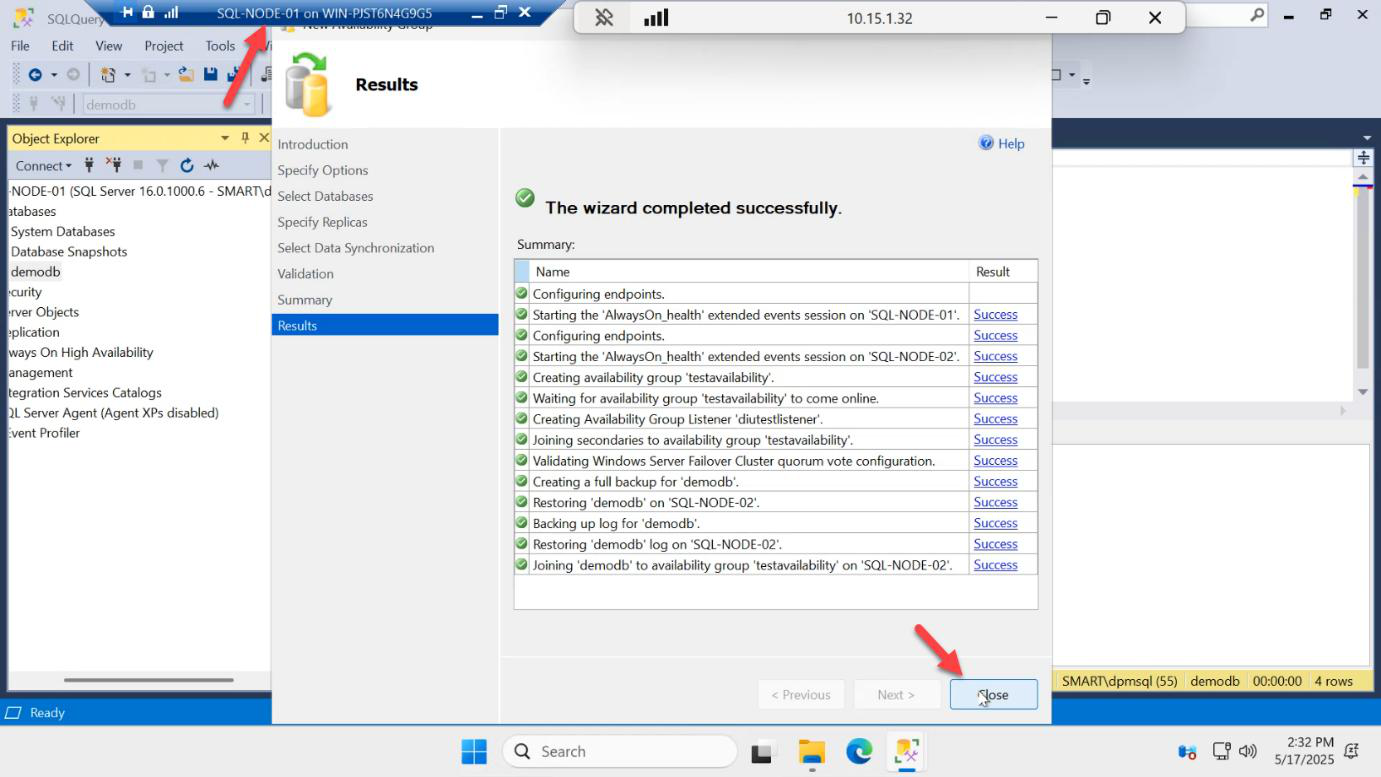
Results page — every step green > Close.
You did nothing on SQL-NODE-02. Everything happened over the wire.
Things that bite people
Listener IP collides with another device
Symptom: AG creation succeeds but the listener resource won’t come online in Failover Cluster Manager. Always ping the listener IP before the wizard to confirm it’s free.
Service account doesn’t have RW to backup share
Initial sync fails partway. Fix the NTFS + share permissions on the witness share, then run the AG wizard again.
Synchronous commit + WAN latency
If your secondary is across a WAN (e.g. cross-region for DR), synchronous commit means every write blocks on round-trip latency to the secondary. Use asynchronous commit for cross-region replicas; reserve sync for same-datacentre/low-latency pairs.
Picked Skip initial sync without pre-staging
If you skip initial sync, you must pre-restore demodb on SQL-NODE-02 with NORECOVERY before running the wizard. Otherwise the secondary join fails.
Listener DNS name = cluster name
Don’t. The cluster CNO and the listener CNO are separate objects. Pick distinct names: SQLCLUSTER01 for the cluster and AG-LISTENER for the listener.
Endpoint port 5022 blocked by firewall
If you turned the firewall back on between Part 3 and now, replication traffic to 5022 will be blocked and validation will fail. Either disable the firewall (lab) or open 5022 inbound on both nodes.
What’s next
Part 6 in the SQL Availability Groups pathway: verify replication in the AG dashboard, confirm the secondary is in Synchronized state, run reads against the secondary (proving readable secondary works), and watch a write attempt fail on the secondary (proving it’s read-only).