
If every DC in every site talked directly to every DC in every other site, an N-site forest with M DCs per site would have N×M×(N-1)×M long-distance connections — explosive growth, and a lot of expensive WAN traffic carrying duplicate data. The fix is the bridgehead server: one DC per site (per NC) that handles all inbound and outbound inter-site replication on behalf of every other DC in that site.
This is Part 7 of the AD Replication Deep Dive series. Part 6 covered the KCC that picks bridgeheads; this part is about what the bridgehead actually does once picked, how to find which DC currently holds the role, and the rare cases where overriding the auto-selection is the right call.
What a bridgehead is and isn’t
A bridgehead server is:
- An ordinary DC.
- Picked by the ISTG (Inter-Site Topology Generator) in its site, per naming context.
- The only DC in its site that exchanges replication traffic with bridgeheads in other sites.
A bridgehead is not:
- A special install. Same Windows Server / AD bits as every other DC.
- A single forest-wide role. Every site has its own bridgehead(s), independently selected.
- Forever. The ISTG re-evaluates the choice on every 15-minute KCC cycle; if the current bridgehead is failing, another DC takes over.
The traffic flow
Picture three DCs in HQ (DC-A1, A2, A3) and two in a branch (DC-B1, B2). Site link HQ↔BRANCH exists. ISTG picks DC-A3 and DC-B1 as bridgeheads.
An admin creates user jdoe on DC-A1 at HQ:
- Intra-site: DC-A1 notifies A2 and A3 after 15 sec. Within 30–45 sec everyone at HQ has
jdoe. - Inter-site: At the next site-link poll, DC-B1 (branch bridgehead) pulls from DC-A3 (HQ bridgehead). The site link can’t see A1 or A2 directly; it only sees A3.
- Intra-site at branch: DC-B1 now has the user. DC-B1 notifies B2. B2 pulls from B1 and gets
jdoe.
From outside HQ, all of HQ’s replication traffic looks like “coming from DC-A3.” The other HQ DCs are invisible to the WAN. That’s the whole point.
Why one DC and not all of them
- Bandwidth: Five HQ DCs pushing their changes to two branch DCs would mean 10 cross-site streams. With bridgeheads, it’s 1 stream of bundled changes.
- Compression efficiency: Inter-site replication compresses payload over a threshold. A bundled stream from one DC compresses far better than 10 independent small streams.
- Scheduling simplicity: Site-link schedules apply per link, not per DC pair. One bridgehead means one schedule per cross-site relationship.
- Firewall friendliness: You only need to allow RPC traffic between bridgehead IPs across the firewall, not between every DC pair.
How bridgeheads are picked
On every KCC cycle in every site, the local ISTG considers each cross-site partner site and asks: “Which DC in my site should be the bridgehead for sending to / receiving from that site, for each NC?”
Selection prefers:
- DCs that are writable for the NC in question (not RODCs).
- DCs that hold the NC in writable form (you can’t bridgehead the Domain NC of another domain).
- For NCs hosted by multiple DCs, a deterministic round-robin by GUID.
The selection is per-NC. In a forest with multiple domains, one DC in a hub site might be the bridgehead for the Configuration NC while a different DC handles a Domain NC. Use repadmin /bridgeheads to see the current map.
Preferred bridgehead servers
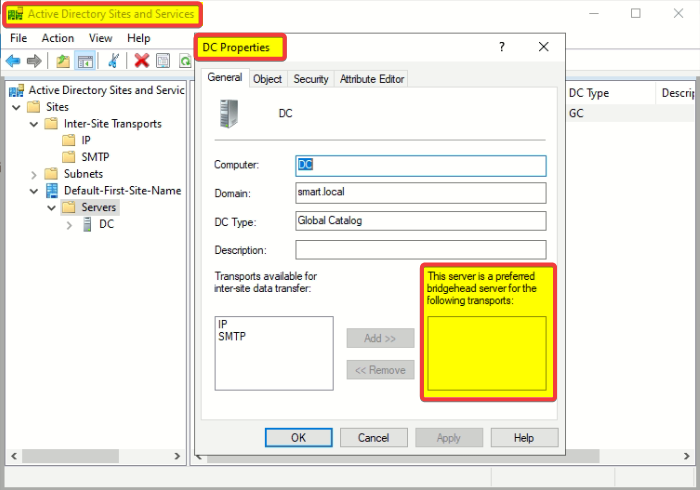
You can override the ISTG by setting one or more DCs as “preferred bridgeheads” in Sites and Services:
- Open Sites and Services.
- Expand the site, find the server, right-click, Properties.
- Move “IP” (or “SMTP”) into the “This server is a preferred bridgehead server for the following transports” list.
From that moment on, the ISTG only considers servers in the preferred list. If you set DC-A3 as preferred and DC-A3 dies, the ISTG will not automatically pick A1 or A2 as a replacement — inter-site replication on that site simply stops until you either un-mark A3 or add a new preferred DC.
This makes “preferred bridgehead” a powerful but dangerous knob. Use it only when you have a specific reason — usually one of:
- You need to pin replication to DCs with specific hardware (e.g., the only ones with WAN accelerator cards installed).
- Compliance forces a specific path that the ISTG might not pick.
- You want to keep replication off DCs that host CPU-intensive workloads.
Finding the current bridgehead
repadmin /bridgeheadsOutput looks like:
Bridgeheads for site CN=HQ,CN=Sites,CN=Configuration,...
  CN=DC-A3,CN=Servers,CN=HQ,...
Bridgeheads for site CN=BRANCH,CN=Sites,CN=Configuration,...
  CN=DC-B1,CN=Servers,CN=BRANCH,...
In PowerShell:
Get-ADReplicationSite -Filter * |
  ForEach-Object {
    [pscustomobject]@{
      Site = $_.Name
      Bridgeheads = (Get-ADReplicationConnection -Filter "ReplicateFromDirectoryServer -eq '*' " |
        Where-Object { $_.SiteName -eq $_.Name }).ReplicateFromDirectoryServer
    }
  }
What happens when a bridgehead fails
Auto-selected bridgehead dies
On the next KCC cycle (worst case 15 min), the ISTG picks another writable DC in the site as the new bridgehead. New connection objects are created. The ISTG drops the old ones. Inter-site replication resumes typically within one cycle. No admin action required.
Preferred bridgehead dies, no replacement preferred
The ISTG does not fall back to a non-preferred DC. Inter-site replication on the affected site link is dead until you either:
- Bring the bridgehead back online.
- Add another DC to the preferred list.
- Remove the bridgehead-preference flag from the dead DC entirely.
Multi-NC partial failure
A DC might be a perfectly healthy bridgehead for the Configuration NC but unable to handle a specific Domain NC (because it doesn’t host that domain). If the ISTG selects the wrong DC for the wrong NC, replication for that NC stops. Symptom: repadmin /showrepl shows success for some NCs and failure for others on the same partner relationship.
Capacity planning for bridgeheads
A bridgehead carries everyone’s changes. In a busy site:
- CPU spikes during compression / decompression of inter-site batches.
- Disk I/O spikes from writing inbound changes locally.
- Memory pressure during large catch-ups (e.g., after a site has been disconnected for a day).
For 1–3 DCs per site, any DC handles bridgehead duties fine. For 10+ DCs per site or high change volumes, designate stronger hardware as bridgeheads via the preferred-bridgehead list.
Things that bite people
Preferred bridgehead set, then forgotten
An admin set DC-A3 as preferred bridgehead 4 years ago. DC-A3 was decommissioned 3 years ago. The preference flag is still there in Sites and Services. New DCs come and go; nobody touches the flag. Today: inter-site replication for HQ has been dead for an unknowable amount of time. Always audit Sites and Services for stale preferred-bridgehead flags after a DC retirement.
Bridgehead being an RODC
Read-Only DCs can’t be writable bridgeheads (they can’t accept incoming writes). The ISTG normally avoids them, but a misconfigured preferred-bridgehead list can pick an RODC anyway. Result: inbound replication fails on that NC.
Site link transitivity assumption
You add two site links A↔B and B↔C, assume A and C now have a transitive path. They do — but only if “Bridge all site links” is on (default) and there’s no manual site-link bridge that excludes them. Triple-check that flag.
Confusing bridgehead with the PDC Emulator
Different things. The PDC Emulator is a forest-level FSMO role (single DC per domain, urgent replication target). A bridgehead is a per-site role (single DC per site, regular replication path). The PDC Emulator can be a bridgehead too — common in small environments — but they’re independent assignments.
What’s next
You now understand the topology layer: KCC builds it, bridgeheads carry it, frequency drives it. Part 8 of the AD Replication Deep Dive pathway covers what happens when two DCs make conflicting changes at the same time: conflict resolution — the version → timestamp → GUID tie-breaker chain, and the special handling for renamed objects, deleted parents, and duplicate SIDs.