
An AD-integrated DNS zone lives inside the directory itself — the records are AD objects, replicated by DC-to-DC replication, protected by AD ACLs. That gives you replication for free and tight integration with the security model. It also means there is no flat .dns file on disk to copy off and stash on a backup target. The first time someone accidentally deletes the zone in DNS Manager, or the directory database hits a corruption that takes the zones with it, you discover that point-in-time DNS-zone backup is its own discipline.
The fix is a two-step pattern. dnscmd /zoneexport writes a flat .dns file from a running AD-integrated zone — this is the backup. To restore, the New Zone Wizard creates a standard Primary zone from that .dns file, and a one-click conversion in the zone properties promotes it back to AD-integrated. The whole cycle takes ten minutes per pair of zones, runs against a live DC, and produces an output identical to the starting state.
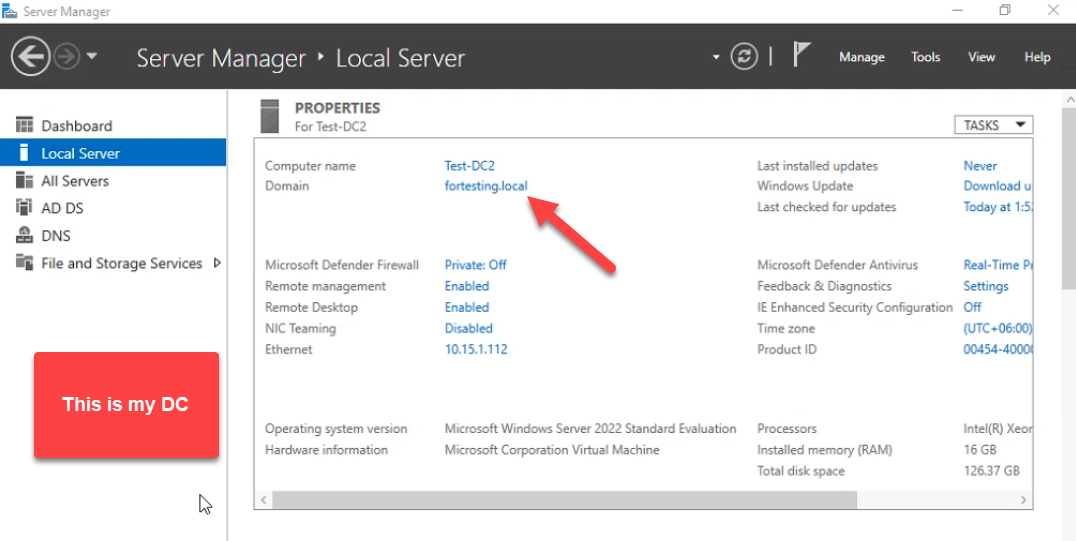
This walkthrough shows the entire round trip on a real domain controller (Test-DC2 in fortesting.local): export both fortesting.local and _msdcs.fortesting.local to flat files, simulate a disaster by deleting the zones, restore them as standard Primary, then convert each back to AD-integrated with the right replication scope and secure-only dynamic updates.
Why DNS-Zone Backup Is Its Own Problem
- System-state backup catches the AD database, not zone files. A Windows Server Backup of system state captures
ntds.dit, which contains AD-integrated DNS zones, but the only path to restore that copy is a full authoritative restore in DSRM. For an accidental zone deletion, that is enormous overkill — a system-state restore touches every other directory object on the DC. - Replication propagates deletions. Delete
fortesting.localon one DC and the deletion replicates to every other DC in the domain within minutes. Re-adding the zone manually loses every record — static and dynamic. - The
_msdcszone is forest-wide critical. Every domain client locates its DC via SRV records in_msdcs.<forest-root>. If that zone disappears, Kerberos discovery breaks across the forest, not just the local domain. - Per-zone restore is the only sane unit of recovery. Most real incidents are “someone deleted one zone” or “one zone got corrupted.” You want the recovery to land at the zone level, not at the directory level.
Hence: per-zone .dns files on a regular schedule, plus the workflow below to put them back when you need them.
Pre-flight
- Domain Admin (or DNS Admins) credentials on the DC.
- Console or RDP access to the DC.
- An out-of-the-DC backup target.
dnscmd /zoneexportdrops files in%SystemRoot%\system32\dns\— the recovery is more useful if you also copy them off to a file share or backup volume.
Open File Explorer on the DC and navigate to C:\Windows\System32\dns\. AD-integrated zones do not have files of their own here yet:
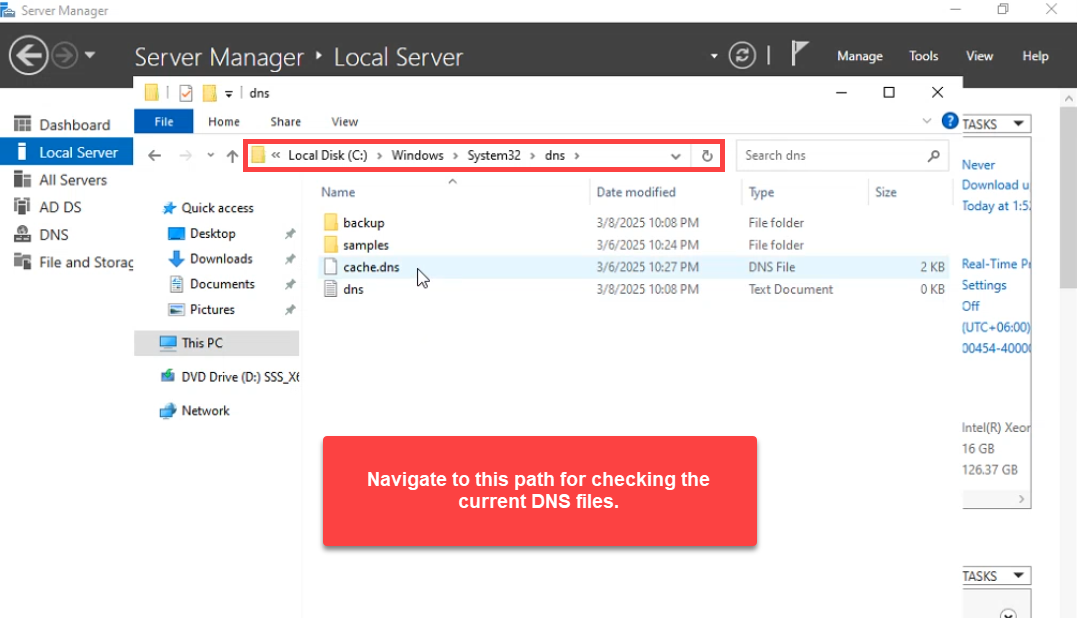
.dns files of their own here — only cache.dns and the empty placeholder. dnscmd /zoneexport writes its output here.Phase 1: Export Each Zone with dnscmd /zoneexport
Open Windows PowerShell as administrator. dnscmd /zoneexport writes the contents of an AD-integrated zone to a text file using BIND zone-file syntax. Run it once per zone:
dnscmd /zoneexport fortesting.local fortesting.local.dns.backup
dnscmd /zoneexport _msdcs.fortesting.local _msdcs.fortesting.local.dns.backup
Each call produces DNS Server . exported zone <zone> to file C:\windows\system32\dns\<name> followed by Command completed successfully:
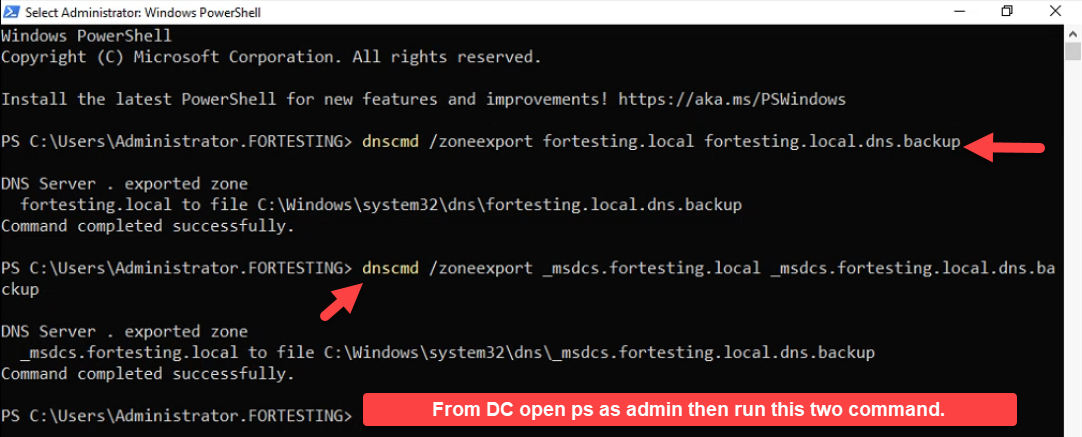
dnscmd /zoneexport commands — one per zone — produce flat-file copies of each AD-integrated zone alongside the existing dns folder contents. The output filename is anything you want; the convention is <zone>.dns.backup so it is recognisable but does not collide with a real .dns file.The output filename is anything you want. The .dns.backup suffix is a convention — recognisable as a backup, will not collide with the .dns file the New Zone Wizard expects later. Both files appear in the dns folder:
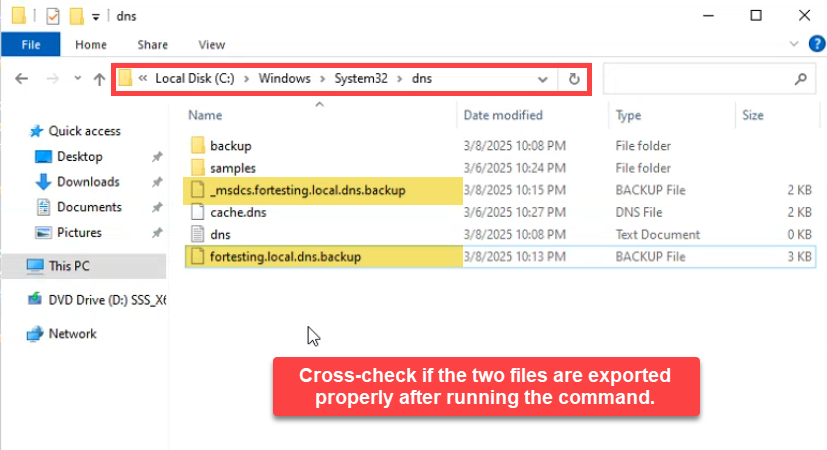
Copy both files off the DC immediately — an SMB share, an Azure storage account, an off-server backup volume. Files that live only on the DC do not survive a DC failure. For a scheduled backup, wrap the two dnscmd calls in a Task Scheduler job and add a robocopy step that pushes the output to the backup target.
The Export-DnsServerZone cmdlet is the modern PowerShell equivalent and produces the same flat-file output:
Export-DnsServerZone -Name fortesting.local       -FileName fortesting.local.dns.backup
Export-DnsServerZone -Name _msdcs.fortesting.local -FileName _msdcs.fortesting.local.dns.backup
Either tool is fine; dnscmd is older but still ships with every supported Server version, while Export-DnsServerZone is part of the DnsServer module and integrates more naturally with PowerShell scripts.
Phase 2: Simulate the Disaster
To prove the restore works end to end, delete both zones from DNS Manager. In a real recovery, this is the state you arrive in — zones already gone — not something you cause yourself.
Right-click fortesting.local → Delete:
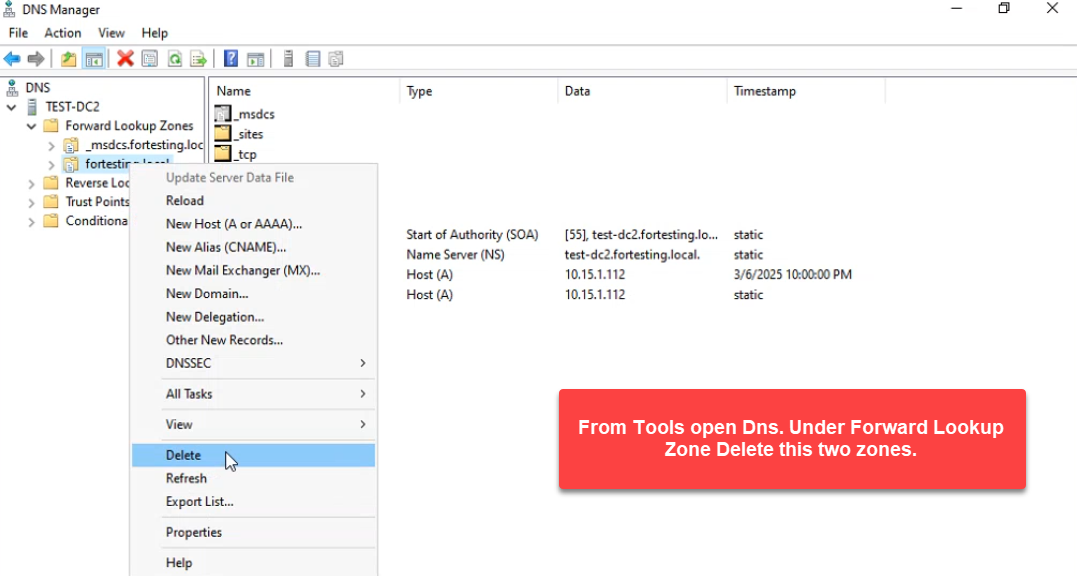
fortesting.local. Right-click the zone in DNS Manager → Delete. In a real recovery scenario, the zones may be missing because of accidental deletion, AD database corruption, or a botched restore.And the same for _msdcs.fortesting.local:
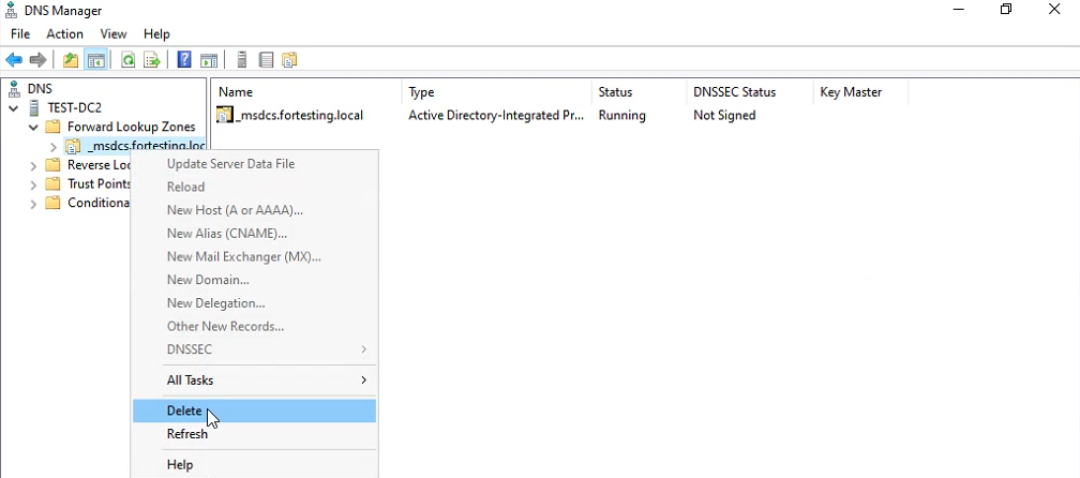
_msdcs.fortesting.local. The _msdcs zone holds the SRV records every domain client needs to find a domain controller; without it, AD logon and Kerberos break domain-wide.Forward Lookup Zones is now empty:
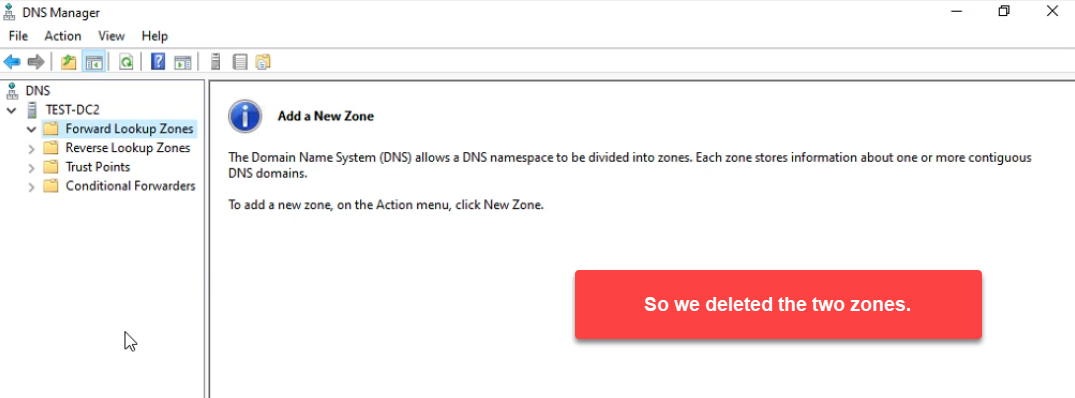
At this point, AD logon for any domain client touching this DC fails. SRV-record lookups for _kerberos._tcp.dc._msdcs.fortesting.local return nothing; the _msdcs zone holding those SRV records does not exist. Members on other DCs are temporarily fine because the deletion replicates — but only until replication catches up. There is genuine pressure to get the zones back.
Phase 3: Restore as a Standard Primary Zone
The New Zone Wizard cannot create an AD-integrated zone directly from a flat .dns file — AD-integrated zones do not read from disk; their data lives in the directory. The restore therefore has two halves: create a standard Primary zone that loads from the file, then convert it to AD-integrated.
Right-click Forward Lookup Zones → New Zone:
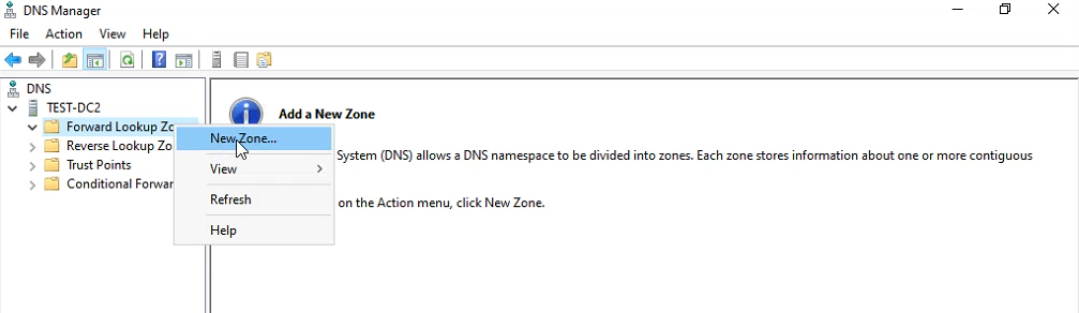
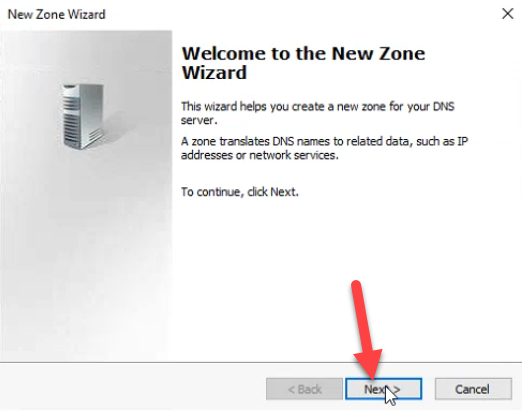
The wizard opens. Click Next:
Pick Primary zone and uncheck Store the zone in Active Directory:
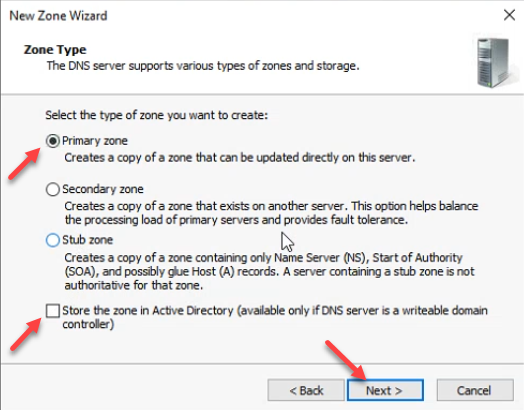
.dns file directly — you have to land it as a standard Primary first, then convert. Click Next.Type the zone name exactly as it was — fortesting.local:
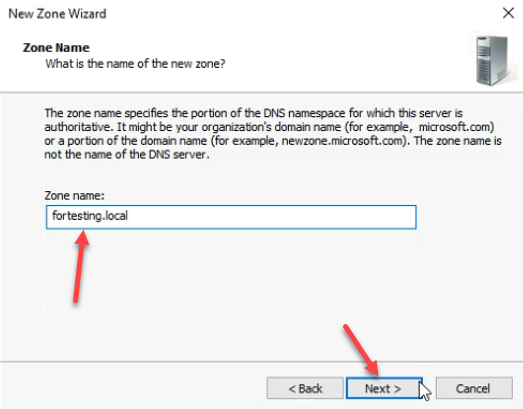
fortesting.local. Capitalisation does not matter; the zone name does.The next page is the file selection. Pick Use this existing file and type fortesting.local.dns (without the .backup suffix). The wizard reads from %SystemRoot%\system32\dns\:
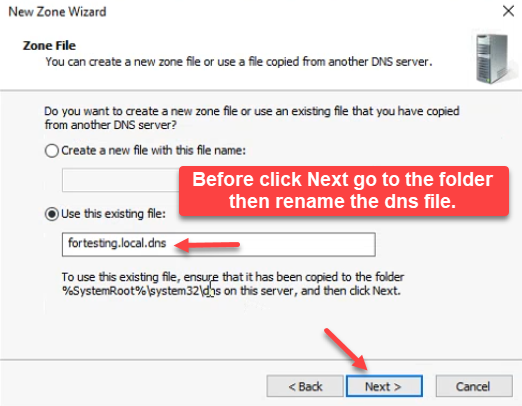
fortesting.local.dns. The wizard reads the file from %SystemRoot%\\system32\\dns\\ — before clicking Next, rename the backup file in the next step.Before clicking Next, switch over to File Explorer in the dns folder and rename the backup file from fortesting.local.dns.backup to fortesting.local.dns:
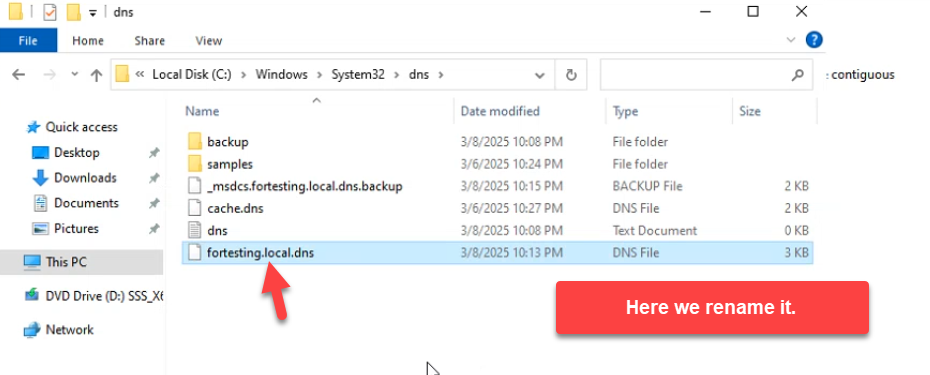
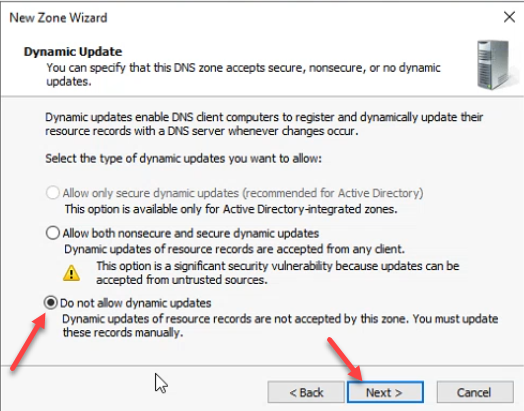
C:\\Windows\\System32\\dns\\, rename fortesting.local.dns.backup to fortesting.local.dns. The wizard expects the file at this path and with this name; the rename is the bridge between the backup convention and what DNS Manager looks for.Then back in the wizard, on the Dynamic Update page, the secure-only option is greyed out because the zone is not yet AD-integrated. Pick Do not allow dynamic updates for now:
The summary screen confirms the restore parameters — Standard Primary, file fortesting.local.dns. Click Finish:
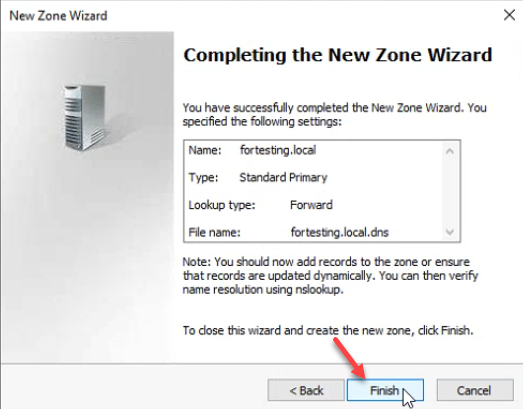
fortesting.local.dns.The zone loads its records from the flat file. Every static record (SOA, NS, A) plus the auto-created sub-folders the AD-integrated zone carried (_msdcs, _sites, _tcp, _udp, DomainDnsZones, ForestDnsZones) are restored in one shot:
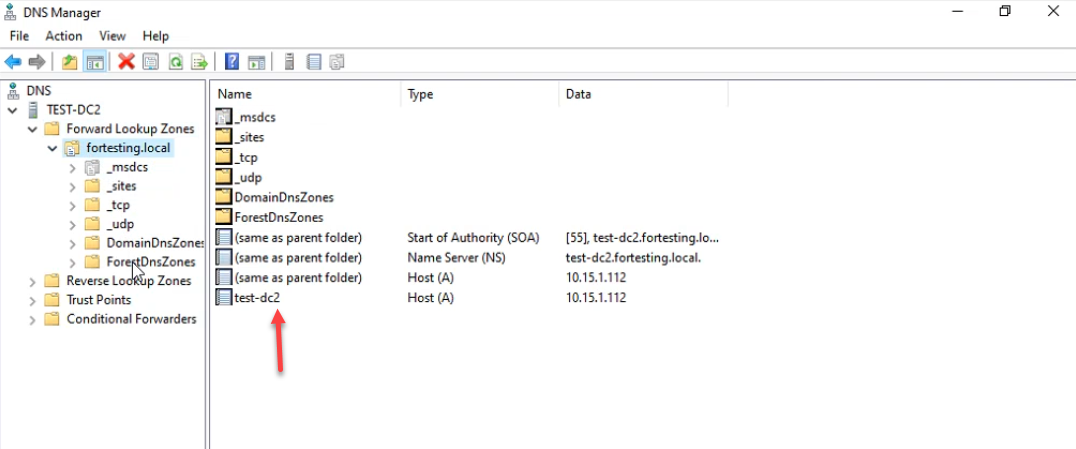
_msdcs / _sites / _tcp / _udp sub-folders the AD-integrated zone carried, all from the flat file. The zone is currently a standard Primary; the next step converts it back to AD-integrated.Phase 4: Convert Back to AD-Integrated
The zone is recovered but is currently a standalone file-backed Primary — no AD replication, no secure-only updates, only this DC serves it. The conversion fixes all three.
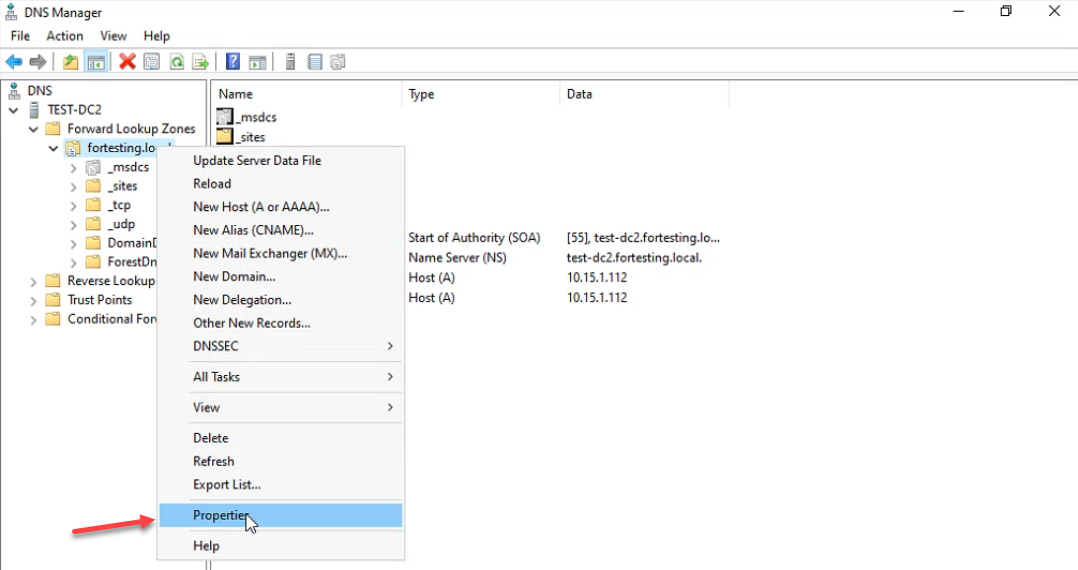
Right-click the zone → Properties:
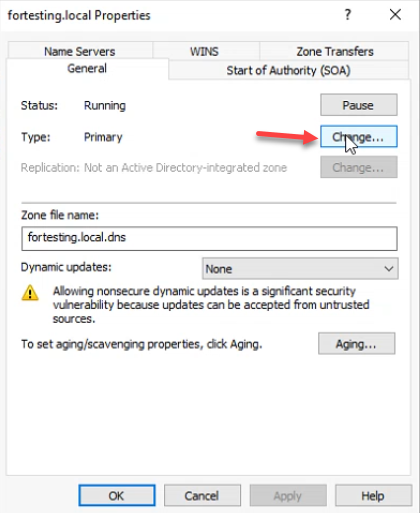
On the General tab, Type reads Primary. Click Change next to Type:
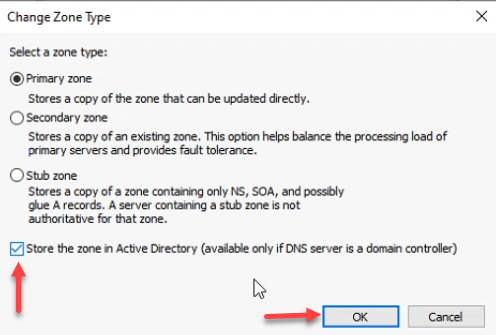
Leave Primary zone selected and check Store the zone in Active Directory. Click OK:
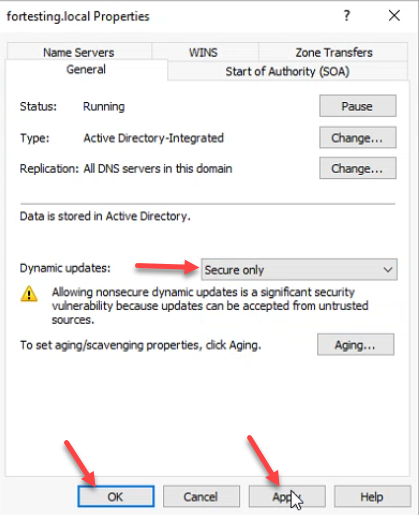
The General tab now reports Type: Active Directory-Integrated, Replication: All DNS servers in this domain. Set Dynamic updates to Secure only — the option is no longer greyed out — and click Apply + OK:
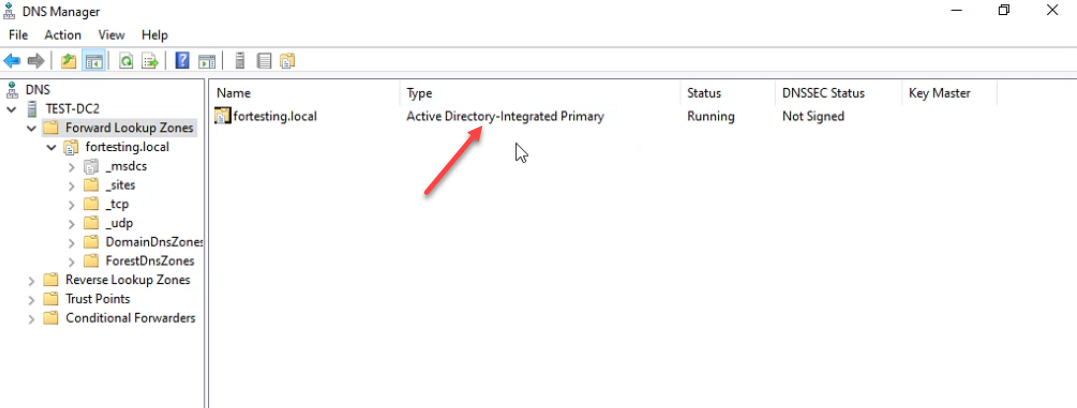
DNS Manager now lists fortesting.local as Active Directory-Integrated Primary, Running. The records replicate to every other DC in the domain within the next AD replication cycle:
Phase 5: Repeat for _msdcs.fortesting.local
Same workflow for the SRV-record zone. Forward Lookup Zones → New Zone:
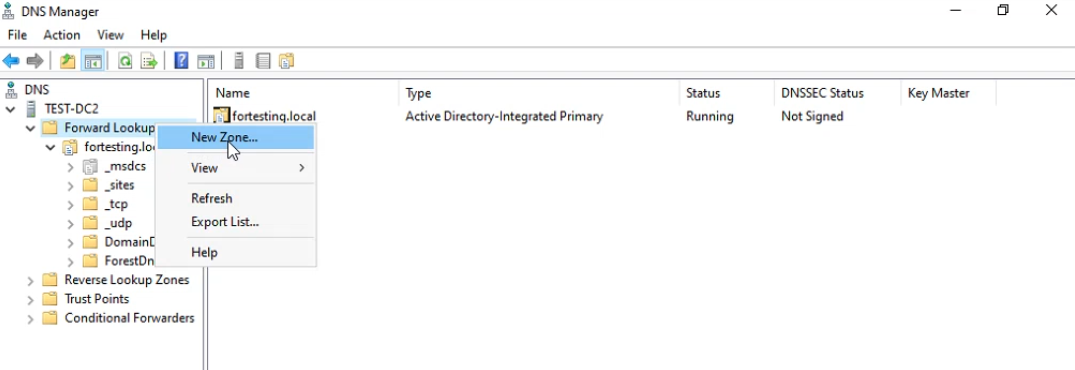
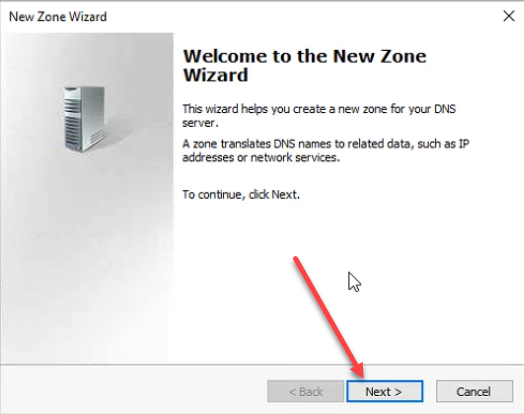
_msdcs.fortesting.local. Right-click Forward Lookup Zones → New Zone.Wizard welcome → Next:
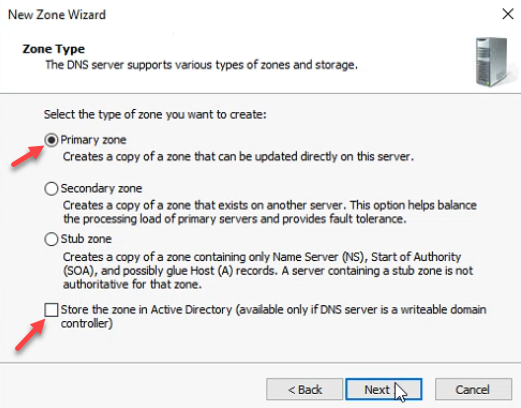
_msdcs zone.Primary zone, AD-integrated unchecked:
Zone name _msdcs.fortesting.local — the leading underscore is required:
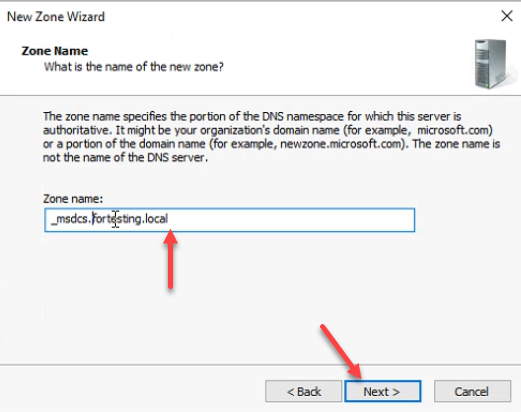
_msdcs.fortesting.local. The leading underscore is required — this is the SRV-record zone every domain client needs to locate a DC.Rename _msdcs.fortesting.local.dns.backup to _msdcs.fortesting.local.dns in the dns folder:
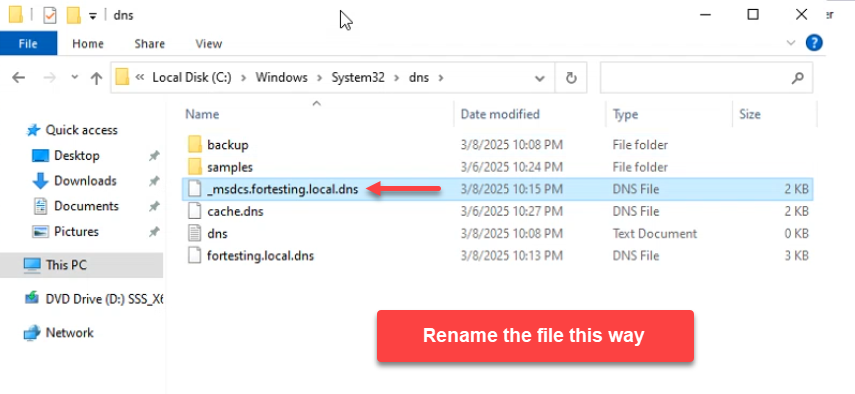
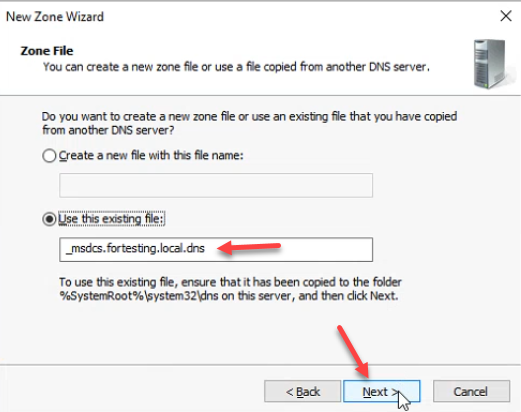
_msdcs.fortesting.local.dns.backup → _msdcs.fortesting.local.dns in the dns folder so the wizard finds it.Wizard zone-file step: Use this existing file: _msdcs.fortesting.local.dns:
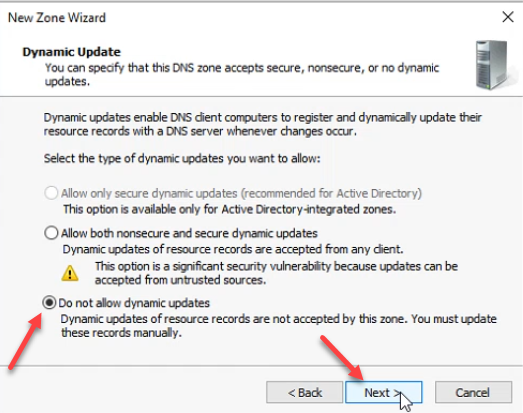
Dynamic update: Do not allow dynamic updates for now:
Wizard summary → Finish:
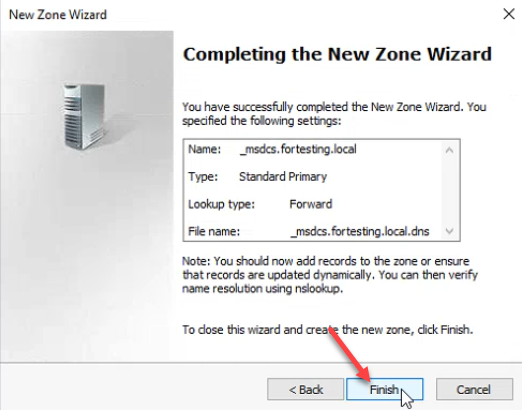
_msdcs zone loads from its .dns file.Right-click the zone → Properties:
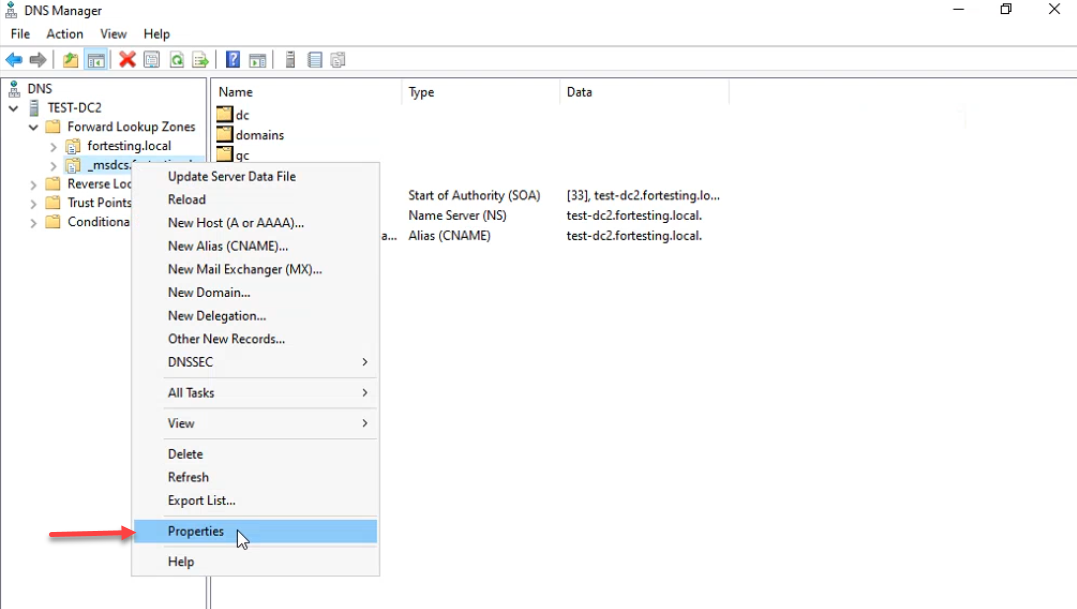
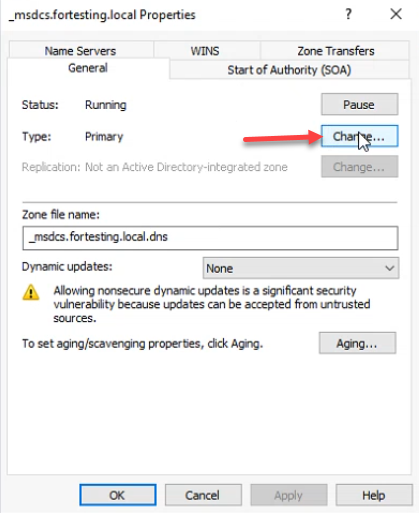
_msdcs.fortesting.local → Properties to convert it back to AD-integrated.Type: Primary, click Change:
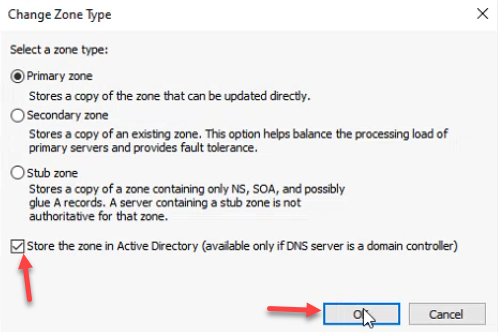
Check Store the zone in Active Directory → OK:
Important: the _msdcs zone defaults to domain-wide replication after the conversion, but the original AD-integrated _msdcs.<forest-root> zone replicates forest-wide — every DC in every domain in the forest needs it. Click Change next to Replication:
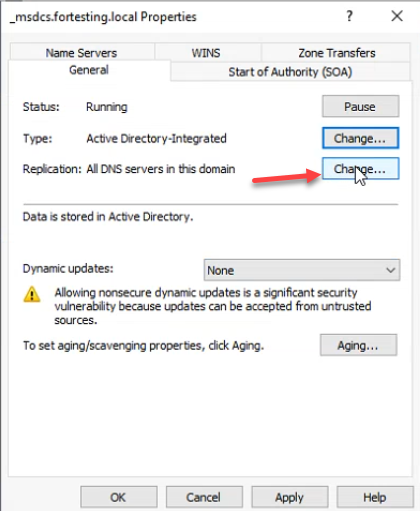
_msdcs is forest-wide by design — every DC in the forest needs to resolve other DCs from this zone. Click Change next to Replication to widen the scope.Pick To all DNS servers running on domain controllers in this forest and click OK. This matches the original scope; without it, child-domain DCs cannot resolve _msdcs.<forest-root> via replication and forest-wide Kerberos lookups break:
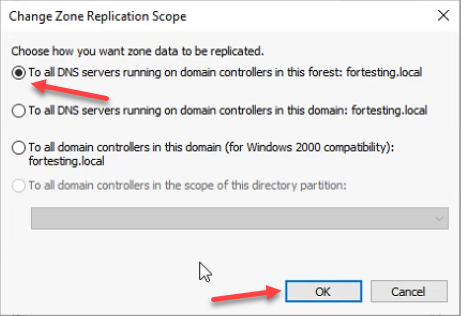
_msdcs replication scope and is what client lookups expect.Set Dynamic updates to Secure only, click Apply + OK:
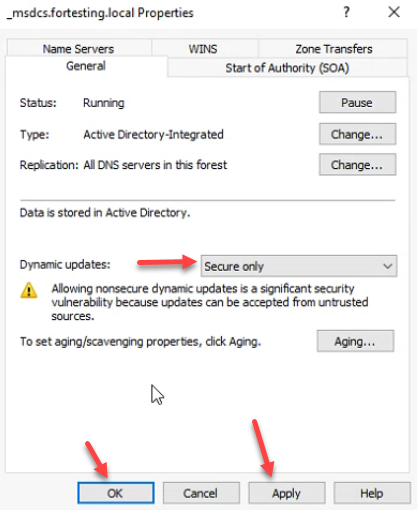
Final state — both zones AD-Integrated Primary, status Running:
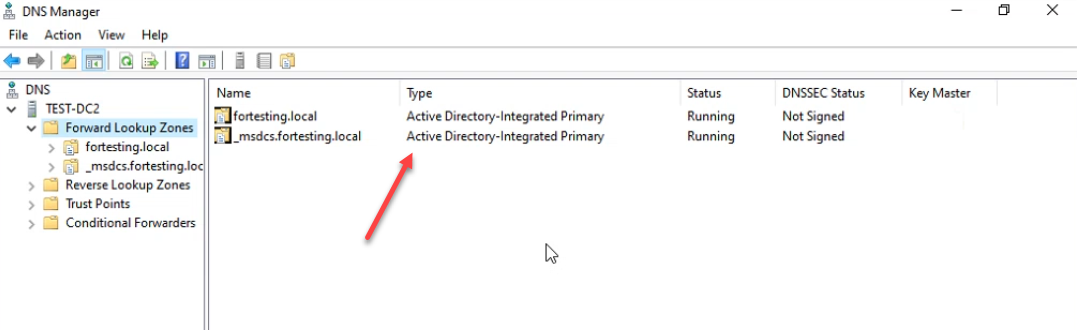
Verifying with PowerShell
From any domain-joined machine:
# Confirm the SRV records resolved by domain clients are back
nslookup -type=SRV _ldap._tcp.dc._msdcs.fortesting.local

# Confirm A record for the DC
nslookup test-dc2.fortesting.local

# Confirm the zones are AD-integrated and the right scope
Get-DnsServerZone -ComputerName test-dc2 |
    Select-Object ZoneName, ZoneType, IsDsIntegrated, ReplicationScope, DynamicUpdate
Expect IsDsIntegrated: True, ReplicationScope: Domain for the forward zone and Forest for _msdcs, and DynamicUpdate: Secure for both.
Common Pitfalls
- Renaming the wrong file. The wizard expects the file at
%SystemRoot%\system32\dns\<zone>.dns— with that exact extension. If you skip the rename or rename it to something else (.bak,.txt), the wizard reports The selected zone file does not exist. - Leaving
_msdcsat domain replication scope. The default after the conversion is domain-wide. The original AD-integrated_msdcs.<forest-root>is forest-wide. Forgetting to widen the scope works for the local domain but breaks DC discovery from child domains. - Forgetting to copy the .dns.backup files off the DC. The export creates files on the DC’s own disk. If the disaster you are recovering from is the DC, those files are gone too. Always pair the export with an off-server copy.
- Trying to import directly into an AD-integrated zone. AD-integrated zones do not read from
.dnsfiles; the data is in AD. The restore must land as a standard Primary first, then convert. Trying to skip the standard-Primary step results in the New Zone Wizard refusing to use the file. - Running this on a single DC with no out-of-band restore plan. If
fortesting.localis the only domain in a single-DC forest and the DC database itself is corrupted, the restore plan needs to start from system-state backup + DSRM, not from.dnsfiles. The.dnsbackup recovers a deleted zone, not a destroyed DC. - Not testing the export. A backup that has never been verified is wishful thinking. Open one of the
.dns.backupfiles in Notepad — it is human-readable BIND syntax. Confirm it has SOA, NS, and the records you expect; if it is empty or truncated, the next failure will surface that fact.
Conclusion
For an AD-integrated DNS zone, the right unit of backup is the zone itself, not the directory. dnscmd /zoneexport (or Export-DnsServerZone) writes a per-zone flat file in BIND syntax; the New Zone Wizard accepts that file as the source for a standard Primary zone; the zone properties dialog promotes a Primary zone back to AD-integrated in a single click. Schedule the exports daily, copy the output to an off-server target, and the next zone deletion is a ten-minute fix instead of an authoritative restore in DSRM.