
A lingering object is a deleted AD object that didn’t get the “you’re deleted” memo before the memo itself expired. It sits on a long-disconnected DC, pretending to still be valid. When that DC reconnects, it can revive the object across the forest — resurrecting users, groups, or computers everyone else deleted long ago.
This is Part 9 of the AD Replication Deep Dive series. Lingering objects are the highest-impact replication failure mode — they bypass normal conflict resolution because they look like brand-new objects to the rest of the forest.
Why deletions need a special mechanism
If you delete a user on DC1, that delete needs to propagate to every other DC. But once the user is gone from DC1’s database, what does DC1 actually send to DC2 during the next replication cycle?
The answer is the tombstone: a stripped-down placeholder that says “this object was deleted on this date.” The tombstone retains the object’s GUID, distinguished name, and a deletion timestamp, but drops everything else. Every other DC replicates the tombstone the same way it replicates a normal change.
Tombstones don’t live forever. After the tombstone lifetime (TSL), AD’s garbage collector physically removes them from the database. New domains built on Server 2003 SP1 or later default to 180 days. Domains migrated from earlier versions may have a 60-day TSL — check with Get-ADObject "CN=Directory Service,CN=Windows NT,CN=Services,CN=Configuration,$(Get-ADRootDSE).rootDomainNamingContext" -Properties tombstoneLifetime.
How a lingering object is created
- Day 0: admin deletes user
emmaon DC1. Tombstone created on DC1. DC1 replicates the tombstone to DC2, DC3. - Day 1: DC2 goes offline (hardware failure, long power outage, packed into a cardboard box). It received the tombstone, so far so good.
- Day 30: a different DC, DC4, is added to the forest. It pulls the Domain NC. Since the tombstone for
emmastill exists everywhere, DC4 learns about the deletion. - Day 181: the tombstone for
emmagarbage-collects on every online DC. The deletion record no longer exists. AD has “forgotten” emma was ever deleted. - Day 200: someone finds DC2 in the box. Plugs it back in. DC2 still has the live
emmauser. Its next replication cycle pulls from DC4. DC4 has no record ofemmaat all — not a live record, not a tombstone. DC4 assumes DC2 has a brand-new user. - DC2 then replicates
emmaoutward as if she’s a new user. Emma resurrects across the forest.
This is the lingering-object failure mode. The defining characteristic: a DC offline longer than the tombstone lifetime, then reconnected.
How AD tries to defend itself: strict replication consistency
Modern AD ships with strict replication consistency turned on by default (you can verify with the registry value at HKLM\SYSTEM\CurrentControlSet\Services\NTDS\Parameters\Strict Replication Consistency; 1 = strict, 0 = loose).
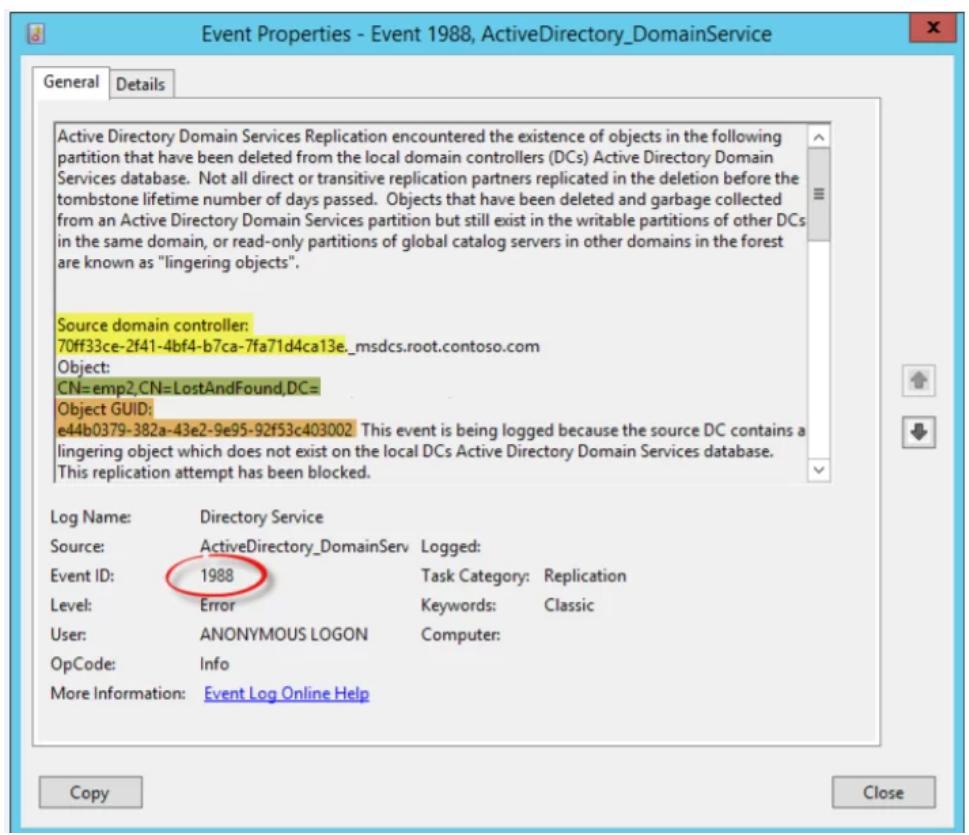
In strict mode, when a DC receives a write for an object it doesn’t know about, and the write looks like a modification (not a creation), AD aborts the inbound replication from that partner for that NC. It logs Event 1988 in the Directory Service log with the offending DC and object DN.
This is correct behaviour: better to halt replication than to propagate the ghost. But it also means a single lingering object can stop all replication from a partner, even though everyone else is fine. The fix is mandatory cleanup, not waiting it out.
In loose mode (older defaults), the inbound write is accepted and AD logs Event 1388 — “hey, this looks weird, but I’m accepting it anyway.” That’s the version of the failure that actually reintroduces deleted objects.
Detecting lingering objects
Event Viewer (real-time)
On every DC, watch the Directory Service log for Event IDs 1388 and 1988. Both indicate a lingering object somewhere in the forest. The event text identifies the offending DC and the object’s DN.
repadmin (forest scan)
repadmin /replsummaryDoesn’t directly list lingering objects, but failed replication partners with cryptic errors are usually a strict-mode block. To enumerate lingering objects on a specific DC by comparing it to a known-good DC:
repadmin /removelingeringobjects DC-Suspect.contoso.com `
  <known-good-DC-GUID> `
  "DC=contoso,DC=com" /advisory_mode
/advisory_mode reports what would be removed without actually removing anything. Always run advisory first to confirm you’re cleaning the right DC.
PowerShell discovery
Get-ADReplicationPartnerMetadata -Target * |
  Where-Object { $_.LastReplicationResult -ne 0 } |
  Format-Table Server, Partner, LastReplicationResult, LastReplicationAttempt
Lists DCs with active replication failures. Not lingering-object-specific but lingering objects almost always show up here.
Cleaning up lingering objects
The repadmin removeLingeringObjects approach
Pick a known-good DC (one that’s been online continuously since well before the suspect outage). Get its DSA GUID:
(Get-ADDomainController DC01).NTDSSettingsObjectDN
# read the objectGUID of that NTDS Settings object
Then for each NC on the suspect DC, run:
repadmin /removelingeringobjects DC-Suspect.contoso.com `
  <DC01-GUID> "DC=contoso,DC=com"
repadmin /removelingeringobjects DC-Suspect.contoso.com `
  <DC01-GUID> "CN=Configuration,DC=contoso,DC=com"
repadmin /removelingeringobjects DC-Suspect.contoso.com `
  <DC01-GUID> "CN=Schema,CN=Configuration,DC=contoso,DC=com"
For each NC, repadmin asks DC-Suspect to compare every object against the good DC. Anything the suspect has and the good DC doesn’t is deleted from the suspect.
After cleanup, force a sync to confirm health:
repadmin /syncall /Ae /PThe nuclear option: demote and re-promote
If the suspect DC has been offline so long that its database is wildly out of sync, or if cleanup keeps surfacing more lingering objects every run, sometimes faster to:
- Force-demote the DC:
dcpromo /forceremoval(orUninstall-ADDSDomainController -ForceRemoval). - Clean its metadata from the forest:
ntdsutil metadata cleanup. - Reinstall Windows, re-promote as a fresh DC. The new DC gets a clean copy of the current directory.
You lose the old DC’s identity and replication metadata, but you gain certainty that no ghosts remain.
Prevention
Don’t leave DCs offline longer than the TSL
180 days is a long time but it’s not infinite. Branch-office DCs that get unplugged for renovations, packed into shipping crates, or stored as “cold spares” are the classic source.
Don’t restore from old backups
Restoring a DC backup older than the TSL is functionally identical to bringing back a long-offline DC. Microsoft’s supported backup window is half the TSL (90 days for a 180-day TSL) precisely to keep a safety margin.
Don’t shrink the TSL
Some admins shrink the TSL to give garbage collection more aggressive timing. This is fine in steady-state, dangerous if combined with any long DC outage. The default 180 days exists to give you a forgiving window.
Monitor for unexpected re-creations
Set up alerts on user / group / computer creation events. If emma the user was deleted 6 months ago and suddenly appears as a creation event today — with the same SID and GUID — that’s a lingering-object resurrection, not a new account.
Things that bite people
Strict mode looks like a problem, it’s actually a save
“DC2 stopped replicating from DC1, Event 1988 in the log” sounds like an outage. It’s the strict-mode defense doing exactly what it’s supposed to. Don’t flip strict to loose to “fix” replication — you’ll just let the lingering object spread. Clean it up properly.
Cleanup hits one NC, misses the others
Schema NC and Configuration NC can hold lingering objects too. If you clean the Domain NC but not the others, replication stays broken. Always clean all three NCs on a suspect DC.
Wrong “good” DC
If you pick a known-good DC that also has lingering objects (e.g., because two DCs came back online from the box at the same time), the cleanup will reinforce the ghosts. Triple-check your reference DC has been continuously online and replicating cleanly.
Tombstone confusion with AD Recycle Bin
The AD Recycle Bin (different feature) keeps deleted objects fully recoverable for the deleted-object lifetime (typically 180 days, equal to TSL). It doesn’t prevent lingering objects — recycled objects still tombstone eventually. The Recycle Bin is about admin convenience, not replication safety.
What’s next
You now know how AD’s deletion-by-tombstone mechanism can fail and how to recover. The final piece of the puzzle is how to monitor the replication system as a whole. Part 10 of the AD Replication Deep Dive pathway walks through repadmin /replsummary — what each column means, what the “largest delta” threshold should be, and how to turn one command into a daily health check.