
Why DNS Is the First Place to Look in AD Trouble
Active Directory and DNS are inseparable. Every domain join, every logon, every Group Policy refresh, every replication event starts with a DNS lookup — specifically, an SRV-record lookup under _msdcs.<domain> to find a Domain Controller for the right service. Break the DNS layer and AD looks broken: clients cannot find a DC, replication freezes, GPO does not apply, logons hang. The actual fix is almost always a DNS configuration change, not an AD one.
This article walks the three most common AD-DNS failure modes in order of how often they bite: clients pointing at the wrong DNS server, the AD-integrated zone going missing, and replication topology breaking down. Each failure has a distinct symptom, a one-line diagnostic, and a documented fix.
What a Healthy AD-DNS Looks Like
Open DNS Manager on a domain controller and look at the forward lookup zones. You should see at least two:
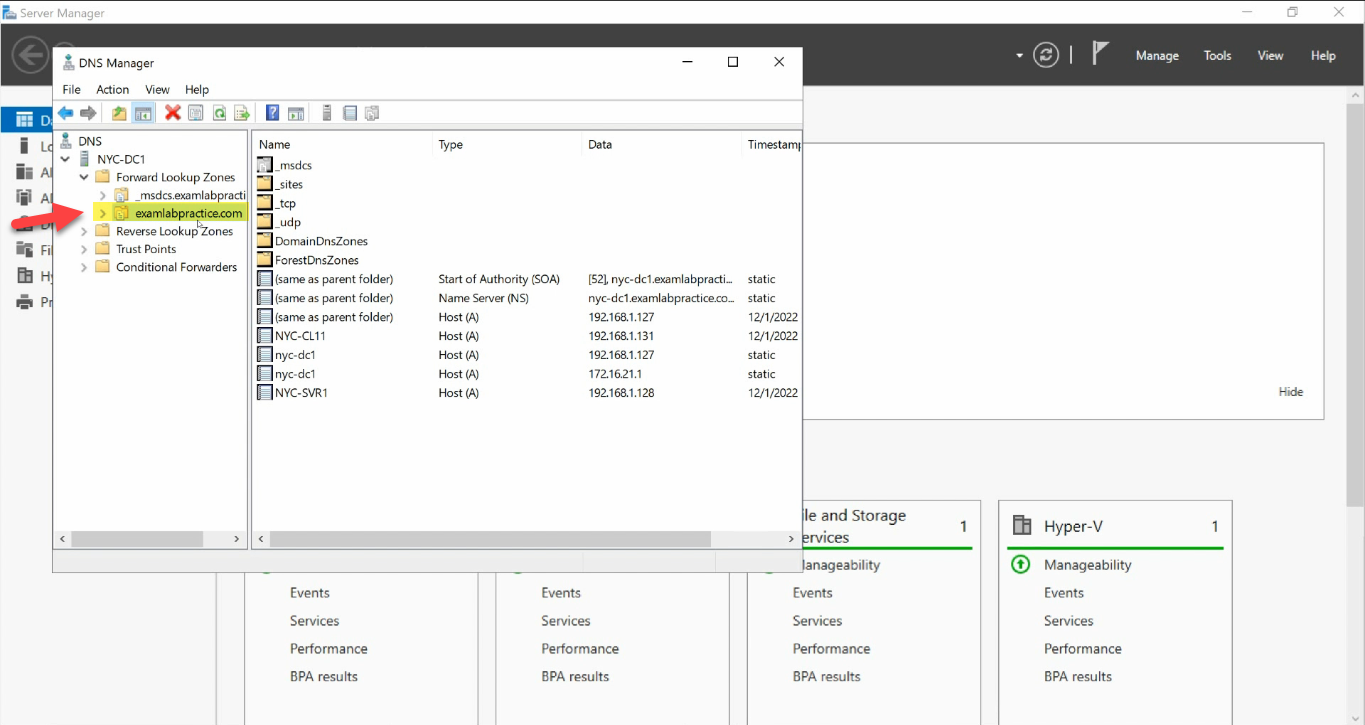
_msdcs + the AD-integrated zone is the source of truth. Every AD client finds DCs via SRV records under it._msdcs.<domain>— the AD-only zone that holds SRV records used to locate domain controllers, global catalogs, and KDCs.<domain>— the main forward lookup zone with A records for every host that has registered, plus its own copy of the_msdcsrecords under_sites/_tcp/_udp.
If both zones are AD-integrated (right-click > Properties > Type = Active Directory-Integrated) and have records for every DC in the forest, DNS is doing its job. Most “AD is broken” tickets resolve to one of those records being wrong, missing, or unreachable.
Failure 1 — Clients Pointing at the Wrong DNS Server
The single most common AD-DNS mistake. Symptom: a domain-joined client (or a fresh DC promotion) that cannot find the domain. Domain-join wizard fails with “The specified domain either does not exist or could not be contacted”. nltest /dsgetdc:<domain> returns Status: 0x54b. Logon prompts at the workstation say “The trust relationship between this workstation and the primary domain failed.”
The fix is almost always: point the client’s DNS settings at a Domain Controller, not at a public resolver. Domain-joined clients query DNS for SRV records that only AD-integrated DNS servers know about. If the client is asking 8.8.8.8 or 1.1.1.1, those servers do not know about _ldap._tcp.dc._msdcs.corp.local — the lookup fails and the client cannot find a DC.
Check what the client is actually using:
Get-DnsClientServerAddress -InterfaceAlias 'Ethernet'For a Domain Controller, the right answer is:
- Preferred DNS: a peer DC’s IP (so the box keeps working if its own DNS service has trouble).
- Alternate DNS:
127.0.0.1(loopback — falls back to the local DNS service if the peer is unreachable). - Never: the DC’s own external IP. That creates a dependency on the network rather than the loopback — if the NIC has issues, the DC cannot resolve its own name.
For a domain-joined client, just point at any DC in the forest:
Set-DnsClientServerAddress -InterfaceAlias 'Ethernet' `
    -ServerAddresses 192.168.1.10, 192.168.1.20
Confirm with a SRV-record probe:
nslookup -type=SRV _ldap._tcp.dc._msdcs.corp.local
# or
Resolve-DnsName -Name "_ldap._tcp.dc._msdcs.corp.local" -Type SRV
You should see one SRV record per DC in the forest, each with the DC’s FQDN and IP. If you see no records, the DNS server you queried does not host the AD zone — that is the next failure.
Failure 2 — The AD-Integrated DNS Zone Is Missing
Less common but more catastrophic. Symptom: DNS Manager opens to a tree with no _msdcs.<domain>, no <domain> zone — or the zones exist but are file-backed (Type = Primary, not AD-integrated). Domain joins fail with the same error as Failure 1, but every DC has the same problem — SRV records have nowhere to register.
How it happens: zone deleted by mistake during a migration, AD-integrated DNS metadata corrupted, or someone restored a too-old DC backup that lost the zone object.
Recovery:
Step 1 — Recreate the Zone
From DNS Manager, right-click your DNS server > New Zone…:
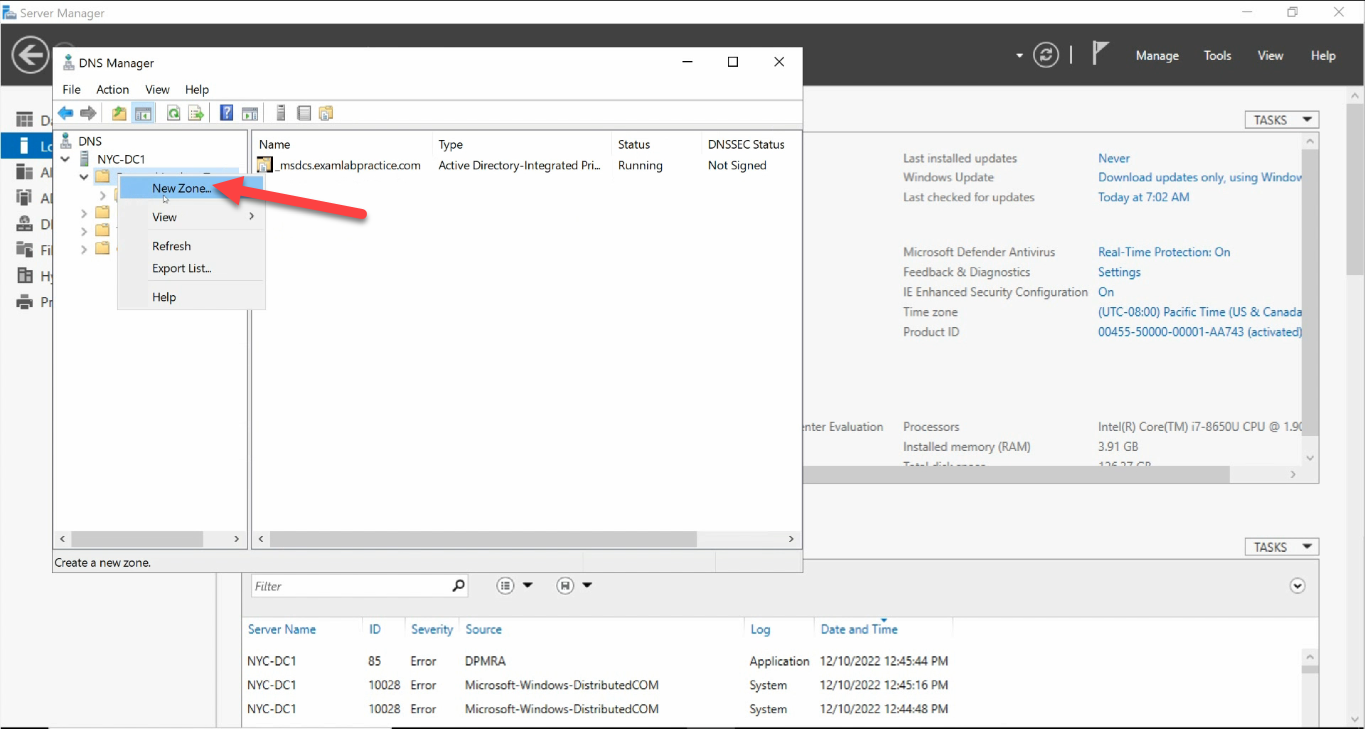
Click through the wizard:
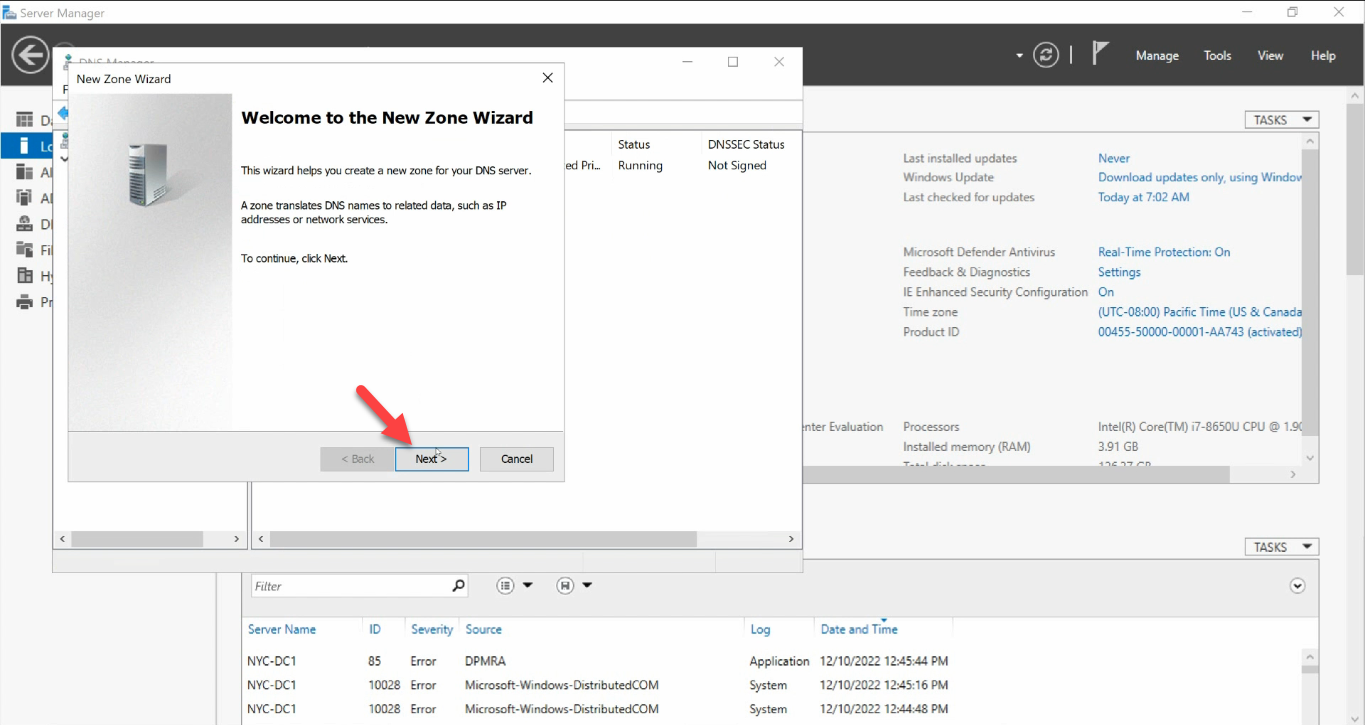
Zone Type: Primary zone + Store the zone in Active Directory:
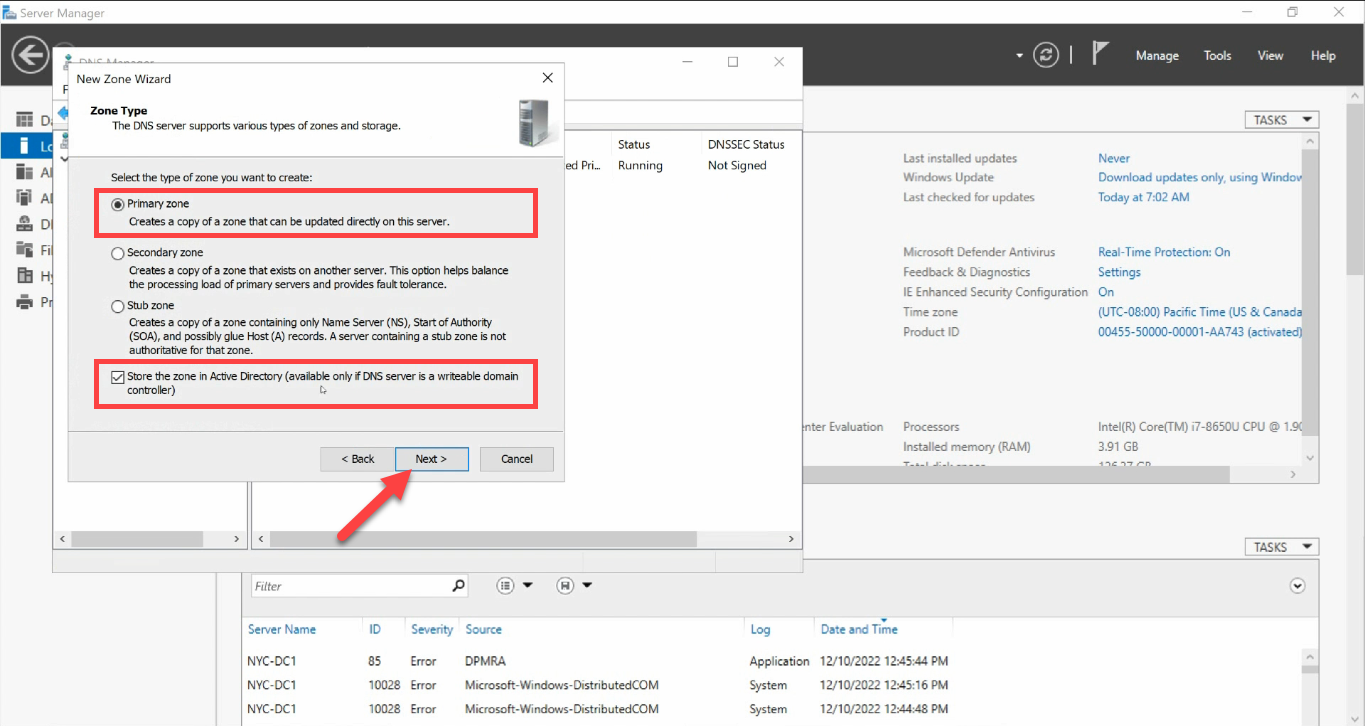
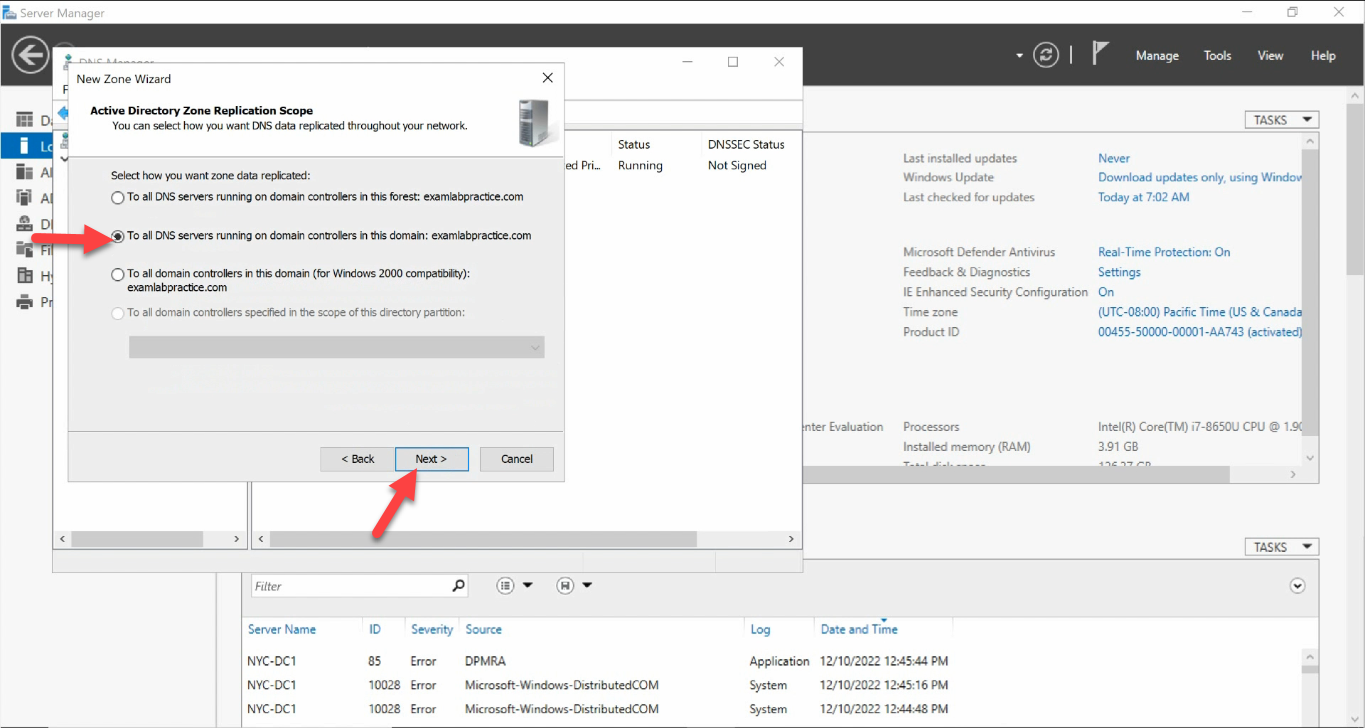
Replication Scope: To all DNS servers running on domain controllers in this domain:
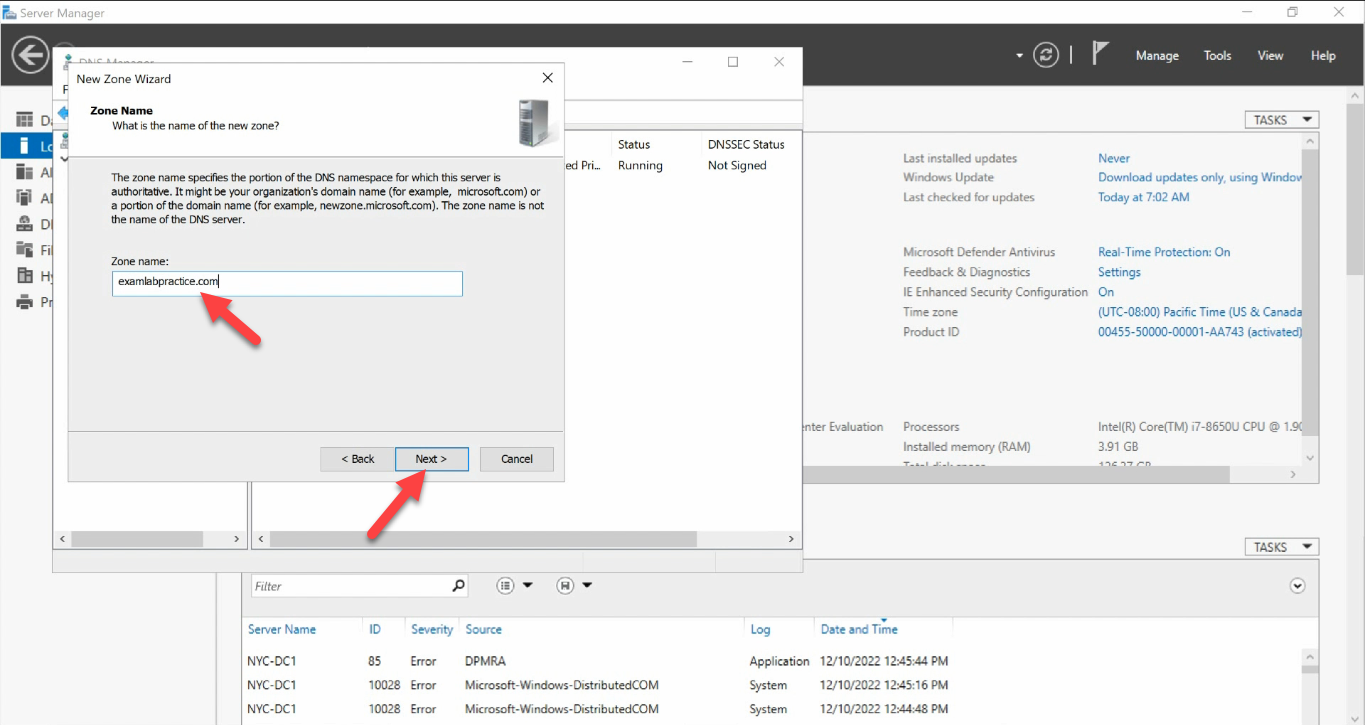
Zone Name: the FQDN of your domain (no leading www., no trailing dot):
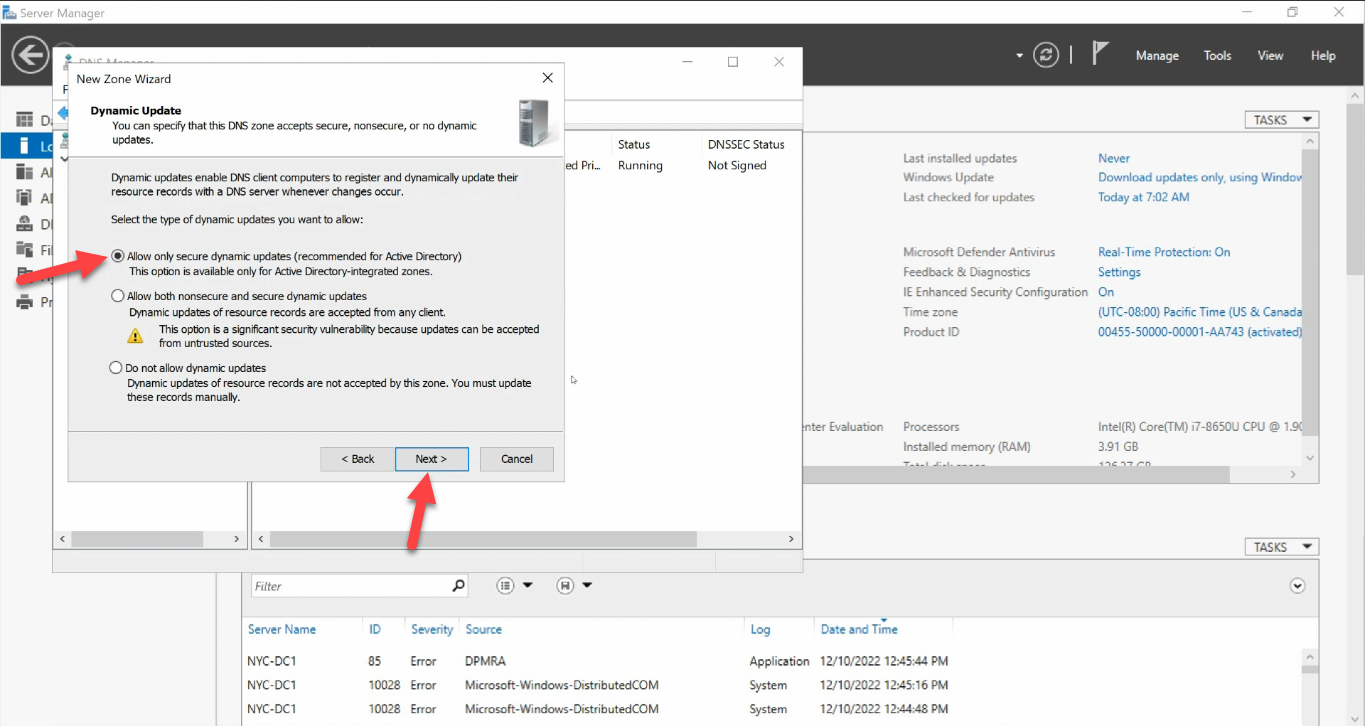
www., no trailing dot).Dynamic Update: Allow only secure dynamic updates. AD-integrated zones must use secure-only:
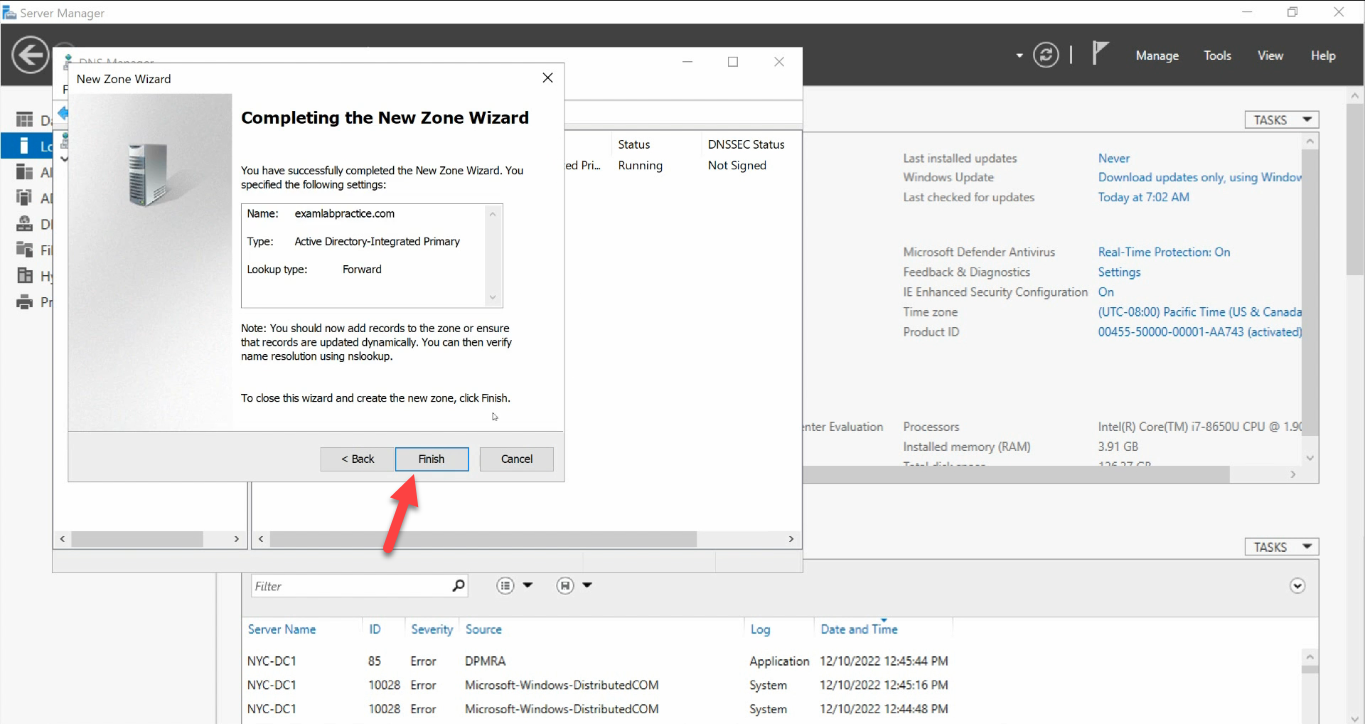
Review the summary and Finish:
The new zone appears with auto-generated SOA + NS records:
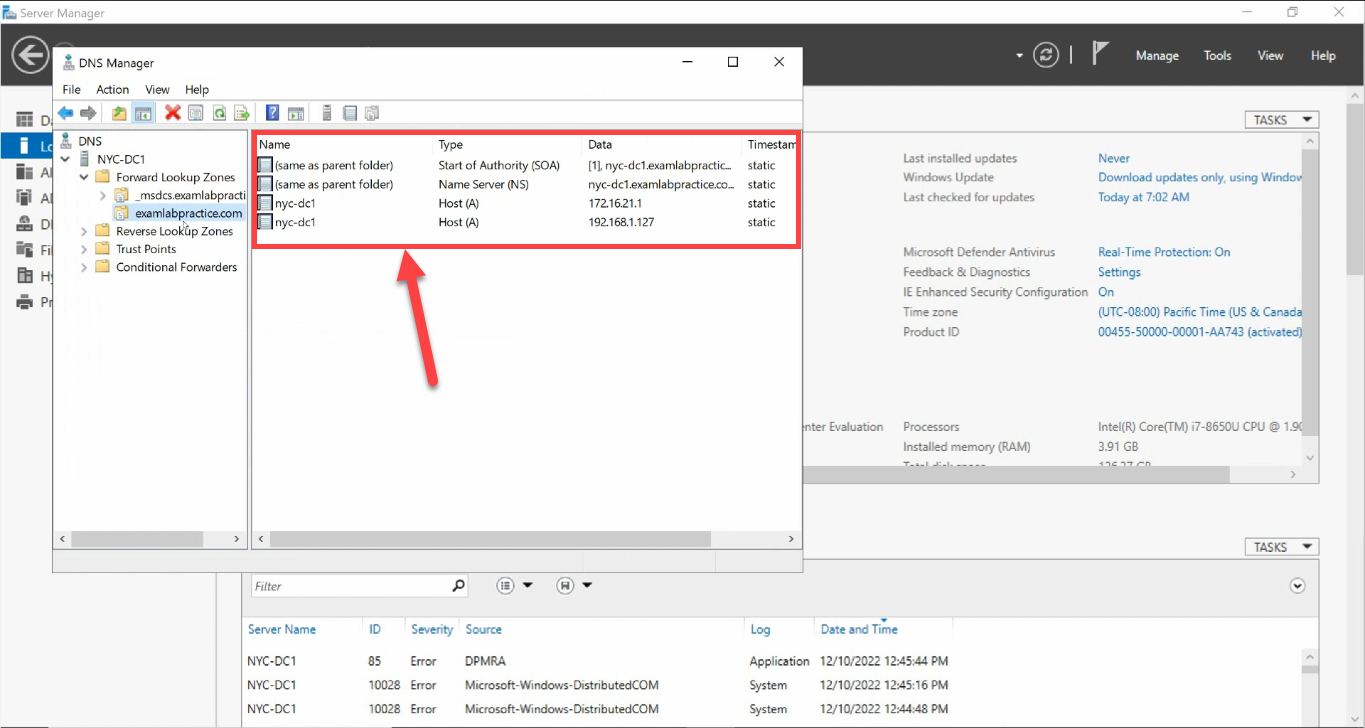
Step 2 — Restart Netlogon to Re-register SRV Records
The zone is empty — no SRV records yet. The Netlogon service registers them when it starts; restarting it forces a fresh registration of every record this DC owns:
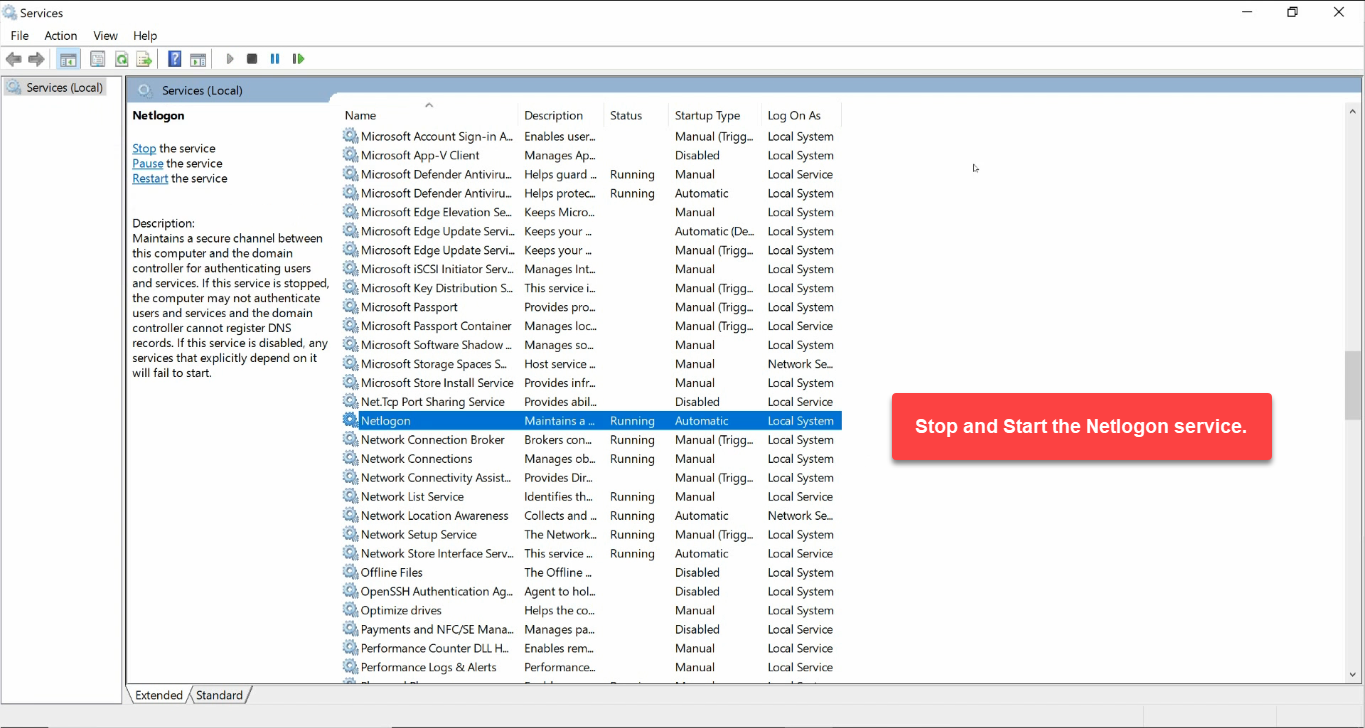
Or with PowerShell:
Restart-Service -Name NetlogonRepeat on every DC in the forest so each one re-registers its own SRV records.
Step 3 — Verify the Records Came Back
Refresh DNS Manager. The standard subtrees regenerate under the zone:
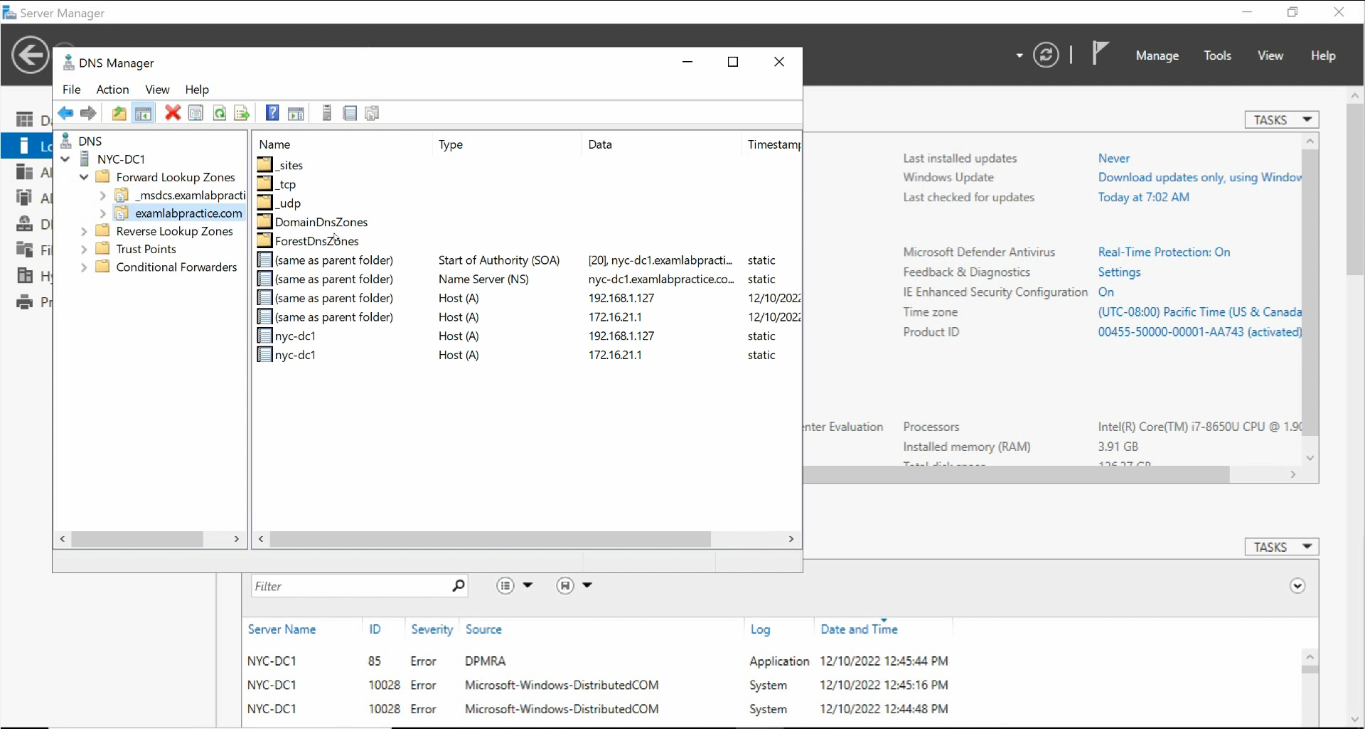
_msdcs / _sites / _tcp / _udp / DomainDnsZones / ForestDnsZones trees are back.You should see _msdcs, _sites, _tcp, _udp, DomainDnsZones, and ForestDnsZones — populated with SRV records pointing to every DC.
Confirm with dcdiag:
dcdiag /test:dns /vYou want every category to show passed.
Failure 3 — Replication Out of Sync
Less common still, more annoying when it strikes. Symptom: a change made on DC1 is visible on DC1 immediately but does not appear on DC2 even hours later. Authentication flaps depending on which DC the client lands on. dcdiag shows passed on each DC individually, but inter-DC replication is broken.
Three commands diagnose the problem:
# Forest-wide summary - which DCs have failed replication
repadmin /replsummary

# Per-DC detail - what's broken between this DC and its replication partners
repadmin /showrepl

# Force a sync attempt
repadmin /syncall /A /e /P
For Event Viewer, look in Applications and Services Logs > Directory Service:
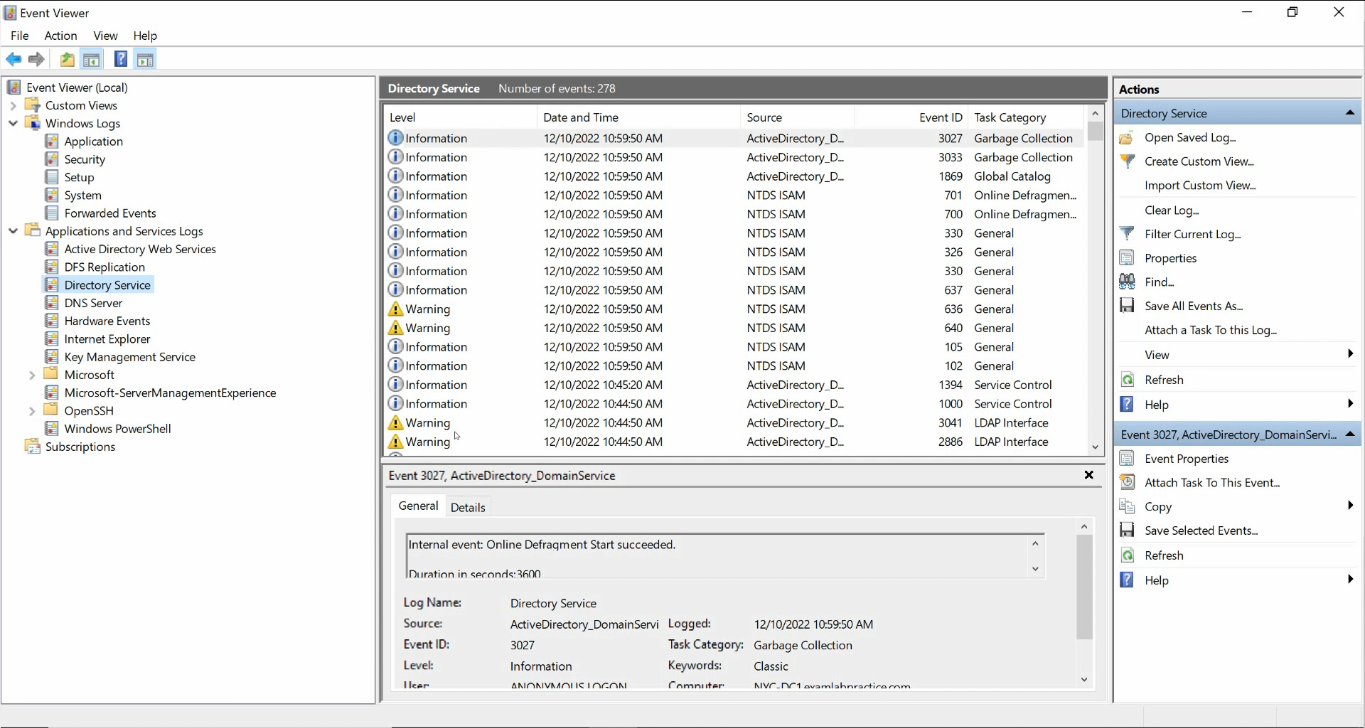
Common causes:
- DNS records pointing at IPs that no longer exist. The KCC builds replication topology from DNS; stale records misroute replication. Run
repadmin /kccto force a topology rebuild after fixing the DNS. - Time skew. Kerberos requires DCs to agree on time within 5 minutes. Out-of-sync clocks break replication. Check with
w32tm /monitor+w32tm /resync. - Tombstone lifetime exceeded. A DC offline longer than the tombstone lifetime (default 180 days) cannot rejoin replication. Demote and re-promote it.
- Firewall blocking RPC. Inter-DC replication uses RPC over dynamic high ports. New firewall + replication = often-broken combination. Allow inbound RPC dynamic between DCs (or use the static-RPC port settings).
The Diagnostic Toolbox
For routine AD-DNS triage, four tools cover 95% of the cases:
nslookup -type=SRV _ldap._tcp.dc._msdcs.<domain>— can the resolver find the DCs? Should return one SRV per DC in the forest.dcdiag /test:dns /v— runs Microsoft’s DNS-specific diagnostics. Each test passed/failed individually.repadmin /replsummary— one-line summary of replication health forest-wide.- Event Viewer / Directory Service — the underlying error reason when one of the above fails.
For a richer health snapshot, the Get-ADHealth.ps1 script wraps all of these into a single HTML report — useful for proactive checking, less useful for live troubleshooting where you want to drill into one DC at a time.
Common Pitfalls
- Pointed Preferred DNS at a public resolver. 8.8.8.8 / 1.1.1.1 do not know about your AD zone. The client must talk to a server that hosts the AD-integrated DNS zone first.
- Pointed Preferred DNS at the DC’s own external IP. Looks fine, but creates a NIC-dependency on the DC resolving itself. Use a peer + loopback instead.
- Created the recovery zone as Primary file-backed instead of AD-integrated. Works for one DC; replication fails because the zone does not live in AD. Always tick Store the zone in Active Directory.
- Skipped the Netlogon restart. The zone is empty until Netlogon re-registers SRV records. Without the restart, clients still cannot find a DC because the zone has no SRV data.
- Treated
dcdiagas the only test.dcdiagtests one DC at a time.repadmin /replsummaryis the inter-DC view. Both are needed. - Time skew bug. Routinely, a DC’s clock drifts and replication starts failing with cryptic Kerberos errors.
w32tm /monitorspots it in seconds. - Firewall changes after the fact. A replication-affecting firewall rule that was added during a migration but never tested. Confirm with
portqry -n <peer-dc> -p TCP -e 135.
Conclusion
DNS is the foundation; replication is the load-bearing wall. Almost every “AD is broken” ticket starts as a wrong DNS pointer or a stale SRV record. Run through the three failure modes top to bottom, run the four diagnostic commands, and ninety-five out of a hundred AD problems resolve themselves to a one-line fix.
For the rest, escalate with the Event Viewer Directory Service log open and an actual error code in hand — not “AD is slow”. The error code is what unlocks every Microsoft KB article worth reading.