
What a Global Catalog Actually Is
The Global Catalog (GC) is one of the quieter but more important pieces of Active Directory plumbing. Every domain controller in a forest holds a complete, writable replica of its own domain’s directory partition — users, groups, computers, OUs, GPOs, the lot. A Global Catalog server holds something extra on top of that: a partial, read-only replica of every other domain’s directory partition in the forest, with a curated subset of each object’s attributes. That partial set is called the Partial Attribute Set (PAS), and the attributes in it are the ones flagged for replication to the GC at schema design time (people’s common names, UPNs, mail addresses, group memberships, manager pointers, etc.).
The result: a GC is the one place a client can issue a single LDAP query and get back results spanning the entire forest, without having to chase referrals to each domain controller in each domain. The GC listens on TCP 3268 (LDAP) and 3269 (LDAP/SSL) instead of the regular 389/636, and clients that want the “forest-wide” view explicitly target those ports.
If a single piece of AD infrastructure goes missing in a single-domain forest you usually feel it within minutes. If a Global Catalog goes missing in a multi-domain forest you feel it more slowly — in slow Outlook lookups, in failed user logons that depend on universal group enumeration, in Exchange address-book staleness. This article is the procedure for promoting an existing Domain Controller to also be a Global Catalog Server, plus the verification you owe yourself afterwards.
Why You Would Add Another Global Catalog
- Site coverage. A site without a GC means clients in that site enumerate universal group memberships across a slow inter-site link on every logon. Promoting a local DC to also be a GC removes that round trip. The universal group caching feature was designed to mitigate this, but a real on-site GC is still better when the link is unreliable or expensive.
- Resilience. Microsoft recommends at least two GCs per forest so that the loss of any one DC does not take Exchange address book lookups, forest-wide LDAP queries, or universal-group authentication offline. Many organizations make every DC a GC for simplicity — in 2003 and later, this is the default behavior of
dcpromoin a single-domain forest, and it is fine for almost any small or mid-sized environment. - Exchange. Exchange Server queries Global Catalogs constantly — address book lookups, distribution list expansion, recipient resolution. If you are deploying Exchange (on-premises or hybrid), the recommendation is one GC per AD site that contains an Exchange server, on the same LAN as that server.
- Application requirements. Some applications and services require a GC to be reachable: Exchange, SharePoint, Skype for Business / Lync, applications that build forest-wide address books or resolve users by UPN.
One nuance worth knowing: in a single-domain forest, the cost of every DC also being a GC is essentially zero, because the “partial replica of every other domain” is empty (there are no other domains). The GC is just a flag on the DC at that point. In a multi-domain forest, every additional GC means another DC that has to host the partial-attribute-set replicas of every other domain — more disk, more replication traffic, more attribute changes that have to fan out forest-wide.
Pre-Flight Before Promoting a DC to GC
- Replication is healthy. Promoting a DC to GC triggers a forest-wide rebuild of that DC’s partial replica copies — potentially gigabytes of replication in a large forest. Run
repadmin /replsummaryfirst and confirm zero failures. Cabling up a freshly broken replication topology with a GC promotion on top of it is a recipe for a long unhappy night. - OS is current and patched. Add the latest cumulative updates first. The Global Catalog promotion itself is a small attribute change, but it kicks off heavy replication; doing it on a healthy, patched DC reduces the surface for surprises.
- Disk space is comfortable. The NTDS database (
ntds.dit) on the new GC will grow. The increase scales with forest size and PAS attribute counts; budget room and confirm the volume hosting%SystemRoot%\NTDS\has at least 30%+ free space before you start. - Schedule for low traffic. Replication for a fresh GC will saturate inter-site links if you do this during business hours in a multi-domain forest. Out-of-hours is friendlier; in a small single-domain forest the impact is negligible.
- You actually need it. Single-domain forests almost always already have every DC as a GC. Run the verification commands at the bottom of this article first — if every DC already reports as a GC, you are done before you started.
Step 1 — Open Active Directory Sites and Services
Sign in to a Domain Controller (the one you are promoting, or any DC with the AD management tools installed). Open Server Manager, click Tools, and choose Active Directory Sites and Services from the dropdown:
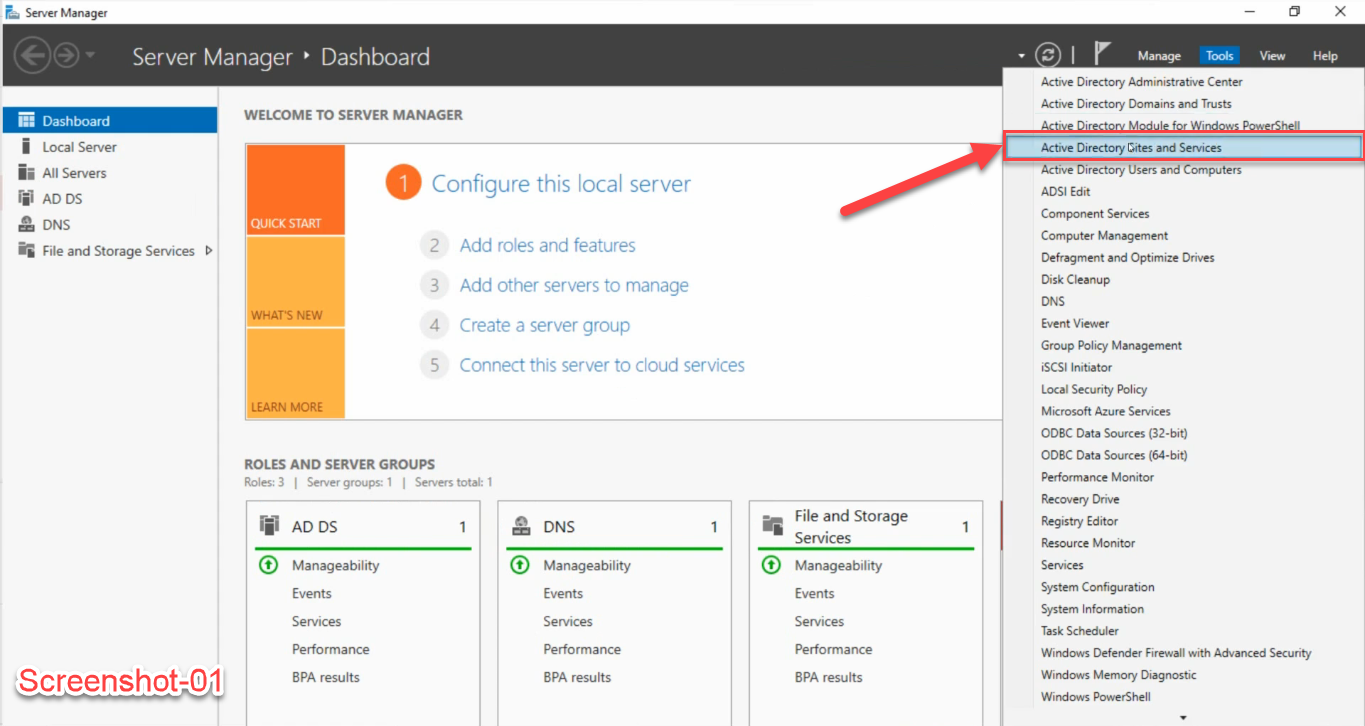
The console opens with the Sites tree visible — Sites at the top, an Inter-Site Transports container, a Subnets container, and a list of every site you have defined (Default-First-Site-Name in a fresh deployment, or named sites if you have a topology).
Step 2 — Right-Click NTDS Settings > Properties
Expand the site that contains the target DC, then expand Servers, then expand the DC’s node. You will see a single child node called NTDS Settings. Right-click it and choose Properties:
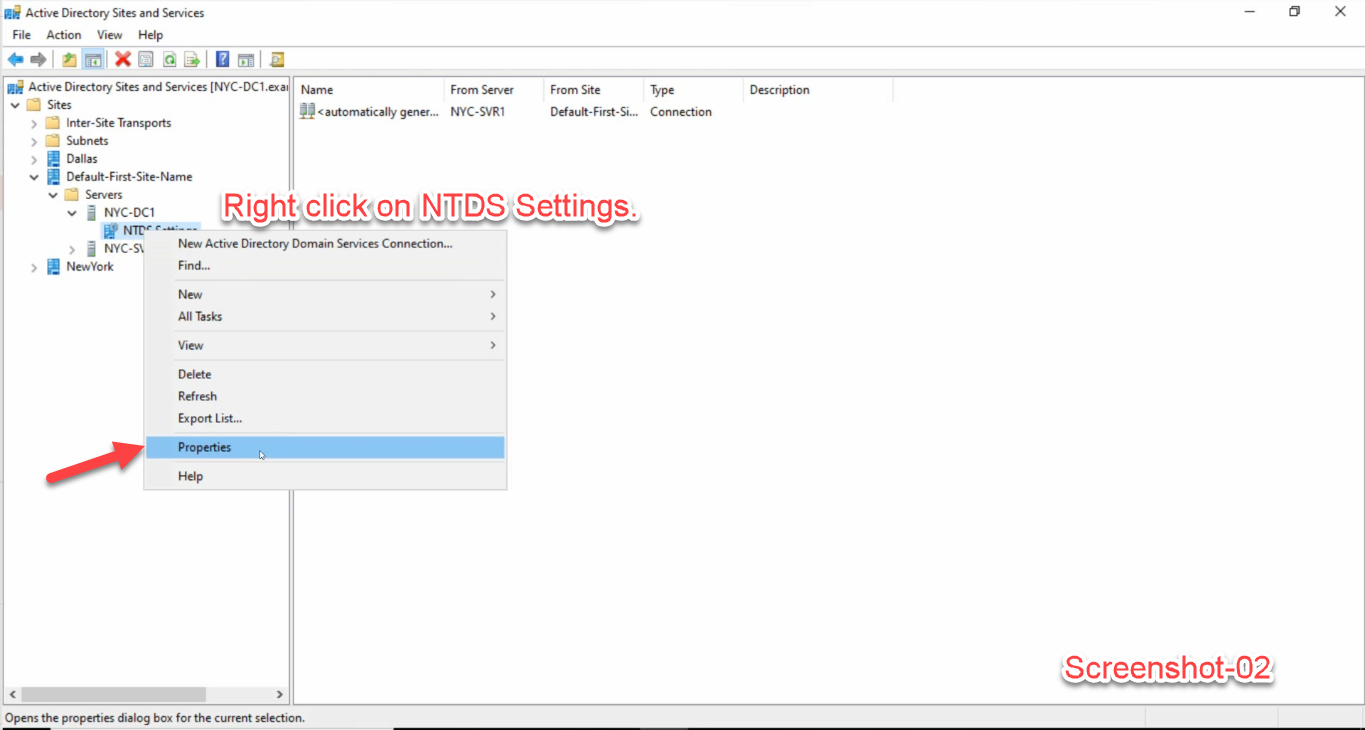
Important: right-click NTDS Settings, not the server node above it. The server-node properties show the OS version and DNS hostname; the GC flag lives on the NTDS Settings object below it. These are visually one above the other in the tree and trivially easy to mix up.
Step 3 — Tick the Global Catalog Checkbox
The dialog opens on the General tab. The Global Catalog checkbox is the third field down, under the read-only DNS Alias line:
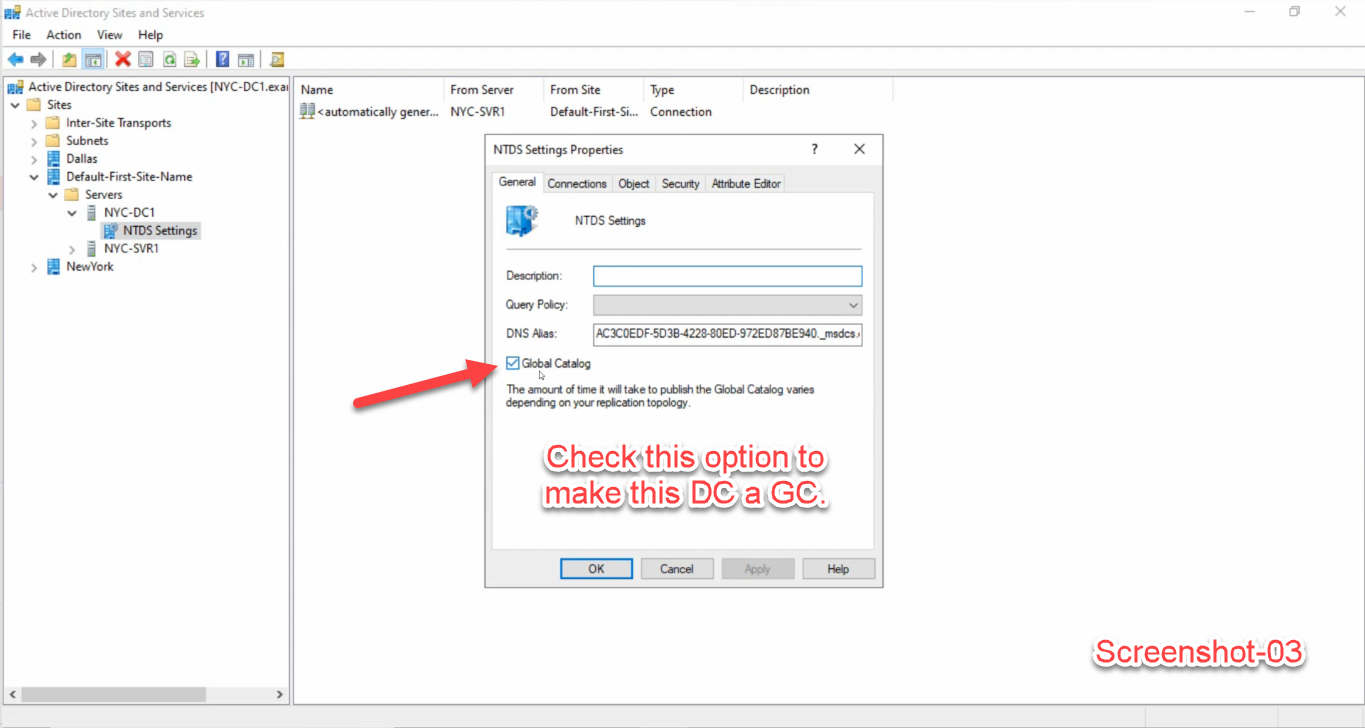
options attribute and replicates forest-wide.Tick Global Catalog, click Apply, then OK. The dialog closes immediately. Behind the scenes the change writes a single attribute (options bit on the NTDS Settings object) which replicates to every DC in the forest. Once that bit lands, every DC starts pushing the partial attribute set for its domain to your new GC.
The dialog text is candid about timing: “The amount of time it will take to publish the Global Catalog varies depending on your replication topology.” In a single-site lab it is seconds. In a multi-site enterprise it can be hours, especially if the forest is large or replication intervals between sites are long.
The PowerShell Equivalent
The whole GUI procedure is one cmdlet call to Set-ADObject against the DC’s NTDS Settings object. The trick is finding that object — it lives at CN=NTDS Settings,CN=<HostName>,CN=Servers,CN=<Site>,CN=Sites,CN=Configuration,DC=.... You can build the path or, easier, query for the DC and use its NTDSSettingsObjectDN property:
# Promote DC01 in the forest to a Global Catalog
$dc = Get-ADDomainController -Identity DC01.infotechninja.local

# The NTDS Settings DN is the parent of where we read it from
$ntds = Get-ADObject -Identity $dc.NTDSSettingsObjectDN -Properties options

# Bit 1 (0x1) of the options attribute is the Global Catalog flag.
# OR it in if it is not already set.
$current = [int]$ntds.options
$new     = $current -bor 1
Set-ADObject -Identity $ntds.DistinguishedName -Replace @{ options = $new }
To demote a GC back to plain DC, clear the bit:
$current = [int]$ntds.options
$new     = $current -band (-bnot 1)
Set-ADObject -Identity $ntds.DistinguishedName -Replace @{ options = $new }
Either direction triggers the same forest-wide replication of partial-attribute-set additions or removals.
Verification — Did It Actually Take?
The most authoritative answer comes from the DC itself, with the AD module:
Get-ADDomainController -Identity DC01.infotechninja.local |
  Select-Object HostName, IsGlobalCatalog, Site, OperatingSystem
Output you want to see:
HostName                          IsGlobalCatalog Site                       OperatingSystem
--------                          --------------- ----                       ---------------
DC01.infotechninja.local                     True Default-First-Site-Name    Windows Server 2025
For every DC in the forest at once:
Get-ADDomainController -Filter * |
  Select-Object HostName, IsGlobalCatalog, Site |
  Sort-Object Site, HostName
The classic CLI tools also work and are useful in scripts where the AD module is not present:
# dsquery: list every GC in the forest
dsquery server -forest -isgc

# repadmin: confirm the options attribute carries the GC bit
repadmin /options DC01.infotechninja.local
# Look for IS_GC in the output
And the real-world test: from a domain-joined machine, query the GC port directly. If port 3268 answers, the DC is serving as a GC:
Test-NetConnection -ComputerName DC01.infotechninja.local -Port 3268
# TcpTestSucceeded : True  -> DC is acting as a Global Catalog
Common Pitfalls
- Right-clicked the server node, not NTDS Settings. The server-node properties dialog has tabs for the DC’s OS and DNS alias but no Global Catalog checkbox. Expand the server node one more level and right-click the NTDS Settings child instead.
- Promoted, then panicked because nothing happened. The dialog text warning is accurate — replication of the partial attribute set takes time. Give it minutes (single site) to hours (multi-site) before you assume the change failed.
repadmin /showreplon the new GC will tell you whether replication is making progress. - Ran out of disk on the new GC. In a large multi-domain forest the
ntds.diton the new GC will grow noticeably as the partial replicas come in. Free space at promotion time != free space three hours into the GC build-up. - Left only one GC in the forest. A single GC is a single point of failure for forest-wide LDAP, Exchange address book, and universal-group authentication. Always have at least two GCs in production.
- Demoted the wrong DC’s GC role. If you uncheck the Global Catalog box on the wrong DC, AD honors that change immediately — the partial replica is dropped. The fix is to re-tick the box on the right DC and wait for replication to rebuild it; nothing is lost permanently, but you may have several hours of degraded forest-wide search until the rebuild completes.
- Forgot Schema Master can be a different DC. The Global Catalog and the Schema Master FSMO role are independent — placing the GC on a particular DC has no relationship to which DC owns the Schema Master role. Promoting a DC to GC does not move any FSMO roles.
Conclusion
Three clicks in Active Directory Sites and Services — or one cmdlet against the NTDS Settings options attribute — is enough to designate a Domain Controller as a Global Catalog. The mechanism is small; the implications are not. A GC is the one DC role that gives clients a single forest-wide query surface, and in any multi-domain forest at least two of them is the difference between “Outlook is slow in the EMEA office” and “Outlook works because there is a local GC.”
If you also want a forest-level health snapshot before and after the promotion, run the Get-ADHealth.ps1 health-check script — it reports the IsGlobalCatalog column for every DC alongside dcdiag and replication status. And if you are about to add a brand-new DC, the forest functional level needs to be high enough to support its OS first.