
Why Universal Group Membership Caching Exists
Active Directory has three group scopes — Domain Local, Global, and Universal — and only one of them is replicated forest-wide: Universal Groups. The membership of a Universal Group lives on every Global Catalog (GC) in the forest, in the partial attribute set, because membership in a Universal Group can grant access to resources in any domain.
That makes Universal Groups powerful, but it also makes the GC mandatory at logon time. When a user authenticates against a Domain Controller, the DC needs to enumerate every group the user is a member of — including Universal Groups defined elsewhere in the forest — so it can build the user’s Kerberos PAC (Privilege Attribute Certificate) and decide what they can access. The DC asks a Global Catalog for that enumeration. No GC reachable, no logon — or at best, a degraded logon that ignores Universal Group access.
For a small single-site forest, this is invisible. Every DC is a GC, the GC is on the same LAN, the lookup is sub-millisecond, nobody notices. For a multi-site forest with a slow or unreliable WAN to the central site, it is a daily problem: every logon at the remote site reaches across that WAN to a GC, every interactive sign-in pays the round-trip cost, and a brief WAN blip means users at the remote site cannot log in.
Universal Group Membership Caching (UGMC) is the answer when you cannot or do not want to put a Global Catalog at the remote site. With UGMC enabled on a site, any DC in that site caches a user’s Universal Group membership the first time they log on, and uses the cached copy for subsequent logons. The cache refreshes every 8 hours by default, in the background, against an upstream GC. The result: the WAN trip happens at most once per user per 8 hours instead of on every logon.
UGMC vs. a Local GC — Which Should You Use?
The choice between “put a GC at the remote site” and “enable UGMC on the remote site” is the fundamental design decision for a multi-site forest. Both solve the same problem; they have different costs.
- Local GC — Promote one of the remote site’s DCs to also be a Global Catalog. Pro: every group, every attribute, every forest-wide query is local; logons are fast even on first attempt; Exchange address-book lookups are fast; works for users not previously logged on at this site. Con: the remote DC has to host the partial attribute set of every other domain in the forest — meaningful disk and replication overhead in a large multi-domain forest. Use when: the remote site has Exchange, has many users, has lots of forest-wide LDAP queries, or has fast and reliable replication links.
- UGMC — Enable the cache on the remote site, no GC there. Pro: tiny replication footprint (only Universal Group memberships of users who have logged on, only refreshed every 8h); zero disk overhead; suitable for sites with limited DC hardware or thin WAN links. Con: first-ever logon for a user at this site requires GC reachability; users cannot use forest-wide LDAP / GC queries from this site; Exchange cannot run here; the cache is not authoritative and will not catch immediate Universal Group membership changes. Use when: the remote site is small, has no Exchange, the WAN is the constraint, and you are OK with the “first logon needs the GC” trade-off.
If you are unsure, default to a local GC. UGMC is for sites where the local GC is genuinely too expensive, not as a routine policy. Microsoft introduced UGMC in Windows Server 2003 specifically to make small remote-branch deployments cheaper.
Pre-Flight Requirements
- Forest functional level ≥ Windows Server 2003. UGMC is a 2003+ feature. Most forests are well past this floor; if you are running a 2000 forest, raise it first (see checking the forest functional level).
- At least one reachable Global Catalog in the forest. UGMC populates the cache by querying a GC. With no reachable GC, the cache cannot fill; first-ever logons at the remote site fail. Confirm the upstream GC is healthy first — Get-ADHealth.ps1 reports per-DC GC status.
- Replication is healthy. The cache itself is small; UGMC does not depend on rebuilding any partial replicas. But the upstream GC does have to receive Universal Group membership changes through replication, so confirm
repadmin /replsummaryshows zero failures before relying on the cache to be current. - You actually have a remote site without a GC. If every DC in the forest is already a GC (the default in single-domain forests since Server 2003), UGMC is moot — the GC is local to every site by definition. Verify with
Get-ADDomainController -Filter * | Select Name, IsGlobalCatalog, Site.
Step 1 — Open Active Directory Sites and Services
Sign in to a Domain Controller. Open Server Manager, click Tools, and choose Active Directory Sites and Services:
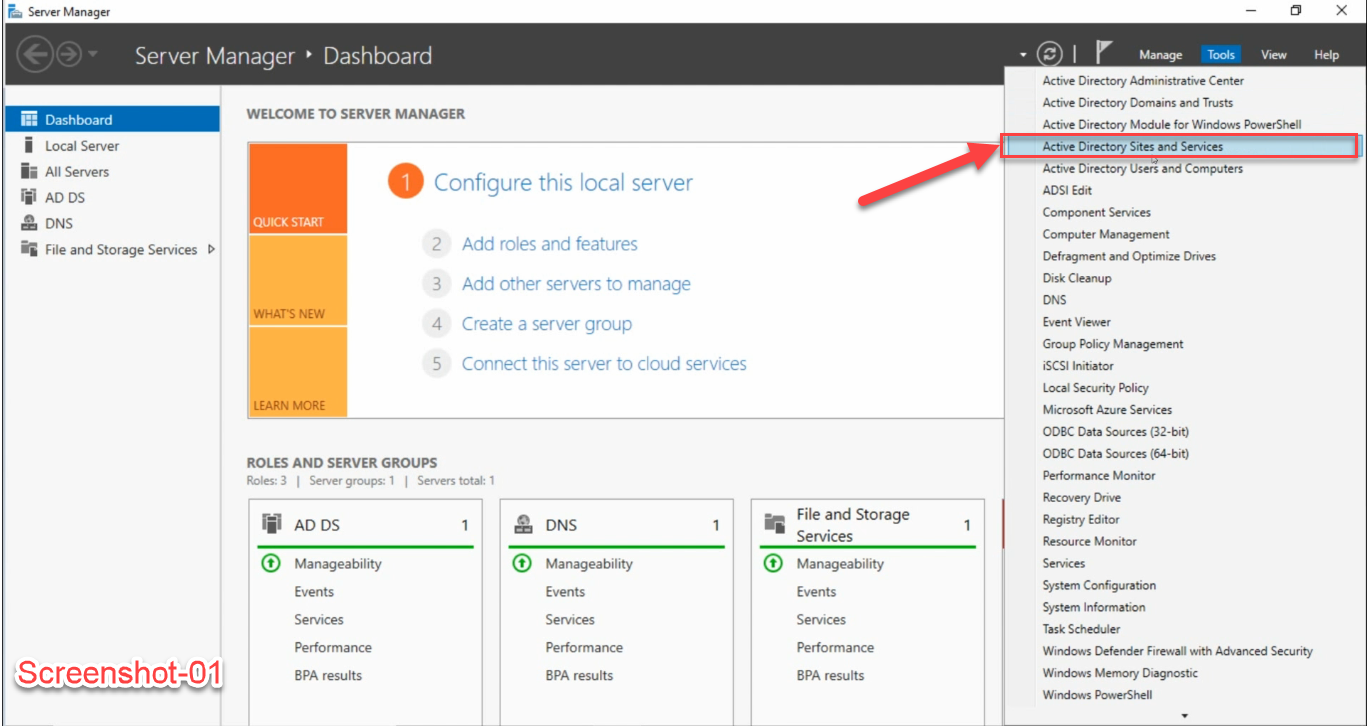
This is the same console used for site topology, subnet-to-site mapping, and the Global Catalog flag. UGMC is a per-site setting, not a per-DC one — once enabled on a site, every DC in that site participates in the caching behavior.
Step 2 — Right-Click NTDS Site Settings on the Remote Site
Expand Sites in the tree and select the remote site you want to enable UGMC on. In the example screenshot below the site is NewYork — substitute whichever site you actually want to cache.
With the site selected in the left tree, look in the right-hand details pane. You will see two children of the site: NTDS Site Settings and Servers. Right-click NTDS Site Settings and choose Properties:
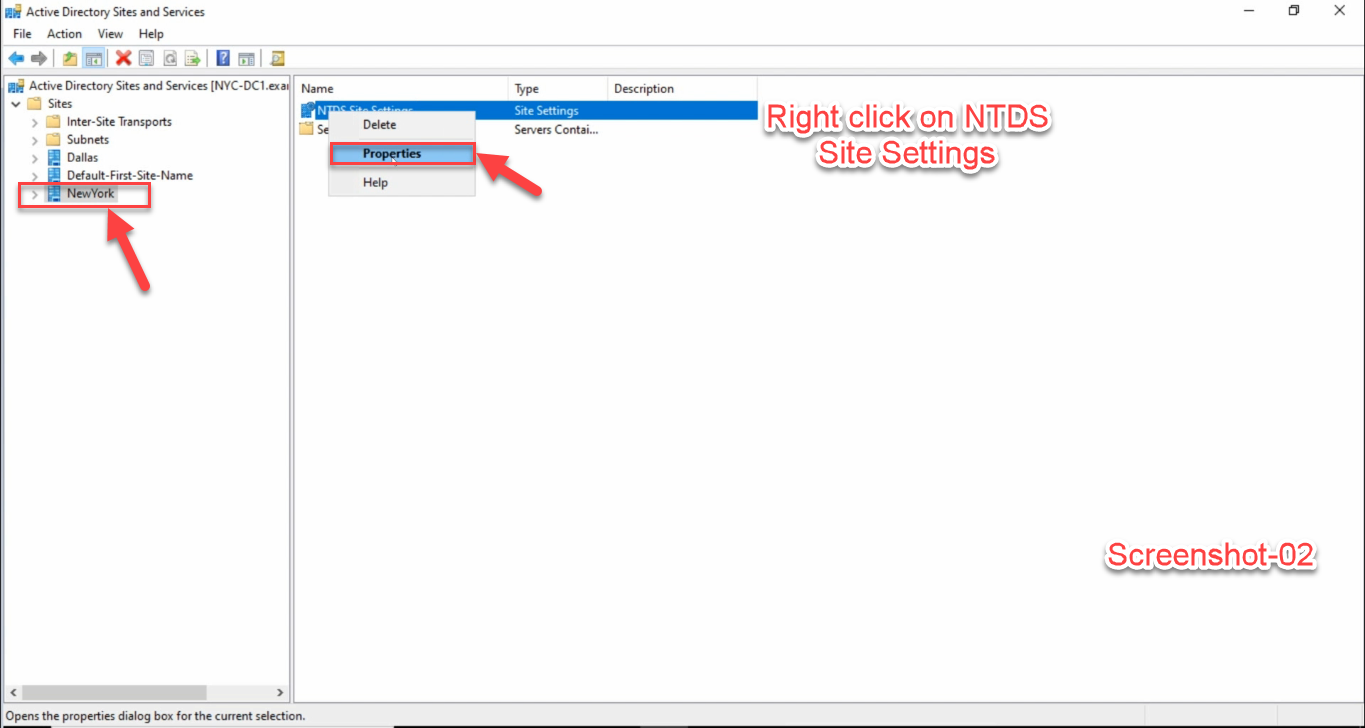
Important: right-click NTDS Site Settings in the right pane, not the site itself in the left tree. The site-node properties only let you change the site description; the cache toggle lives on the NTDS Site Settings child object. These are easy to confuse if you have not done it before.
Step 3 — Tick “Enable Universal Group Membership Caching”
The Properties dialog opens on the Site Settings tab. Most of this tab is concerned with the Inter-Site Topology Generator. The bottom group is the one you want, labeled Universal Group Membership Caching:
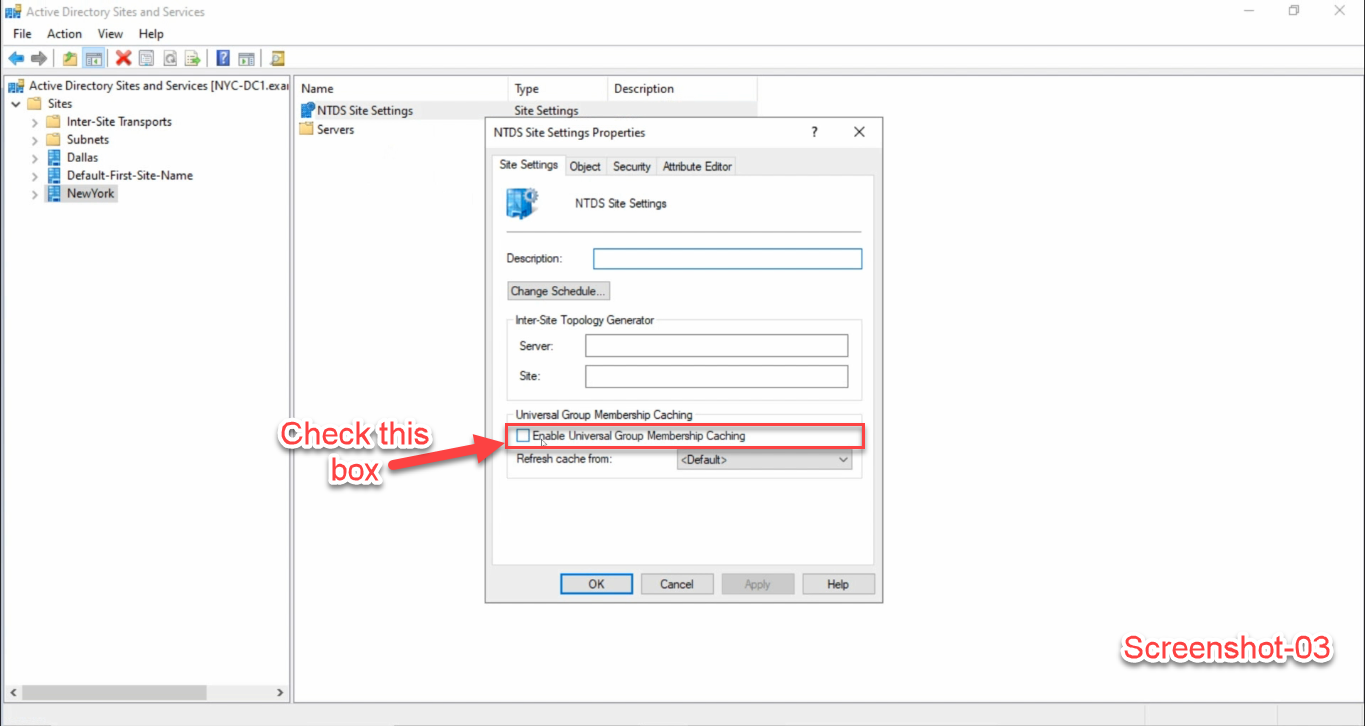
<Default> unless you want to pin to a specific upstream site. Apply > OK.Tick Enable Universal Group Membership Caching. The Refresh cache from dropdown stays at <Default> — this means “use any Global Catalog the DC can reach.” Set it to a specific upstream site only if you have a reason: e.g., a regional hub site that holds the GC and you want this remote site’s DCs to refresh the cache from that hub specifically rather than from a different (slower or more distant) GC.
Click Apply, then OK. The change writes one bit to the NTDS Site Settings options attribute and replicates forest-wide. From this moment on, every DC in this site will start caching Universal Group memberships for users who log on, refreshing those caches every 8 hours.
The PowerShell Equivalent
The whole GUI procedure is a one-line attribute change on the NTDS Site Settings object of the target site. The DN looks like CN=NTDS Site Settings,CN=<SiteName>,CN=Sites,CN=Configuration,DC=.... The options attribute is a bitmask; bit 0x20 (decimal 32) is the UGMC flag.
# Enable UGMC on the NewYork site
$forest = (Get-ADForest).Name
$site   = "NewYork"
$config = (Get-ADRootDSE).configurationNamingContext
$dn     = "CN=NTDS Site Settings,CN=$site,CN=Sites,$config"

$obj    = Get-ADObject -Identity $dn -Properties options
$current = if ($obj.options) { [int]$obj.options } else { 0 }
$new     = $current -bor 32   # set the UGMC bit (0x20)
Set-ADObject -Identity $dn -Replace @{ options = $new }
To pin the cache refresh to a specific upstream site, set the msDS-Preferred-GC-Site attribute on the same object:
# Refresh the cache from the Dallas site specifically
$dallasDn = "CN=Dallas,CN=Sites,$config"
Set-ADObject -Identity $dn -Replace @{ "msDS-Preferred-GC-Site" = $dallasDn }
To disable UGMC, clear the same bit:
$current = [int]$obj.options
$new     = $current -band (-bnot 32)
Set-ADObject -Identity $dn -Replace @{ options = $new }
Verification — Did It Actually Take?
The fastest check is to read the options bitmask back from the same NTDS Site Settings object:
$config = (Get-ADRootDSE).configurationNamingContext
$dn     = "CN=NTDS Site Settings,CN=NewYork,CN=Sites,$config"
$obj    = Get-ADObject -Identity $dn -Properties options
"options = {0} (UGMC bit set: {1})" -f $obj.options, (([int]$obj.options -band 32) -ne 0)
Or, with the Quest / older AD command-line tools, dsquery + dsget:
# Read the options attribute on the NTDS Site Settings object
dsquery * "CN=NTDS Site Settings,CN=NewYork,CN=Sites,CN=Configuration,DC=infotechninja,DC=local" -attr options
From a workstation in the remote site, the user-facing check is whether logon survives a temporary loss of GC reachability. With UGMC enabled, a user who has logged on once and is logging on again within the cache-refresh window should succeed even if the WAN is severed. Without UGMC and without a local GC, that same logon would fail.
The cache itself lives in HKLM\SYSTEM\CurrentControlSet\Services\NTDS\Parameters on each DC in the site, but Microsoft does not document the exact key layout and you should not rely on inspecting it directly. The options bitmask is the source of truth.
Common Pitfalls
- Right-clicked the site node, not NTDS Site Settings. The site-node properties dialog has tabs for site description and management; the UGMC checkbox lives on the NTDS Site Settings child in the details pane. Easiest mistake to make on first attempt.
- Enabled UGMC at HQ. UGMC is for sites that do not have a Global Catalog. Enabling it at the GC site is harmless but pointless — the GC is right there. Confirm the site you are configuring genuinely lacks a local GC first.
- First-ever logon at the cached site fails after a WAN outage. UGMC populates the cache at logon, by querying a GC. A user who has never logged on at the site has no cache entry, so their first logon there still requires a reachable GC. Solve this by ensuring at least one user-class account has logged on at the site before the WAN is unreliable, or accept that brand-new users will be unable to log on until the WAN recovers.
- Cache stale after a Universal Group change. The 8-hour refresh interval means a Universal Group membership change in HQ may not be visible to remote-site logons for up to 8 hours. For most administrative changes this is fine; for emergency revocations (an account is compromised, a role-based group must lose a member now) you also need to invalidate the cache. The cleanest way is to disable + re-enable UGMC on the affected site, which clears the cache forest-wide.
- Confused with universal-group caching at the DC level. UGMC is a site-scoped feature configured on the NTDS Site Settings object. There is no equivalent per-DC toggle. Every DC in a UGMC-enabled site participates; no DC in a UGMC-disabled site does.
- Treating UGMC as a substitute for replication. UGMC reduces the GC chatter at logon, not the underlying AD replication. Replication latency between HQ and the remote site is unchanged; you still need a healthy replication topology so the upstream GC is itself current. UGMC just stops the remote DCs from asking the GC on every logon.
Conclusion
Universal Group Membership Caching is the “cheap branch office” answer to the GC-required-at-logon problem. Three clicks in Active Directory Sites and Services — site → right-click NTDS Site Settings → tick the box — or one PowerShell Set-ADObject against the options attribute. The mechanism is small, the operational impact is large: a remote site that previously failed to log users in during a WAN outage suddenly survives one, at the cost of an 8-hour staleness window for Universal Group changes.
For sites where the trade-off does not fit — Exchange servers, large user counts, applications that issue forest-wide LDAP queries — promote a local DC to a Global Catalog instead. The companion article Configure a Domain Controller as a Global Catalog Server walks that procedure end to end. Together, those two articles cover almost every “branch site, slow WAN, GC question” design conversation you will have.