
Out of the box, a Windows DNS server resolves anything not in its own zones by recursing from the root hints — a long, latency-prone walk down the DNS hierarchy that hammers your link and your server every time someone needs to reach a name you don’t host. Forwarding fixes that. You delegate the lookup to a more capable server — either a public resolver like Google or Cloudflare for general internet names, or a partner’s authoritative DNS for a specific zone — and your server just relays the answer back to the client. Less recursion, faster responses, fewer surprises.
This walkthrough covers both flavors: regular forwarders for general external resolution, and conditional forwarders for zone-specific routing (cross-forest trusts, partner organizations, internal subdomains managed by other DNS teams). It also nails down the resolution order so you know exactly which forwarder will catch a given query.
What you need before starting
- A Windows Server with the DNS Server role installed
- Administrative rights on the DNS server (or DNS Admin delegated rights)
- The IP addresses of the DNS servers you intend to forward to (public resolvers, partner DNS, etc.)
- Outbound UDP/TCP 53 connectivity to those forwarders — sounds obvious, gets missed
Why forwarding beats recursion
When a client asks your DNS server for an external name, the server can do one of two things. Without forwarders, it climbs the DNS hierarchy from the root hints, contacts each level in turn, and eventually reaches an authoritative answer — correct, but slow and chatty. With a forwarder configured, it just hands the query to the forwarder and waits. The forwarder usually has a warm cache and finishes the lookup in single-digit milliseconds. The first lookup of a name is faster; every subsequent client lookup of the same name is faster still because both your server and the forwarder cache the answer.
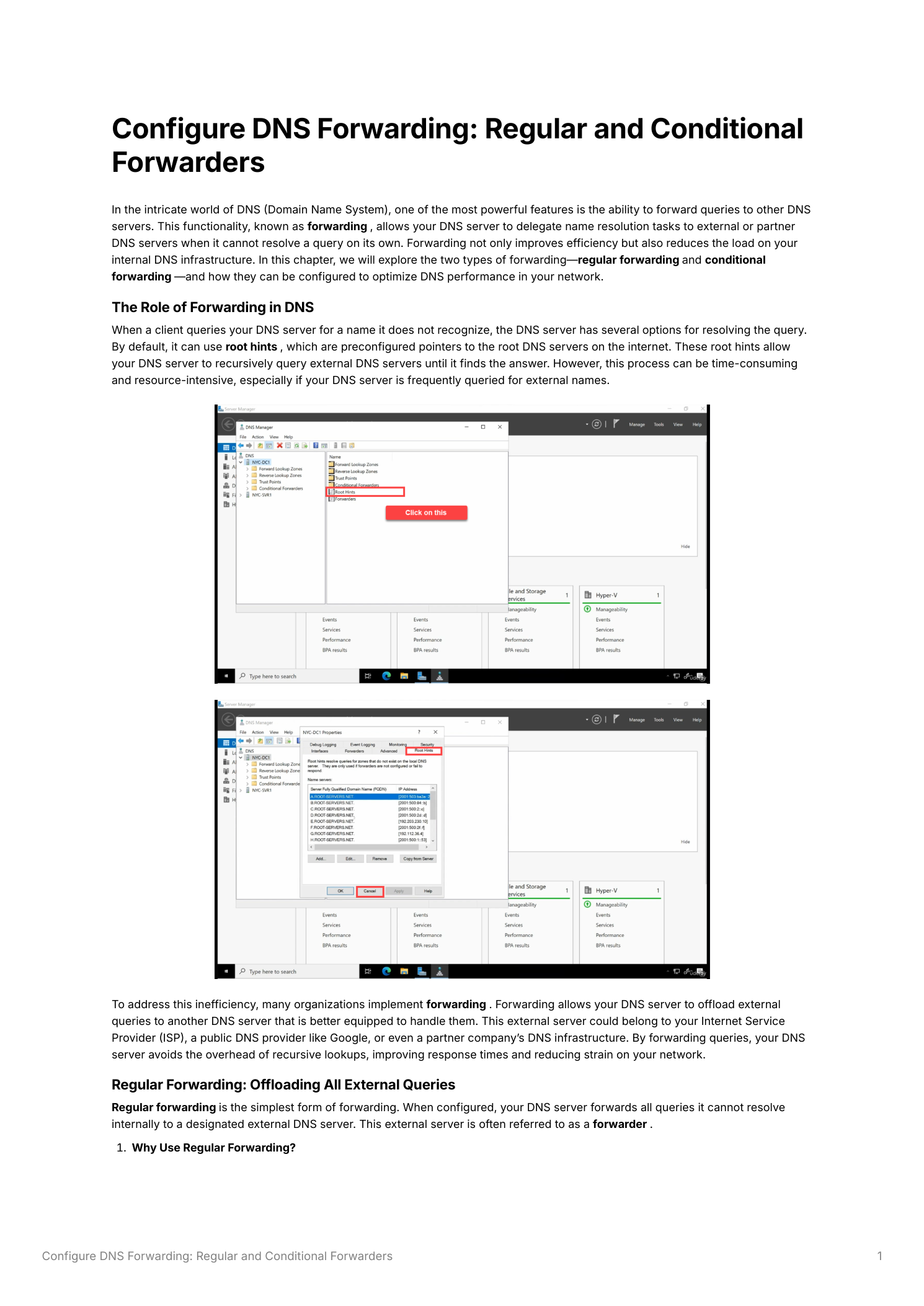
Part 1 — Regular (default) forwarders
Regular forwarders catch everything your server can’t resolve from its own zones. One config, one set of upstream IPs, applies to all unmatched queries.
When to use it
- Performance — Public resolvers (Google
8.8.8.8/8.8.4.4, Cloudflare1.1.1.1/1.0.0.1) sit on global anycast infrastructure with massive caches; their answers come back faster than recursion from your server - Reduced load — Less recursion means smaller cache, fewer outbound queries, and a smaller attack surface for cache poisoning attempts originating from the open internet
- Compliance — Some organizations route all external DNS through a filtered upstream (Cisco Umbrella, Quad9, Cloudflare for Families) for malware blocking or content filtering; forwarders are how you wire that into Windows DNS
Configure regular forwarders
- Open DNS Manager (Server Manager > Tools > DNS)
- Right-click the server name in the left panel and pick Properties
- Switch to the Forwarders tab
- Click Edit and add the IPs of your chosen upstream resolvers —
8.8.8.8,8.8.4.4, or whichever combination fits - OK to save
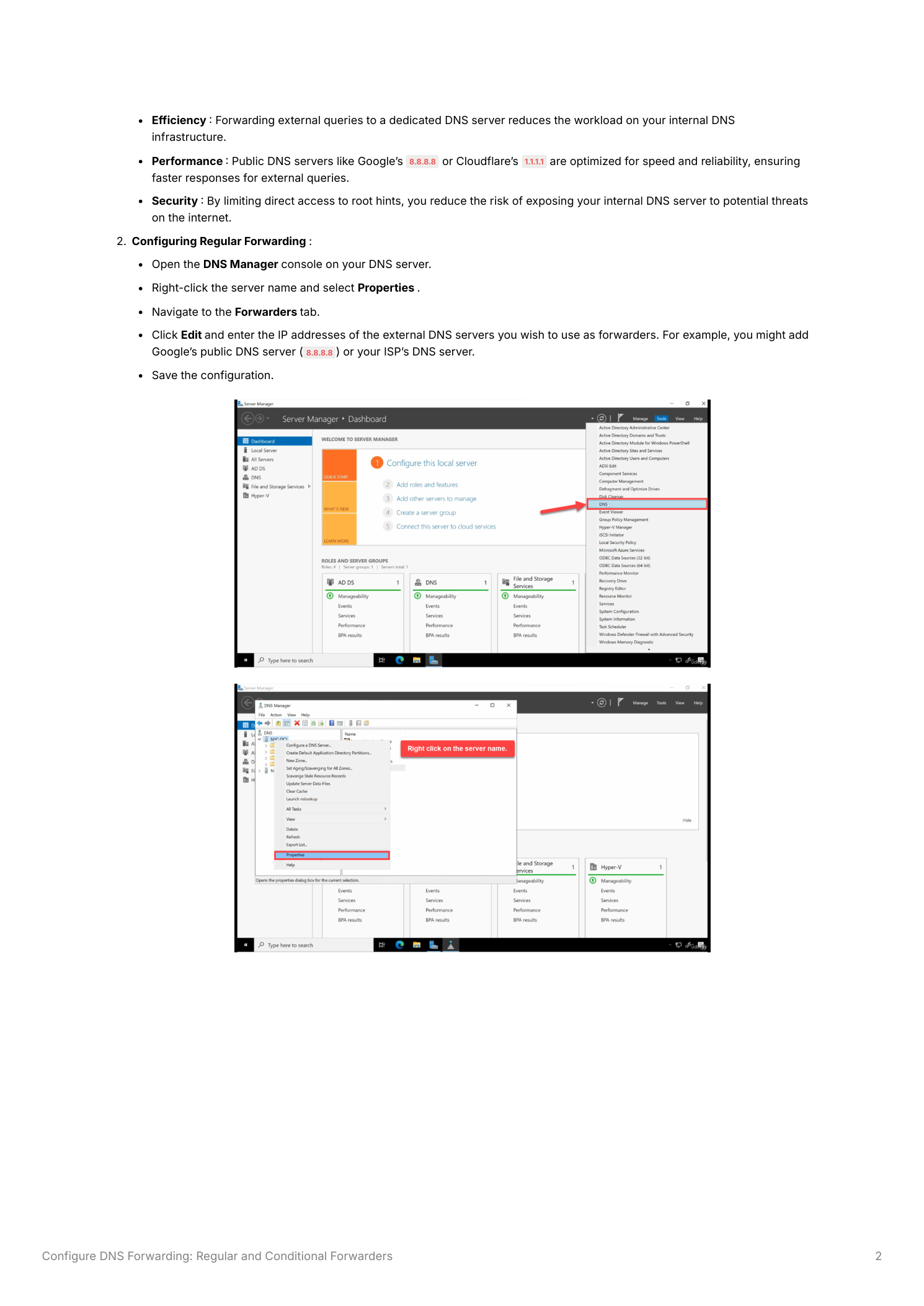
What actually happens at query time
Client asks for www.microsoft.com. Your server checks its hosted zones — no match. It checks conditional forwarders (none of them match either). It hands the query to the first regular forwarder. The forwarder either pulls the answer from its cache or recurses from the root, then returns it. Your server caches the response per the TTL on the record and answers the client. Subsequent lookups of the same name are served from your cache until the TTL expires — you only pay the upstream round-trip on cache miss.
Part 2 — Conditional forwarders (zone-specific routing)
Regular forwarders are one-size-fits-all. Conditional forwarders let you say “everything for this specific zone goes to that specific server” — bypassing the regular forwarder entirely for that zone.
When you actually need this
- Cross-forest AD trusts — This is the canonical use case. A trust between
contoso.locandtest.locwon’t work until each forest’s DNS can resolve the other’s names; conditional forwarders are how you do it without zone delegation or full secondary zone replication - Partner organizations — You need to resolve
partner.com’s internal names that aren’t in public DNS — their internal authoritative DNS server is the right target - Internal subdomain delegation — Large enterprises where a sub-team owns
dev.example.comon their own DNS infrastructure; conditional forwarders avoid the complexity of formal NS delegation
Add a conditional forwarder
- In DNS Manager, expand the server node and click Conditional Forwarders
- Right-click Conditional Forwarders > New Conditional Forwarder
- Enter the DNS Domain — the FQDN of the zone you’re routing (e.g.
partnercompany.com) - Enter the IP address of the authoritative DNS server for that zone (e.g.
192.168.1.1) - Tick “Store this conditional forwarder in Active Directory” — this is the right answer in any multi-DC environment; the config replicates to every DNS-running DC automatically
- Click OK
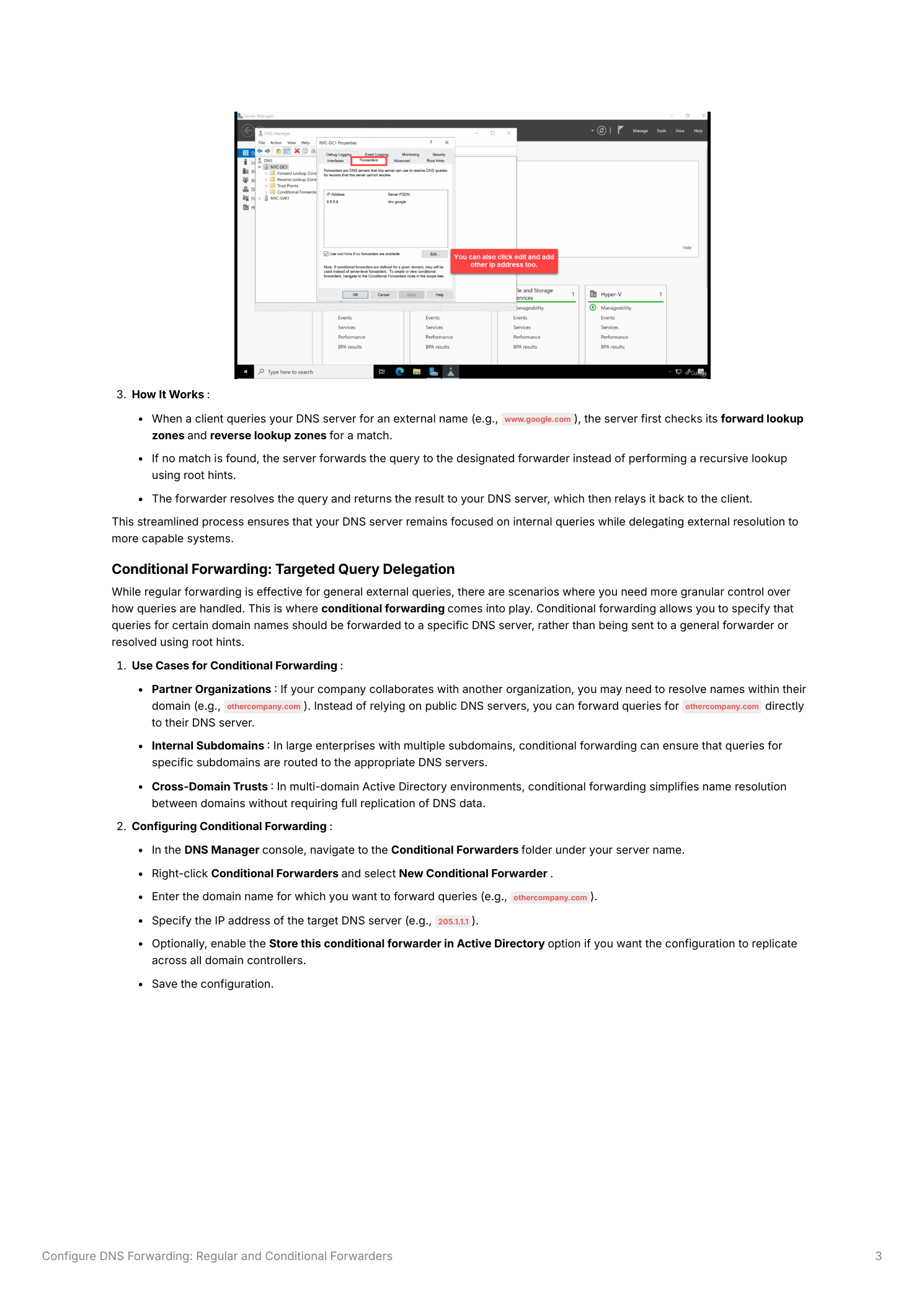
What happens at query time
Client asks for server.partnercompany.com. Your server checks its hosted zones — no match. Then it checks conditional forwarders. The partnercompany.com entry matches; the query goes straight to the partner’s DNS at the configured IP. The regular forwarder never sees it, root hints never see it. Anything not matching a conditional forwarder falls through to the regular forwarder as before.
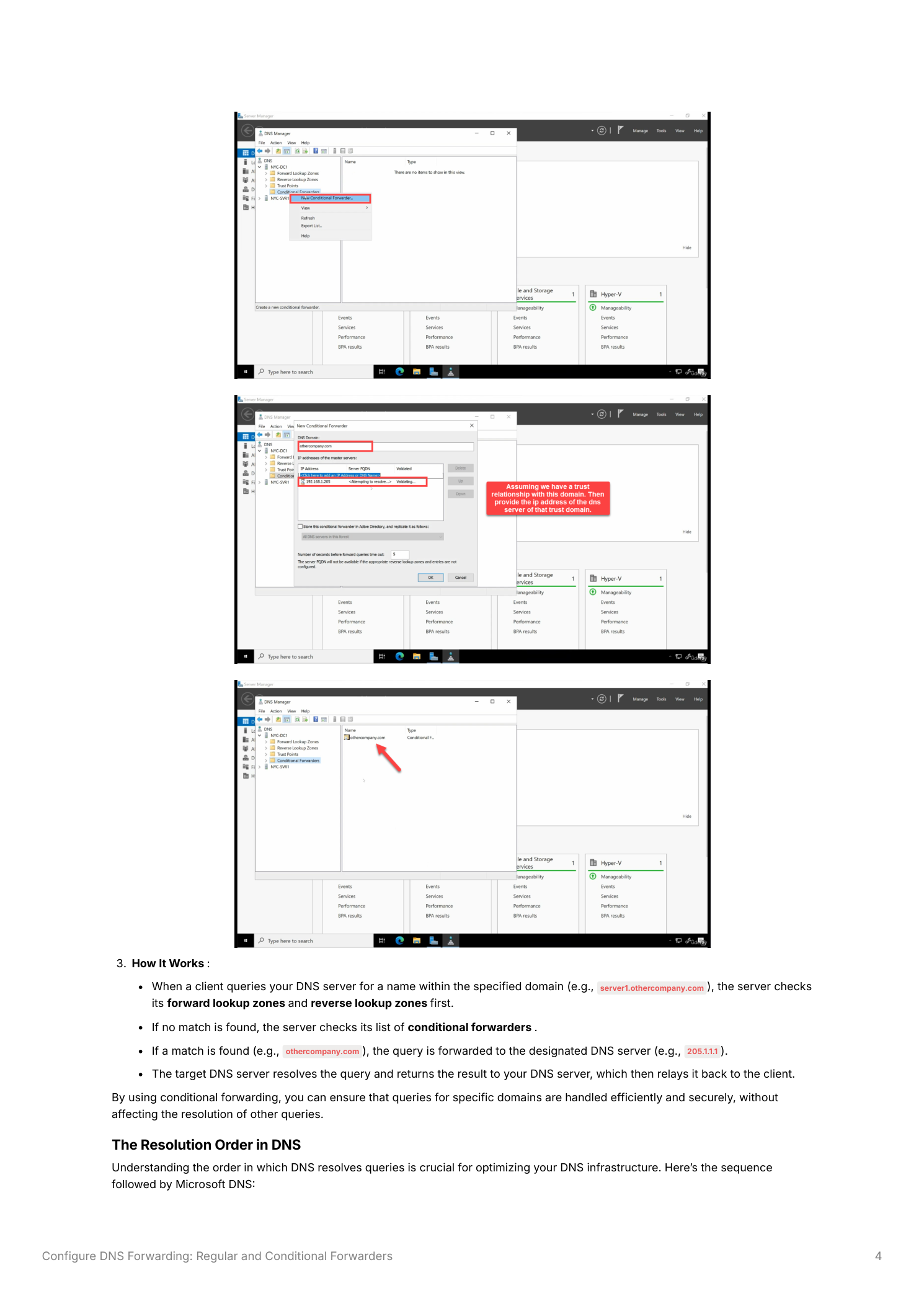
The exact resolution order
Internalize this — it’s what determines whether your forwarder configuration actually does what you think it does:
- Forward and reverse lookup zones — If the queried name is in a zone hosted on this server, answer authoritatively. Don’t consult forwarders, don’t hit the upstream — you’re the source of truth.
- Conditional forwarders — If any conditional forwarder matches the queried zone, send the query to that specific server. First match wins; the rest are skipped.
- Regular forwarders — If no conditional forwarder matched, send the query to the regular forwarders in the order they’re listed.
- Root hints — If all forwarders fail (unreachable, timing out), fall back to recursive resolution from the root hints. This is the safety net that prevents a forwarder outage from killing all DNS.
The local-zones-first behavior matters: don’t configure a conditional forwarder for a zone you also host locally as a primary. The local zone always wins; the conditional forwarder will appear to be ignored, and you’ll spend an afternoon wondering why.
Things that bite people in production
Pick reliable upstreams — and at least two
Single-IP regular forwarders mean a single point of failure. List at least two upstreams. Public anycast resolvers (Google, Cloudflare, Quad9) are reliable choices with strong uptime SLAs. ISP DNS works too but tends to be slower and less reliable; verify before depending on it. For conditional forwarders, the target must be an authoritative server for the zone — pointing a conditional forwarder at a public resolver that has no special knowledge of the zone just adds a hop.
Don’t disable root hints
The DNS Manager Properties dialog has options to disable recursion entirely. Don’t. If all your forwarders go down, root hints are the last fallback that keeps DNS working at all. Disable recursion only on internet-facing authoritative DNS servers (where you specifically don’t want to resolve arbitrary external names for the world); never on internal Windows DNS that’s also serving clients.
AD-integrate every conditional forwarder in a multi-DC domain
The “Store in AD” tickbox is the difference between “configure once and forget” and “hunt down every DC after a topology change.” In any environment with more than one DNS-hosting DC, AD-integrate. The replication scope (default: all DNS servers in this domain) determines who gets the config — it covers every DC in the domain that runs DNS, which is normally what you want.
Forwarders don’t carry security — the upstream might
If you forward to a malware-filtering upstream like Cisco Umbrella or Quad9, you get filtering for free. If you forward to 8.8.8.8, you don’t. Pick the upstream based on whether you want filtering — and remember that DNS-over-HTTPS (DoH) bypasses your DNS server entirely; if you care about all clients going through your filter, also block outbound DoH at the firewall.
Where this fits
Forwarders are one piece of a robust DNS strategy. The companion pieces are DNS reverse lookup zones and PTR records (so reverse lookups work for clients on your subnets), DNSSEC (so the answers you forward and cache are authenticated), and the DHCP server role (so client A records are registered automatically). All of these live in the DNS, DHCP & Networking pathway. For multi-forest setups specifically, see creating a trust relationship between Active Directory forests — conditional forwarders are step 1 of that procedure.