
Active Directory replication is the silent plumbing that keeps every domain controller in lockstep — password changes, group memberships, GPO edits, schema updates, every directory write fans out from the originating DC to its partners through a multi-master mesh that is supposed to converge in minutes. When that mesh stops converging, you find out about it the hard way: stale group memberships, logon failures at one site, GPOs that apply on some workstations and not others, password changes that won’t take. repadmin /showrepl is the first command an AD administrator runs at the first sign of trouble. The output looks like an unstructured wall of text on first reading, but it is actually six well-defined sections stacked on top of each other, and once you can name each section the command becomes a fast, surgical health check. This article walks the output one block at a time so the next time you run it under pressure you can read it as a paragraph instead of a screen-dump.
What you need before starting
- A Windows Server-based domain controller and an account in the Domain Admins or Enterprise Admins group (replication metadata is privileged data; an unprivileged account will see access-denied errors)
repadmin.exe— ships with the AD DS role on every supported version of Windows Server (2012 R2 forward) and is part of the RSAT bundle on Windows 10/11 admin workstations- A working understanding that AD replication is per-naming-context, not per-DC — the same partner DC can be healthy for one partition and broken for another, which is why the output lists every partition separately
- An elevated PowerShell or cmd window —
repadminneeds admin rights even when run locally on a DC
The command, with and without a target
Run on its own, repadmin /showrepl reports replication status for the DC where the command is invoked — the same as passing localhost. Pass a hostname and the report comes back for that remote DC instead, which is the more common usage when you’re standing on an admin workstation rather than RDPing into the DC itself.
repadmin /showreplrepadmin /showrepl <DCName>The DC argument can be a NetBIOS name (LA-SRV-DC02), an FQDN (la-srv-dc02.infotechninja.local), or the literal localhost. Quoted-out site names work too if the DC is unique to a site. RPC has to be reachable to the target — if a firewall sits between you and the DC you’re querying, the command fails before it returns any output.
The output, section by section
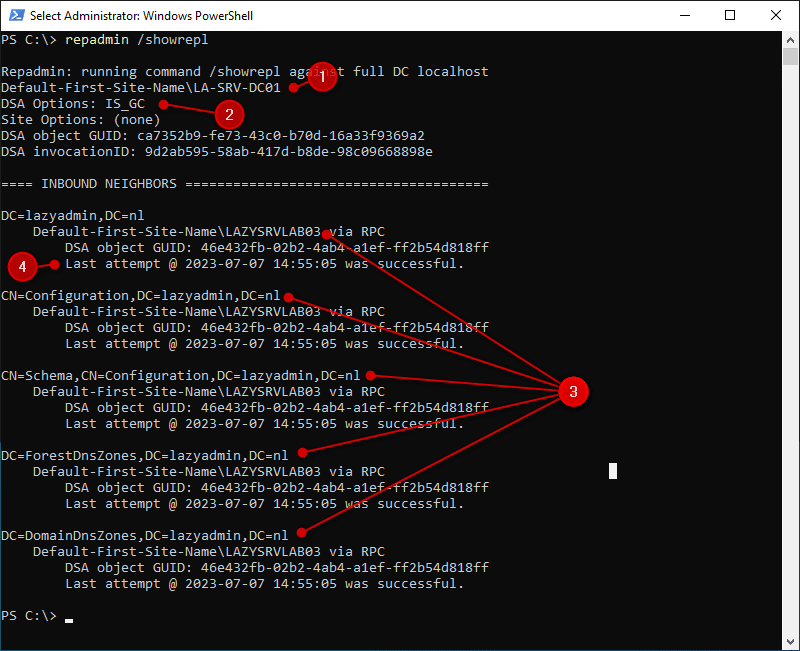
repadmin /showrepl output — the DC’s identity at the top, then a list of inbound replication partners with one status block per replicated naming context.The screenshot above is a healthy showrepl result — one DC checking its replication status against one inbound partner, with all five naming contexts replicating cleanly over RPC. The structure breaks down into six logical blocks. We’ll take them in order.
1. The target DC line — who you’re asking about
The first line tells you which DC the report is for and where it lives in the AD Sites topology:
Default-First-Site-Name\LA-SRV-DC01The format is always SiteName\DCName. Default-First-Site-Name is the AD Site the DC belongs to (the literal name AD assigns when no sites have been defined yet); LA-SRV-DC01 is the DC’s computer-account name. If you’re running the command without a hostname argument and you don’t recognise the DC name in this line, you’re on a different DC than you thought — double-check before drawing any conclusions from the rest of the output.
2. DSA options and identity GUIDs
The next block reports identity attributes about the DC’s directory service agent — the “DSA” that holds and replicates the AD database on this server:
DSA Options: IS_GC
DSA object GUID: ca7352b9-fe73-4c30-b70d-16a3f9369a2
DSA invocationID: 9d2ab595-58ab-417d-b8de-98c09668898e
DSA Options is a flag set. IS_GC means the DC is a Global Catalog — it holds a partial replica of every domain in the forest, on top of its own domain’s full replica. Other values you might see here include DISABLE_INBOUND_REPL, DISABLE_OUTBOUND_REPL, and DISABLE_NTDSCONN_XLATE; any of those mean replication has been administratively disabled on this DC and you have a different problem to investigate.
The DSA object GUID is the immutable identifier of this DC’s nTDSDSA object in the configuration partition — it stays the same for the life of the DC and is what other DCs use to address replication requests to this server. The invocationID is the identifier of the AD database instance running on this DC. The crucial property: it changes whenever the database is restored from backup. Replication uses up-to-dateness vectors keyed by invocationID; a changed invocationID is what tells partner DCs that this DC has been rolled back and they need to re-replicate from scratch from objects originated here. If you’ve recently done an authoritative restore on this DC and the invocationID hasn’t changed, that’s a serious problem — partner DCs will silently reject what they think are duplicate updates.
3. INBOUND NEIGHBORS — who is pushing updates to this DC
The literal banner tells you the next block is about replication partners that send updates to this DC:
== INBOUND NEIGHBORS ==This is a meaningful distinction. AD replication is pull-based — a DC pulls updates from its partners on a schedule (or in response to a notification). The neighbours listed here are the source DCs that this DC reaches out to. To see the reverse view (which DCs this DC pushes notifications to), use repadmin /showrepl /repsto or repadmin /showconn. For most failure-mode triage, inbound is the right view: if a directory change made on a partner DC isn’t showing up here, the inbound replication relationship from that partner to this DC is where the problem lives.
4. Naming contexts — what is being replicated, partition by partition
Under each inbound neighbour, the output enumerates the naming contexts (NCs, also called partitions) that DC sources for this one. A standard AD forest has five:
DC=lazyadmin,DC=nl— the domain partition. Holds users, groups, computers, OUs, contacts — everything you see in ADUC. Replicated only between DCs in the same domain.CN=Configuration,DC=lazyadmin,DC=nl— the configuration partition. Holds forest-wide topology: sites, subnets, site links, services, the schema location reference. Replicated to every DC in the forest.CN=Schema,CN=Configuration,DC=lazyadmin,DC=nl— the schema partition. Defines every object class and attribute the directory understands. Read-only on every DC except the Schema Master FSMO. Replicated to every DC in the forest.DC=ForestDnsZones,DC=lazyadmin,DC=nl— an application partition for forest-wide DNS data (root hint references, _msdcs.* records). Replicated to every DC in the forest that runs the DNS Server role.DC=DomainDnsZones,DC=lazyadmin,DC=nl— a per-domain application partition for DNS data scoped to this domain (the AD-integrated zone for the domain itself). Replicated only to DC-DNS servers in the same domain.
If a partition is missing from this list for a partner that should be sourcing it, that’s a configuration problem — the source DC isn’t hosting the partition or hasn’t been added as a replication source for it. If a partition appears but has a stale “last attempt” timestamp or an error code (covered next), that’s a runtime replication failure for that specific partition only.
5. Status messages — the success/failure verdict per partition
For every partition under every neighbour, the output reports the transport and the result of the last replication attempt:
via RPC
Last attempt @ 2023-07-07 14:55:05 was successful.
via RPC means the replication used Remote Procedure Call — the standard intra-site and most inter-site replication transport. The other value you might see is via SMTP, used only for inter-site replication of the configuration and schema partitions when the site link is configured for SMTP transport (rare in modern environments — almost everyone uses RPC even between sites). RPC requires direct port connectivity (TCP 135 + dynamic high ports) between the DCs; if that path is broken, “via RPC” will be paired with a connection error rather than a success line.
Last attempt was successful is the line you want to see. The alternatives are several variations on “Last attempt failed with error” followed by a Win32 error code — 1722 (RPC unavailable, almost always firewall/DNS), 5 (access denied, often a Kerberos or trust issue), 8524 (DNS lookup failure for the source DC), 8453 (replication access denied), 8606 (insufficient attributes were given to create an object), and others. When you see a failure here, the next step is usually repadmin /showrepl /errorsonly for a forest-wide view, then dcdiag /test:replications for a deeper analysis.
6. Summary table — the at-a-glance recap
The condensed reading of the output is one row per (partner, partition) pair. Here’s the version of the summary that tracks against the screenshot above:
| Section | What it answers | Where to look in the raw output |
|---|---|---|
| Target DC | Which DC am I checking, in which AD site? | First line of the report |
| DSA options + GUIDs | What are this DC’s special roles and identity? | DSA Options, DSA object GUID, invocationID |
| Inbound neighbours | Which partner DCs is this DC pulling from? | == INBOUND NEIGHBORS == banner and the partner names below it |
| Naming contexts | Which partitions are replicating from each partner? | One DN per partition under each neighbour |
| Transport | RPC or SMTP — how is replication moving? | “via RPC” / “via SMTP” line |
| Last result | Did the last replication attempt succeed? | “Last attempt @ <time> was successful” or error code line |
When the output goes red — a triage path
If showrepl reports a failure on one or more partitions, the order of operations is:
- Run
repadmin /showrepl /errorsonlyacross the whole forest to confirm whether it’s a single relationship that’s failing or a forest-wide pattern. - Run
repadmin /replsummaryfor a one-screen summary that includes the largest replication delta — if a DC has a delta in days rather than minutes, it’s effectively unreachable for replication purposes. (Walked through in repadmin /replsummary.) - Resolve the Win32 error code attached to the failure.
1722usually means firewall (verify TCP 135 + the dynamic RPC port range, and DNS resolution from the failing DC to the source).8453means replication permissions; check the DC’s computer account membership and any recent ACL changes on the partition root. - If the error suggests a corrupted relationship, force a sync with
repadmin /syncall /AdeP— verify the partition argument before running this in production;/Ameans “all partitions” and/Pmeans “push to partners,” both of which can be heavy. - Cross-check with
dcdiag /test:replications /test:dns—dcdiagcatches problems thatrepadmindoesn’t (DNS resolution, time skew, secure channel, KDC service status).
Things that bite people in production
Per-partition success means partition success, not DC success
One of the most common misreadings: “the last attempt was successful” on the domain partition does not mean the schema partition or DomainDnsZones is healthy. Each partition is replicated independently. Always read every partition line, not just the first one.
The default tombstone lifetime is the silent failure mode
If showrepl reports a partition has been failing for more than 60 days (the default tombstone lifetime, raised to 180 days on newer forest functional levels), the affected DC is past the point where AD will let it sync any deleted-object metadata. The fix at that point is to demote the DC, clean up its metadata, and re-promote — not to keep retrying replication. Catching this before the lifetime expires is the entire reason for monitoring showrepl regularly rather than only running it when something breaks.
InvocationID changes that aren’t expected are a red flag
If you didn’t restore this DC from backup but the invocationID has changed, something is wrong — likely a virtualisation snapshot rollback or a USN rollback condition. AD has automatic protection against USN rollback in modern Windows Server versions (the DC will quarantine itself), but the symptom on the partner side is the partition will report a sudden change followed by replication failures.
RPC ports through firewalls need explicit configuration
RPC’s use of dynamic high ports (49152–65535 by default on Windows Server 2008+) is what trips most cross-site replication failures. Either pin the AD replication port via the TCP/IP Port registry value (a fixed port to whitelist) or open the full dynamic range. Half-configured firewall rules — opening only TCP 135 and forgetting the dynamic ports — produce the textbook “via RPC… Last attempt failed with error 1722” symptom.
Time skew greater than 5 minutes breaks Kerberos, which breaks replication
Replication uses Kerberos for authentication. Kerberos has a hard 5-minute time skew tolerance by default. A DC with drifting time will start failing replication with cryptic access-denied errors before anyone notices the clock is off. w32tm /query /status on every DC is the matching companion check — if showrepl says “access denied” for no obvious reason, check time first.
Where this fits
Reading showrepl output cleanly is the entry point to AD replication troubleshooting. The next-level commands take the same data and aggregate it: repadmin /replsummary compresses the per-partner detail into a forest-wide health table, and advanced audit policies capture the directory changes that flow over the replication topology in the first place. For the broader replication architecture — sites, site links, the KCC, intra- vs inter-site schedules — the Active Directory pathway covers the rest of the surface area.