
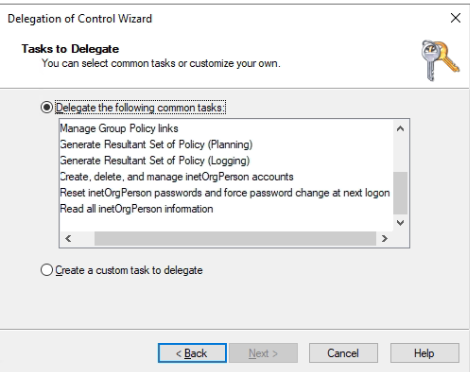
Active Directory’s permission model is so granular it’s effectively unusable to configure by hand. Every container, every object, every attribute can carry its own access control entries; combining the right ACEs to delegate “helpdesk staff can reset passwords for users in the Sales OU but not change anything else” takes intimate knowledge of the schema and a steady hand on the Security tab. The Delegation of Control Wizard is Microsoft’s answer to that complexity — a guided UI that bundles the most-common delegation patterns into named tasks and applies the underlying ACEs to a target OU on your behalf. The wizard’s Common Tasks page lists eleven of those bundles. This article walks through what each one actually does, where it fits in a real delegation model, and the catches that the wizard’s friendly checkbox UI doesn’t warn you about.
What you need before starting
- An Active Directory environment with at least one OU you want to delegate within
- A security group representing the people you’re delegating to (helpdesk team, regional admins, departmental IT, etc.) — always delegate to a group, never to an individual user; group membership is the right level of granularity
- Active Directory Users and Computers (ADUC) installed on whichever machine you’re running the wizard from — part of the standard RSAT bundle
- Membership in the Domain Admins group (or equivalent rights to modify ACLs on the target OU)
What the wizard actually does
The Delegation of Control Wizard, launched by right-clicking an OU in ADUC and selecting Delegate Control…, is a UI shortcut that does three things in sequence:
- Asks which user or group you’re delegating to
- Asks which task(s) you want to delegate — either picking from the eleven preset Common Tasks (this article’s focus) or building a custom delegation by selecting specific object types and permissions
- Applies the corresponding access control entries to the target OU’s ACL, scoping each ACE to the appropriate object class and inheritance behaviour
The result is identical to what you’d achieve by hand-editing the OU’s Security tab in ADUC’s Advanced Features view — the wizard just packages the right combinations of permissions, applies-to scopes, and inheritance settings into a named operation. Each Common Task is a curated bundle of ACEs that maps to a real-world job role.
Important caveat upfront: the wizard creates ACEs but it doesn’t track them. Once applied, the only record that the delegation happened is in the OU’s ACL itself. Revoking a delegation later means manually finding and removing the ACEs the wizard added. There’s no “Undo Delegation” option in the UI; this is one of the genuine pain points of the wizard pattern, covered in the gotchas at the end.
The eleven Common Tasks
1. Create, delete, and manage user accounts
Grants the delegated group full control over user objects within the OU subtree: creating new users, deleting accounts when staff leave, and editing standard user properties (display name, department, manager, phone, address — the lot). The delegated party can do anything an admin would do at the user-object level, but only for users inside this OU. They can’t reach into other OUs, and they can’t edit anything that isn’t a user object.
Right for: a regional or departmental IT lead who needs to onboard, offboard, and update staff in their slice of the directory without holding global admin rights.
2. Reset user passwords and force password change at next logon
Two related permissions bundled together: the password-reset extended right, and write access to the pwdLastSet attribute (which is what the “User must change password at next logon” checkbox manipulates). The delegated group can clear forgotten passwords and force the user to pick a new one on next sign-in — the canonical helpdesk task. They can’t do anything else to the user account; pure password management.
Right for: front-line helpdesk staff. This is the single most-delegated task in any AD environment and the one that justifies having a Delegation Wizard in the first place.
3. Read all user information
Read-only access to every attribute of every user object in the OU subtree — including the attributes that aren’t exposed in the default ADUC view (employee ID, custom attributes, group memberships, etc.). The delegated party can view but cannot modify anything.
Right for: tier-1 support that needs to look up “what’s the user’s phone extension?” or “which groups is this user in?” without having any write access. Also useful for HR-adjacent roles that need directory information for reporting but shouldn’t change it.
4. Create, delete, and manage groups
Equivalent of task 1 but for group objects. The delegated group can create new security or distribution groups in the OU, delete obsolete ones, and edit group properties (group name, scope, type, description). Note this is about creating and managing groups themselves — the next task covers managing membership.
Right for: an admin responsible for the access-control structure within their OU — building out new groups for new projects, retiring old ones, restructuring the group taxonomy.
5. Modify the membership of a group
The narrower task: add and remove users from existing groups, but not create or delete the groups themselves. Bundles the WriteProperty permission on the member attribute of group objects.
Right for: a team lead who manages access to a specific shared resource (a team file share, a shared mailbox, a project tool) where the membership changes regularly but the group itself shouldn’t be touched. Combine with task 4 only if the same person should also create/delete groups.
6. Manage Group Policy links
Grants permission to link existing GPOs to the OU and to remove those links — not to create new GPOs or edit the contents of existing ones. The delegated party can decide which GPOs apply to this OU but can’t change what those GPOs do.
This is the right granularity for a decentralised model where central IT publishes the GPO catalogue and per-OU admins choose which policies apply to their OU. For the create-and-edit side of the same model, see the “Group Policy Creator Owners” built-in group, which is a separate (forest-wide) delegation. The combination of central GPO authoring with per-OU link control is the pattern Contoso College in the planning for Group Policy walkthrough uses for its decentralised IT model.
7. Generate Resultant Set of Policy (Planning)
RSoP Planning mode lets the delegated party run hypothetical “what would happen if this user signed into this computer in this OU?” queries against the directory, producing a report of which GPO settings would apply, in what order, with which winning. Crucially this is simulation only — nothing is actually applied to anyone.
Practical use case: an admin wants to add a new GPO to the OU, but the OU already has half a dozen GPOs linked. RSoP Planning runs the scenario, shows exactly which settings would result for the test user, and reveals any conflicts before the GPO actually gets linked. Saves the “deploy then realise three departments are now locked out of Control Panel” failure mode.
8. Generate Resultant Set of Policy (Logging)
RSoP Logging mode is the “what is actually applying right now” equivalent — queries a real user/computer combination and reports what’s currently in effect. This is the same data gpresult /h report.html produces from the command line; the delegation here is the right to query it remotely against directory objects in the OU.
Right for: troubleshooting roles that need to answer “why is this user’s desktop locked down?” without needing to RDP to the user’s machine and run gpresult locally.
9. Create, delete, and manage inetOrgPerson accounts
inetOrgPerson is an LDAP standard object class (RFC 2798) that predates Active Directory’s native user class and is widely used in non-Microsoft directory implementations (OpenLDAP, eDirectory, Sun Directory Server, etc.). Microsoft added inetOrgPerson support to AD in Windows Server 2003 specifically for interoperability scenarios — environments where AD has to coexist with or migrate to/from LDAP-based directories.
This task is the inetOrgPerson equivalent of task 1 (manage user accounts). If your AD doesn’t talk to anything LDAP-flavoured outside the Microsoft ecosystem, you can ignore this and the next two delegation tasks — you’ll never have an inetOrgPerson object to delegate against. The class exists in your schema (every modern AD has it) but nothing creates instances unless you specifically need them.
10. Reset inetOrgPerson passwords and force password change at next logon
The inetOrgPerson equivalent of task 2. Same shape, same scope, just operating on inetOrgPerson objects instead of user objects. Same rule of thumb — ignore unless you’re actually using inetOrgPerson for cross-platform interop.
11. Read all inetOrgPerson information
The inetOrgPerson equivalent of task 3. Read-only access to every attribute of every inetOrgPerson object in the OU subtree.
Real-world example: tier-1 helpdesk delegation
Concrete worked example. The Sales OU contains 200 user accounts. The IT department has a tier-1 helpdesk team that should be able to reset passwords and look up user attributes for sales staff — but should not be able to create accounts, change group memberships, edit properties beyond password resets, or touch anything outside the Sales OU.
The right delegation:
- Create an AD security group named
Sales-Helpdesk-T1and add the appropriate helpdesk staff as members - In ADUC, right-click the Sales OU > Delegate Control…
- Add
Sales-Helpdesk-T1as the delegated group - On the Common Tasks page, tick:
- Reset user passwords and force password change at next logon (Task 2)
- Read all user information (Task 3)
- Click through to finish; the wizard applies the corresponding ACEs to the Sales OU
The helpdesk team can now reset passwords and look up info for any user in the Sales OU; they cannot affect accounts in other OUs, cannot create or delete users, cannot modify group memberships. New helpdesk staff get the rights by being added to the Sales-Helpdesk-T1 group; departing staff lose them by being removed. This is the canonical least-privilege delegation pattern.
RSoP Planning — the “preview before deployment” pattern
RSoP Planning (Task 7) is one of the more underused delegations because most admins forget the simulator exists. The shape of the workflow:
- Identify the change you’re planning — e.g. you want to add a new GPO that blocks USB storage and applies a new corporate wallpaper to the Sales OU
- From a delegated machine, run Group Policy Modeling Wizard in GPMC (the modern UI for RSoP Planning)
- Pick a representative user (e.g. a sales rep’s account) and a representative computer (their workstation)
- The wizard simulates Group Policy processing as if those identities were live, including the new GPO you’re proposing
- The resulting report shows every setting that would apply, every conflict, and which GPO would win each conflict
The value: you find out about the “wait, this conflicts with the existing per-region wallpaper policy” problem before the GPO is linked, not as a flood of helpdesk tickets after deployment. RSoP Planning is essentially “dry-run mode” for GPO changes — which is exactly what every change-control process should require.
Things that bite people in production
The wizard creates delegations; it doesn’t revoke them
The single biggest pain point. Once the wizard applies ACEs to an OU’s ACL, there’s no “undo” button. Removing a delegation later means opening the OU’s Security tab in ADUC’s Advanced Features view, hunting through the ACL for the entries the wizard added, and removing them by hand — without breaking any other delegations that share permissions on the same object types. For environments that delegate frequently, this is enough of a problem that some shops document every delegation in a separate spreadsheet so the “what was delegated and how do we revoke it” question has an answer outside the OU’s ACL.
Always delegate to a group, never to a user
If you delegate directly to jdoe@infotechninja.local and jdoe changes roles or leaves, the only way to clean up is to find the ACEs and remove them. If you delegate to Sales-Helpdesk-T1, you remove jdoe from the group and the access disappears immediately — clean, auditable, and revocable through the same group-membership UI you use for everything else.
The Common Tasks aren’t the only delegation patterns — just the most-used ones
Beyond the eleven Common Tasks, the wizard’s “Create a custom task to delegate” path lets you choose any combination of object types and permissions. Use it when none of the eleven preset tasks fit — for example, “the delegated group can modify the telephoneNumber attribute of users but no other property,” or “the delegated group can create computer objects but not user objects.” The custom path produces the same kind of ACE bundle; it just gives you finer-grained control over what goes in the bundle.
Delegated group memberships need their own audit trail
The combination of “delegate to a group” and “wizard doesn’t track delegations” means the only record of who actually has delegated rights at any moment is the membership of the delegation groups. Audit those memberships periodically — advanced audit policies with the right subcategories enabled will log who’s being added to or removed from those groups, but only if you’ve actually configured the auditing.
Inheritance is on by default — understand the scope
The wizard applies ACEs with the “This object and all descendant objects” inheritance scope by default. That means a delegation made at the Sales OU also covers any sub-OUs (Sales-NorthAmerica, Sales-EMEA, etc.) automatically. If you intend a narrower scope (just users at the Sales OU level, not in sub-OUs), you have to use the custom delegation path with explicit inheritance flags. The Common Tasks page doesn’t expose this option; it always uses subtree inheritance.
inetOrgPerson tasks are for non-Windows interop — ignore otherwise
If you don’t have any inetOrgPerson objects in your directory (which is the case for the vast majority of pure-Windows AD environments), tasks 9, 10, and 11 are no-ops and don’t need to be delegated. Don’t tick them “just to be safe” — they grant ACEs that target a class of objects you don’t use, which makes the OU’s ACL noisier without delivering any value.
Where this fits
OU-scoped delegation is the foundation of any non-trivial Active Directory administration model — central authority publishing baselines, delegated control over the day-to-day. For the broader OU-design context, see planning for Group Policy and configuring AD Sites and Services; for advanced audit configuration that catches changes to delegated groups (and to AdminSDHolder, and to other privileged objects), see configure advanced audit policies in Active Directory and enable Active Directory auditing.
For real-world delegation patterns that go beyond the Common Tasks — attribute-level delegation, the schema-confidential bit, volume-object ACLs — see real-world Active Directory delegation examples. The Active Directory pathway covers the rest of the AD admin surface.