
Group Policy is the centralised configuration system that drives every domain-joined Windows endpoint — security baselines, drive maps, software restrictions, audit settings, the lot. The mechanics are well-documented; the design is where most environments quietly drift into pain. A flat OU layout with one giant GPO works fine for fifty users and is a maintenance nightmare for fifty thousand. A heavily nested OU tree with dozens of small GPOs at every level slows logon, complicates delegation, and makes troubleshooting a multi-hour event. Good Group Policy design balances three pressures — performance, ease of management, and granularity of control — and the right balance depends entirely on the size and structure of the organisation it serves.
This article walks through how to plan a Group Policy deployment from scratch. We start with the OU-design decisions that are actually GPO-design decisions in disguise, then a practical method for identifying what policies you actually need, then twelve design guidelines that have stood up across enough real environments to be worth treating as defaults. The article ends with three concrete example organisations — small (3,000 users), medium (30,000 users), and very large (250,000 users) — showing how the same guidelines play out at very different scales.
OU layout is GPO layout (whether you planned it that way or not)
Two unrelated decisions drive Active Directory OU design, and they often pull in opposite directions:
- Delegation of administrative permissions — who is allowed to manage which user, group, computer, or service account objects. Delegation runs cleanest when each delegated team owns a discrete OU subtree they can lock down without affecting anyone else.
- Placement of Group Policy Objects — where in the directory tree each GPO is linked, and therefore which users and computers it applies to. Policy targeting also runs cleanest when each policy lines up with a clear OU subtree.
If your environment manages everything centrally and the entire domain receives the same handful of policies, OU layout barely matters — you could stack everything in a single container or scatter it across dozens of branches and the GPO behaviour would be identical. The shape only matters once you start needing variation.
Imagine a thousand-user environment with ten administrators, each responsible for managing their own slice of a hundred users. You can technically lift this off in a single OU by setting per-user ACLs that grant each admin the rights they need over their hundred targets — but the resulting permissions matrix becomes opaque the first time someone audits it, and any change to the delegation model means re-walking the ACLs across a thousand objects. Splitting that same population into ten OUs of a hundred users each gives every admin a clean container to own, makes the delegation visible at a glance, and turns “who can manage this user?” into a one-click question.
The same logic applies to GPO targeting. If different user populations need different policy bundles — finance gets the audit-policy GPO, engineering gets the developer-tools GPO, manufacturing gets the locked-down kiosk GPO — an OU structure that mirrors those populations makes link placement obvious. Where the delegation model and the policy-targeting model conflict (they sometimes do), one of them has to bend, and security filtering on the GPO is usually the right release valve when neither OU layout fits both.
Identify the policies before you design the OUs
The instinct when planning Group Policy is to start by drawing OU trees. Resist that. The OU layout follows from what you’re actually trying to enforce. Start with the policy goals.
Write down, in plain language, what you need Group Policy to accomplish. The exact registry-key-and-value detail comes later; right now you just need the intent. A starter list looks something like:
- Deploy the finance application to the accounting team in the Sydney office
- Restrict desktop personalisation across the entire European region
- Enforce account-lockout settings domain-wide
- Map a department-specific drive on logon for the legal team
- Apply the strict Microsoft security baseline to every domain controller
For each goal, decide on its scope: site-wide, domain-wide, OU-level, or filtered to a specific security group. If you can’t cleanly assign a single scope, that’s a useful signal — either the policy is doing too much (split it into two) or your OU layout doesn’t match the way users are actually grouped (rework the OU layout). At this stage it’s perfectly reasonable to land on overlapping scopes; the design pass that follows is where you reconcile them.
With the policy goals written down, you can sketch the OU structure that supports them — and only then start filling in the GPO settings. The design document you end up with should clearly state, for each policy: which settings it changes, which security groups (if any) filter its application, where it’s linked, and the business reason for each non-obvious decision. The reasoning matters more than people expect — the next admin who inherits this in two years has no context for why BlockUSBStorage = Enabled is filtered out of the “Engineering-Lab” OU unless you wrote down that the lab uses USB-attached test rigs.
Twelve guidelines that hold up across real environments
Every Group Policy deployment has to balance two competing pressures: policies should apply quickly (so users aren’t waiting on a 30-second logon while five GPOs process) and policies should be easy to maintain over years and admin handoffs. The twelve guidelines below are how experienced GPO designers stay on the right side of both.
1. Pick a structure that’s comfortable to operate
There’s no single right way to split user-config and computer-config settings. Many shops separate them into distinct GPOs because the user/computer half-disable trick (turning off the unused half via the GPO properties) trims processing time. Others combine them when the policy serves one logical purpose and splitting feels artificial. Pick whichever pattern you can reliably explain to the next admin who joins the team. Consistency across your GPO library matters more than which side you choose.
2. Keep the count of applied GPOs reasonable
Every GPO that applies to a user or computer adds processing time at logon and at periodic refresh. A handful of GPOs per object is fine; thirty is starting to hurt; a hundred is going to dominate logon time. If you’re finding that several GPOs at the same OU level are doing related work, consolidate them. The actual processing cost depends on what the GPOs do (a complex registry preferences GPO is more expensive than a simple security-options GPO), so test in your environment before declaring a target number.
3. Don’t over-nest the OU tree
Microsoft documents a 10-level practical limit on OU nesting depth, but in practice the depth itself isn’t the problem — the GPO count at each level is. One GPO at the site level + one at the domain level + five at the OU level + one at a child OU = eight GPOs to evaluate. Ten GPOs at each of those four levels = forty. Same depth, dramatically different processing cost. Track the GPO count, not just the nesting count.
4. Filter with security groups, not Deny ACEs
Security filtering on a GPO — controlled by the “Security Filtering” pane on the Scope tab in GPMC — is the right way to control which users or computers actually receive a policy that’s linked to a broader OU. The pattern that scales is: link the GPO at the OU that contains every potential target, and use a security group to gate “Apply Group Policy” permission to the actual target subset.
Avoid the temptation to use explicit Deny ACEs to exclude specific groups. Deny works but creates a debugging nightmare — the next admin who can’t explain why a user isn’t getting an obviously-applicable GPO has to chase down every Deny across every GPO ACL. Explicit Allow scoping is far easier to reason about.
5. Block Inheritance and Enforced are last resorts
The Block Inheritance flag on an OU prevents inherited GPOs from above from applying. The Enforced flag on a GPO link makes it ignore Block Inheritance below. Used carefully, both have legitimate places. Used reflexively, they create override webs that take an entire afternoon to untangle when something stops working as expected. Reach for them only when you’ve actively decided the situation calls for them — not as the default tool when a policy isn’t applying the way you want.
6. Flat OU + smart group filtering is a valid design
The opposite of an over-nested OU tree is a deliberately flat OU layout that uses security groups for all the targeting. Both work. The flat-plus-groups model is often easier to maintain in environments where the population structure changes frequently — users move between teams without needing to be moved between OUs. The trade-off is that group membership becomes the source of truth for policy application, so group hygiene (what does each group actually do? who manages it?) becomes critical.
7. Don’t link GPOs across domains
Linking a GPO from one domain into the OU structure of a different domain technically works, but at logon time the client computer has to contact a domain controller in the foreign domain to read the GPO. Across a fast LAN that’s tolerable; across a WAN it adds latency to every logon and produces hard-to-diagnose intermittent failures when the cross-domain link is sluggish or down. The cleaner pattern is to recreate the same policy as a separate GPO inside the destination domain, accepting the slight maintenance overhead in exchange for predictable logon behaviour.
8. Use the link-priority order to layer general and specific policies
At the site, domain, and OU levels, you can re-order the GPOs linked at that level to control the precedence in which they’re applied. The pattern that works: a broad GPO sets the baseline for everyone, and a more specific GPO further down (or higher in the link order) overrides selected settings for a subset. This is far easier to maintain than two near-duplicate GPOs — one change to the baseline propagates correctly without you having to remember to update both.
9. Loopback processing is powerful and surprising
Loopback processing applies the user-configuration settings of the policies linked to the computer’s OU instead of (or in addition to) the policies linked to the user’s OU. It’s the right answer for shared-computer scenarios — kiosks, lab machines, point-of-sale terminals, manufacturing-line workstations — where the user experience should be determined by the device, not by the user.
Two modes:
- Replace — the user’s normal user-config policies are ignored entirely; only the computer’s user-config applies. Cleanest for tightly controlled environments.
- Merge — both sets of user-config policies apply, with the computer’s set winning conflicts. Useful for environments where users still need some personal settings on shared machines, but the GPO count can balloon quickly.
Plan loopback carefully. The first time you deploy it without testing, something unexpected breaks — usually a per-user drive map or printer assignment that you didn’t realise you depended on.
10. Test WMI filters before deploying them
WMI filtering lets a GPO check arbitrary system conditions before applying — “only on laptops,” “only on Windows 11,” “only when the computer name starts with FIN-.” It’s very flexible. It’s also one of the slowest things you can do during policy processing if the WMI query is poorly written or hits an expensive provider. A bad filter can push logon time up by tens of seconds per affected user.
Always test new WMI filters in a lab environment first. Measure logon time before and after. If a filter adds noticeable delay, rewrite the query or find a different way to scope the GPO — security group filtering is almost always faster than WMI.
11. Never push a new GPO straight to production
Group Policy changes can be quiet for days and then bite an entire population at once when something specific triggers them — a particular logon path, a specific application launch, an event that only happens on the first of the month. Test environments aren’t optional for any non-trivial GPO change. The lab doesn’t have to mirror production exactly, but it does need a representative client OS, a representative user account, and the same applications the real users run.
12. Monolithic vs segmented — pick by team and scale
You can package GPO settings into monolithic GPOs (a small number of large policies, each covering many settings) or segmented GPOs (many small policies, each covering one specific concern). Both are legitimate.
- Monolithic — fewer GPOs to evaluate, faster logon, but harder to delegate (whoever owns the GPO owns everything inside it) and harder to disable a single setting without affecting others.
- Segmented — easier to delegate per-policy ownership, easier to enable/disable individual concerns, but more GPOs apply per object and logon time grows accordingly.
Most environments converge on a hybrid: monolithic GPOs for stable, broadly-applied baselines (security baselines, audit policy, account lockout) and segmented GPOs for specific, situational concerns (per-team drive maps, per-application restrictions). The right ratio depends on team structure and tolerance for logon-time overhead.
Beyond these twelve, the broader meta-rule: design for long-term maintainability, not just the immediate problem. The GPO library you build today will outlive most of the staff turnover that follows. Future-you will thank current-you for the consistent naming, documented intent, and structural simplicity.
Three example organisations — how the guidelines play out at different scales
Abstract guidelines only get you so far. The three examples below show what these decisions actually look like at three very different organisational scales: a 3,000-employee manufacturing-and-office mix, a 30,000-student decentralised university, and a 250,000-employee global enterprise. The pattern that fits each is genuinely different.
Tailspin Toys — 3,000 employees, centralised IT
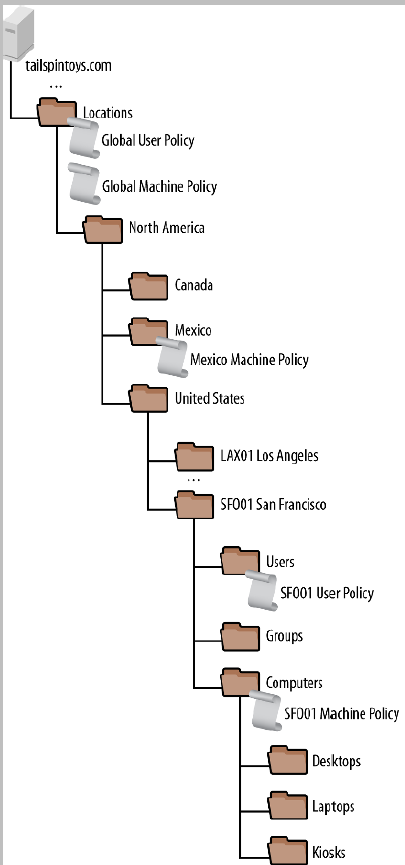
Tailspin Toys is a fictional medium-sized organisation: roughly 3,000 employees and 4,000 client computers spread across offices in the United States and Canada, with manufacturing operations in Mexico. Some staff work from home. The IT team is centralised at the San Francisco headquarters and manages the entire estate from there.
OU strategy
Because Tailspin manages everything centrally and doesn’t need to delegate management of subtrees to local IT, the OU layout is driven entirely by GPO targeting needs rather than by delegation needs. The chosen pattern is location-based at the top level with object-type splits below — OUs are organised by geographic site (city, country) and within each site by device type (desktops, laptops, kiosks, manufacturing equipment).
End-user computing
For office workers, Tailspin’s policy needs are minimal. A handful of organisation-wide settings cover the security baseline; occasionally a per-location GPO maps a network drive or installs a specific printer. The design intentionally stays simple:
- Policies are linked at the highest practical OU level so they inherit down to every relevant child OU automatically
- User-side and computer-side policies are split into separate GPOs (the user/computer half-disable trick trims processing)
- Global policies cover everyone; per-location overrides are added only where they’re actually needed
- GPO names are prefixed with the location they target so the link order in GPMC is self-documenting — for example,
CAN-Toronto-Desktop-Policy
The whole pattern leans heavily on GPO inheritance to keep the library small, the link count low, and management overhead minimal.
Manufacturing — the same company, a very different design
The manufacturing side of the house operates under different rules. Production-line computers are tightly controlled because unauthorised changes can stop the line, and the policy requirements vary not just per site but per machine role — a computer that controls a robotic arm needs different settings than one that runs a barcode scanner station next to it.
The pattern Tailspin uses for manufacturing:
- A global manufacturing computer policy is linked to the Manufacturing OU and sets the baseline for every production machine
- That global policy enables loopback processing in replace mode, so the computer’s policies always win regardless of which user logs in — an operator’s personal preferences never bleed into a production console
- Sites with a single uniform standard get a site-specific policy — e.g.
Manufacturing-CHI01for the Chicago site - Complex sites with multiple machine roles —
SFO01being the example — get multiple GPOs at the site OU, each security-filtered to apply only to the specific computer accounts that need them.Manufacturing-SFO01-ScannerPolicyapplies only to scanner stations, not to robotic-arm controllers in the same site. - Every manufacturing GPO name starts with “Manufacturing” and the site code, making the policy library easy to navigate
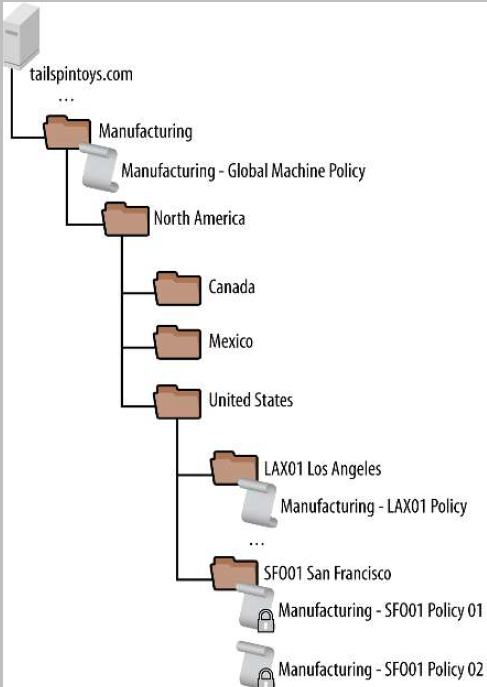
The two halves of the same organisation use the same toolset (GPMC + GPOs) in opposite directions: light-touch inheritance for office users where uniformity is fine, and tightly-filtered explicit policies for manufacturing where every machine role gets its own configuration. Both designs follow the twelve guidelines — they just weight the trade-offs differently.
Contoso College — 30,000 students, decentralised IT
Contoso College is a fictional educational institution: 3,500 staff, 30,000 students, and 5,000 computers all on a single campus. The structural twist is that IT is decentralised — each academic department runs its own IT operations and manages its own computers and accounts independently of the central IT team.
AD and OU layout
Central IT runs a single Active Directory forest to provide common identity, automated account provisioning, and the underlying directory service. Within that forest, each department gets its own OU subtree where the department’s admins have delegated control — they can create users, manage computers, and link their own GPOs without needing central IT involvement. Central IT keeps responsibility for the forest itself, identity management, and the few campus-wide policies that everyone must follow.
Balancing central and departmental control
The design has to satisfy two competing demands:
- Central IT needs to enforce campus-wide policies for security, compliance, and the academic-network protection requirements imposed by external regulators
- Departments want autonomy to configure their own labs, classrooms, and staff offices without central IT bottlenecking every change
The split that works:
- Central IT publishes a small number of global GPOs covering security baseline, audit policy, and compliance requirements. These GPOs are linked at the domain level with the Enforced flag, so departmental Block Inheritance can’t override them. Use of Enforced is one of the legitimate cases for it — the policies it protects are non-negotiable.
- Each department’s admin is added to the Group Policy Creator Owners group, giving them rights to author new GPOs in the domain.
- The directory ACLs are configured so each departmental admin can only link GPOs into their own OU subtree, not into another department’s subtree or the domain root. This prevents accidental (or deliberate) cross-departmental policy interference.
The shared-computer problem
All 30,000+ users live in a single “People” OU under central IT’s control. That works for identity but makes per-department user-configuration tricky — a Computer Science student logging into a lab in the Engineering building is the same user object regardless of which department’s computer they sit at, so user-OU-linked GPOs can’t differentiate.
The fix is loopback processing. Departmental computer OUs apply user-configuration settings via loopback, so the lab in Engineering applies Engineering’s user policies to whoever logs in, the lab in Science applies Science’s policies, and the People OU’s minimal user-config baseline carries over otherwise.
Pattern summary
Contoso’s design is a textbook example of central governance plus departmental autonomy. Central IT enforces what must be enforced and stays out of the way otherwise; departments own their slice and apply their own preferences. The combination of Enforced GPOs at the top, scoped GPO-link delegation at the bottom, and loopback for the shared-computer scenario covers all three requirements without any of them stepping on the others.
Fabrikam — 250,000 employees, global with regional autonomy
Fabrikam is a fictional very-large enterprise: more than 250,000 employees and computers across 100+ locations worldwide. Headquarters is in Chicago; four regional hubs (Asia-Pacific, North America, South America, Europe) coordinate the global operation. Branch offices connect to their hub over WAN links ranging from 64 kbps for the smallest sites to T1 for the larger ones; the hubs themselves connect to Chicago and to each other over substantially faster links.
Management model
Fabrikam runs a regional management model where each major region operates with substantial local autonomy under the global structure. Although Chicago is geographically part of North America, organisationally it sits above the regional hierarchy — Chicago IT makes the strategic decisions about how the global network is structured, what policies are enforced, and how branch sites are supported.
Branch support follows a size threshold:
- Branches with 500+ employees have their own local IT staff — a local administrator, a local backup setup, and a local helpdesk
- Branches under that threshold are managed remotely from the hub they’re connected to
Group Policy goals
Fabrikam’s GPO needs are driven by two distinct concerns:
- Security audit and compliance — every computer in the organisation must meet the same security baseline; this drives the global GPOs
- Site-level customisation — local sites occasionally need to adjust the desktop or user experience for legitimate reasons (a regulatory difference, a language or locale requirement, a specialised application)
Beyond mandatory security requirements, Fabrikam deliberately doesn’t try to micromanage the user experience. Wallpapers, Start menu layouts, and most personalisation are left at Windows defaults unless there’s a specific business reason to override them.
How GPOs get created and managed
The global pattern that keeps the policy library coherent at this scale:
- Global GPOs and country-level GPOs are created and owned by central IT in Chicago. These cover security and compliance and are non-negotiable.
- Local sites that need a custom GPO can’t just create one. They have to submit a request to central IT that includes:
- A short description of what the policy does
- A documented business justification for needing it
- The security group that will be allowed to edit the policy after creation
- Approved requests are created and linked by Chicago AD admins, with editing rights delegated to the requested security group
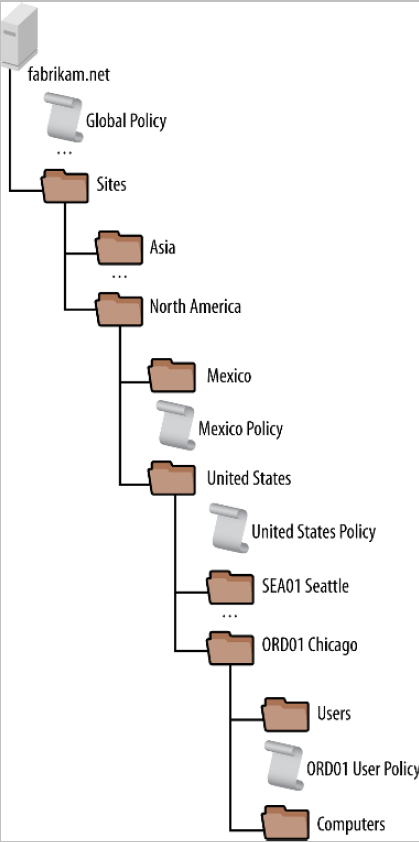
The deliberate friction in the request process is the point — at 250,000 endpoints, anything that lets local sites freely add GPOs ends up with a policy library that no-one understands and that takes minutes to process at logon. The justification requirement keeps the library small and traceable; the delegation pattern lets local teams own and update their approved policies without bottlenecking on Chicago for every change.
Pattern summary
Fabrikam’s design is centralised authority with delegated execution — the opposite of Contoso’s decentralised authority with central baselines. Both work for the organisations they fit. Tailspin’s mostly-centralised, location-keyed approach works for the size and consistency of operations Tailspin runs. None of the three is “the right answer” in absolute terms; each is the right answer for the org structure it serves.
Putting the design pass into practice
Two operational notes that don’t fit cleanly into any single guideline but matter once you start designing:
- Document the “why”, not just the “what”. Every non-obvious GPO should have a description (the GPO Properties dialog has a Comment field that nobody uses) explaining why this policy exists, what it depends on, and what would break if you disabled it. Future-you and your replacement will thank you.
- Naming convention is part of the design. A policy library named
Default Domain Policy,New Group Policy Object,New Group Policy Object (2),asdf, andtest123is unmaintainable regardless of how good the underlying settings are. Pick a convention —{scope}-{purpose}-{audience}works well, e.g.Domain-AccountLockout-AllUsersorOU-FinanceApp-AccountingTeam— and apply it to every GPO from day one.
And if you take only one thing from this article: design for the next admin. The GPO library you build today will outlast most of the people who built it. Consistency, naming, documentation, and structural simplicity all compound over time — small early investments save hours of future debugging when something stops working at 4pm on a Friday.
Where this fits
This article covers the planning and design layer. The mechanics layer — how GPOs actually process, how scope and inheritance work, what gets cached where — lives in the InfoTech Ninja comprehensive Group Policy Objects guide, which is the foundational reference for everything in this article.
Specific GPO patterns referenced above are covered in dedicated walkthroughs: backup and restore GPOs for the operational hygiene piece, block built-in apps with AppLocker GPO for the application-control example, map a network drive by group with GPO for the per-team drive-map pattern Tailspin uses, configure advanced audit policies in Active Directory for the audit baseline that almost every Group Policy library starts with, and configure account lockout policy for the canonical domain-wide GPO example.
For the broader Active Directory side — OU design, delegation patterns, site topology — see configuring AD Sites and Services, the Active Directory pathway, and the dedicated Group Policy pathway.