
Active Directory Domain Services has both physical components (domain controllers, sites, replication links) and logical components (the schema, OUs, forests, domains, and the partitions inside the AD database). The logical side is what shapes how identity actually works: which objects exist, which DCs replicate which data, where to look for a setting, and why a single DC carries different copies of different data depending on which domain and which forest it serves. This is the conceptual reference for that side — the five core logical components and the four directory partitions that hold the actual data.
Pair this with the practical articles on the forest and domain functional level theory, the raise-functional-level walkthrough, and the AD DS installation guides for the hands-on side.
1. The Schema
The schema defines the types of objects that can exist in Active Directory and the attributes each type can carry. Two kinds of schema objects:
classSchemaobjects — one per object class. user, computer, group, organizationalUnit, contact, etc. Each defines what attributes are mandatory and what attributes are optional on objects of that class.attributeSchemaobjects — one per attribute. sAMAccountName, mail, telephoneNumber, thumbnailPhoto, etc. Each defines the attribute’s name, its data type, whether it is multi-valued, whether it is indexed, and which classes can use it.
The schema is extensible: applications that add new functionality (Exchange, SCCM, Skype for Business, certificate services) extend the schema with their own classes and attributes. Those extensions are permanent — once added, the schema cannot be reverted to the unextended state without an authoritative restore from before the extension. This is why Schema Admins is one of the most-protected groups in AD: a bad schema extension can affect every object in the forest forever.
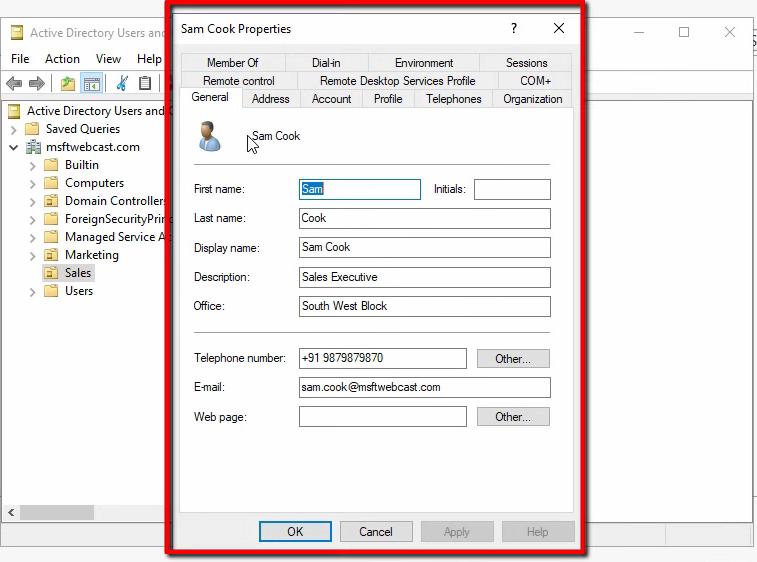
Every domain controller in the forest holds a copy of the schema. The Schema Master FSMO role lives on one DC at a time and is the only DC where schema modifications are allowed; all other DCs receive the changes via replication.
2. Organizational Units (OUs)
An OU is a container inside a domain that holds users, groups, computers, and other OUs. Two reasons OUs exist:
- Delegated administration. Grant a security group rights at the OU level and members can manage objects inside that OU without being Domain Admins. The Sales team admin can reset Sales user passwords; the Marketing team admin cannot.
- Group Policy targeting. Link a GPO to an OU and the policy applies to every object in that OU and every child OU underneath it. The whole GPO infrastructure is built around the OU as the unit of scope.
Active Directory ships with one OU created automatically: Domain Controllers. Every other OU is something you create. Modern AD designs use OUs heavily — one per business unit, one per geographical site, one per security tier — because OUs are the natural unit for delegation and policy.
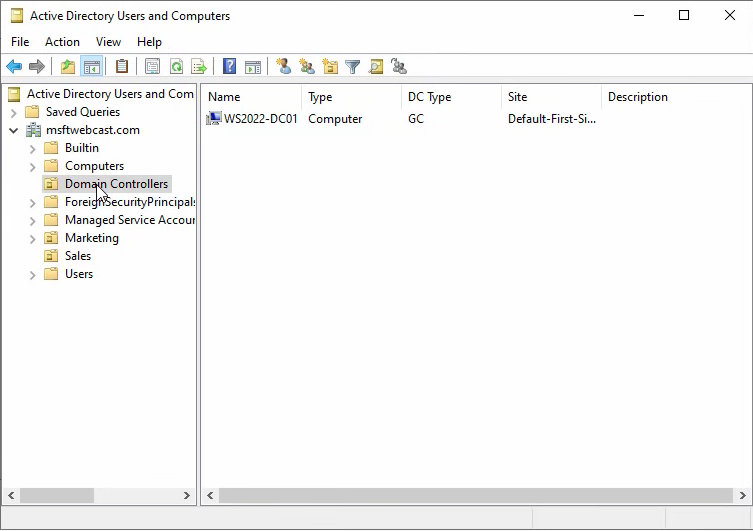
OUs are not the same as the built-in containers: Builtin, Computers, Managed Service Accounts, Users. Containers look similar in ADUC but are a different object class (container, not organizationalUnit). The critical practical difference: you cannot link a GPO to a container. New domain-joined machines land in Computers by default; new users go in Users. To apply Group Policy to them, redirect those defaults to a real OU first — redirusr and redircmp are the supported tools for that.
3. Forest
A forest is the outermost AD security and trust boundary. It is a collection of one or more domains that:
- Share a common schema.
- Share a common Global Catalog.
- Are bound by automatically created two-way transitive trusts — any domain in the forest implicitly trusts any other domain in the forest.
Most organizations run a single forest. Reasons to run more than one are narrow: complete administrative separation between parts of an organization (e.g. an acquired subsidiary that must remain administratively independent), incompatible schema requirements (one forest needs an Exchange-extended schema, another does not), or regulatory isolation. Multiple forests can be linked with explicit forest trusts, but the management overhead doubles compared to a single forest.
4. Domain
A domain is a logical administrative unit inside a forest. One domain database, one set of accounts, one Kerberos realm. The forest contains one or more domains; each domain has one or more domain controllers serving it.
A domain tree is a set of domains that share a common root domain and a contiguous DNS namespace. Example: fortesting.local, sales.fortesting.local, and marketing.fortesting.local form one tree because they share the fortesting.local root and a contiguous namespace. infotechninja.com would be a separate tree in the same forest — same schema, same trusts, different namespace root.
Reasons to use multiple domains in a single forest:
- Different password / account policies (these are domain-scoped at default; fine-grained password policies relax that).
- Replication boundaries (very large directories may benefit from per-domain replication scope — though sites are usually the better answer for replication tuning).
- Acquisitions where the acquired company keeps its own domain inside your forest.
Reasons not to: every additional domain doubles the operational complexity, and most environments are better served by one domain plus OUs.
5. The AD DS Database and Its Partitions
The AD DS database is the actual file (ntds.dit) on each DC that stores every user, computer, group, OU, GPO, and configuration object. Inside that single file the directory is split into partitions — also called naming contexts. A partition is a contiguous portion of the directory that has its own replication scope and schedule.
Every AD forest has at least four partitions:
- Schema Partition
- Configuration Partition
- Domain Partition (one per domain)
- Application Partition (one or more, depending on what is installed)
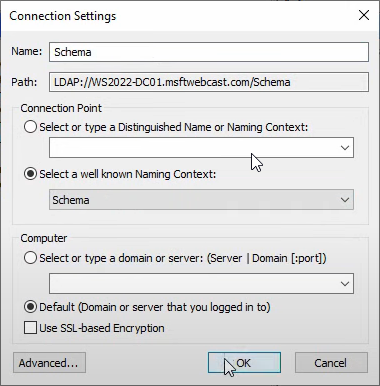
To inspect them, open ADSI Edit. From Server Manager › Tools, pick ADSI Edit, right-click ADSI Edit → Connect to…, and pick a well-known naming context:
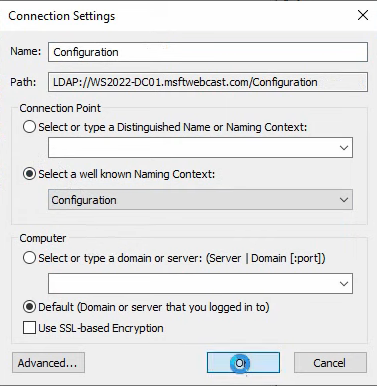
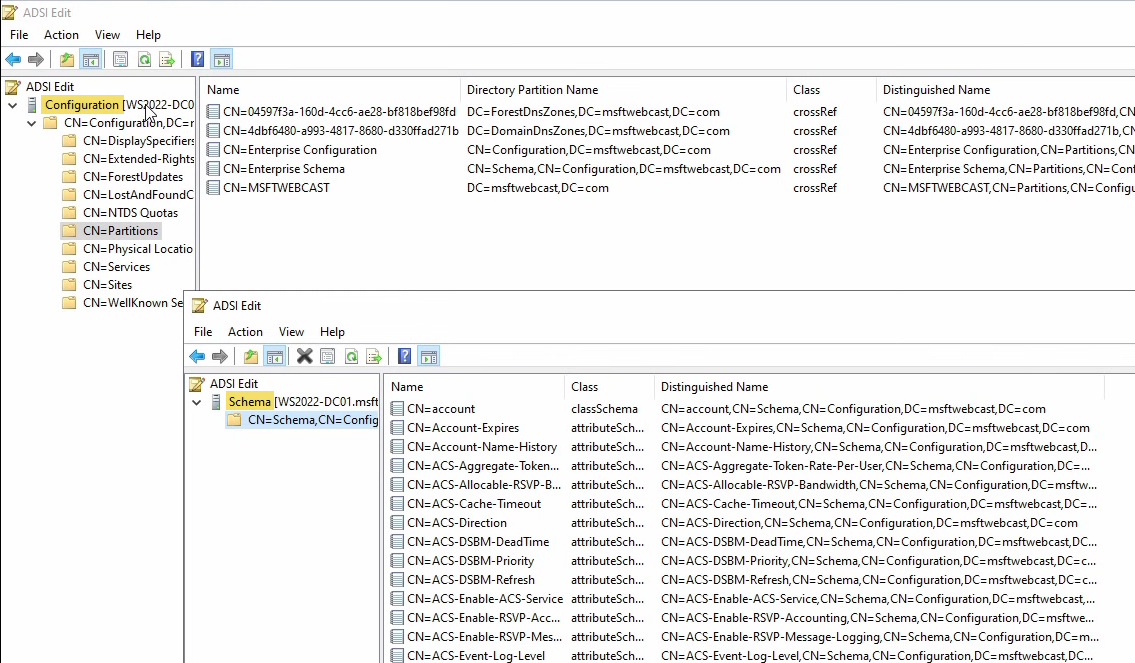
The first connection (Configuration) lands you on CN=Configuration,DC=<forest-root>. Drill into CN=Partitions for the directory’s self-description of what partitions exist:
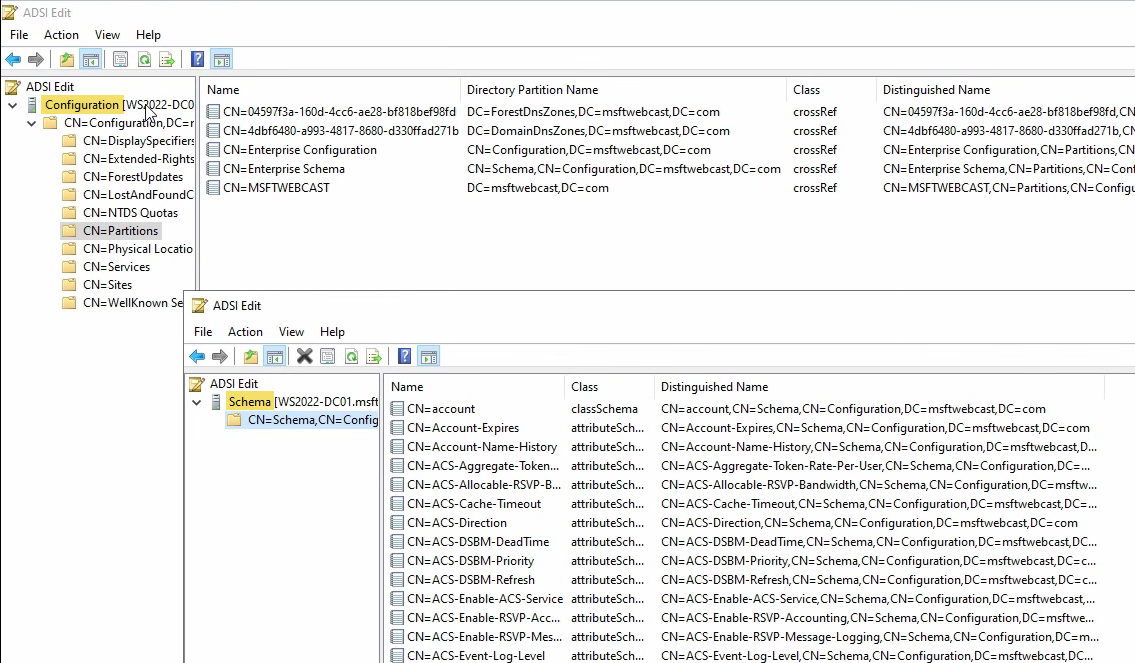
Schema Partition
The Schema partition (CN=Schema,CN=Configuration,DC=<forest-root>) holds the classSchema and attributeSchema objects discussed earlier. Open a second ADSI Edit and connect to the Schema naming context:
Every classSchema object visible here is a class an AD object can be. Every attributeSchema object is an attribute that classes can use. Forest-wide replication scope — every DC in every domain has an identical copy. Sometimes called the Enterprise Schema partition for that reason.
Configuration Partition
The Configuration partition (CN=Configuration,DC=<forest-root>) holds the directory’s description of itself: replication topology, sites and subnets, services, the partition list, and where the DCs live. Forest-wide replication scope — every DC in the forest has an identical copy. This is why a DC in a child domain knows about every other DC in the forest: they all replicate from the same Configuration partition.
Domain Partition
Each domain has its own Domain partition (DC=<domain>,DC=<tld>) that holds the actual user, computer, group, and OU objects. Connect to the Default naming context to see it:
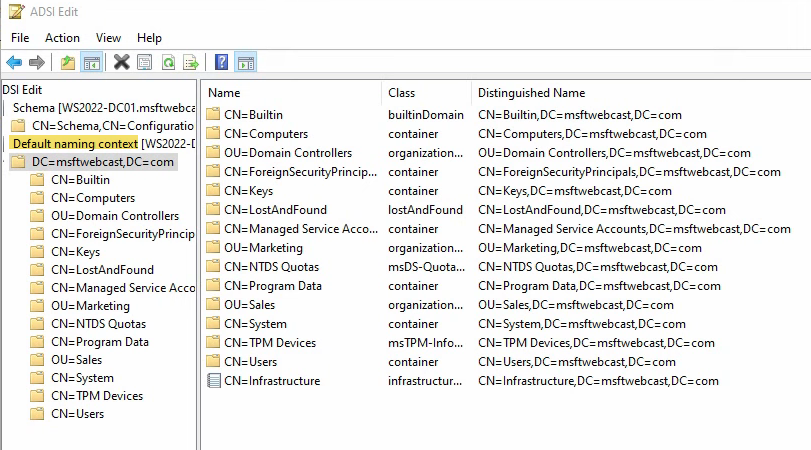
This is what ADUC shows you, but raw. Every container, every OU, every user object — with their distinguished names, classes, and full attribute sets visible. Domain-only replication scope — only DCs in the same domain hold a full copy of the Domain partition. DCs in other domains in the same forest do not. (Global Catalog servers hold a read-only subset of every other domain’s partition — just enough attributes to support cross-domain searches and login.)
Application Partition
Application partitions (introduced with Windows Server 2003) hold data for specific services that need partitioned replication. The two you encounter on every modern AD-integrated DNS deployment:
- DomainDnsZones —
DC=DomainDnsZones,DC=<domain>,DC=<tld>. Stores AD-integrated DNS zones with domain-wide replication scope. Every DC in the local domain holds a copy. - ForestDnsZones —
DC=ForestDnsZones,DC=<forest-root>,DC=<tld>. Stores AD-integrated DNS zones with forest-wide replication scope. Every DC in every domain in the forest holds a copy.
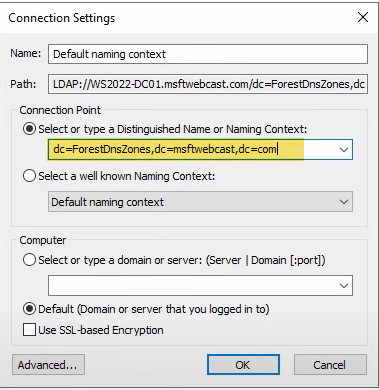
To inspect them in ADSI Edit, switch the Connection Settings to Select or type a Distinguished Name and type the DN explicitly:
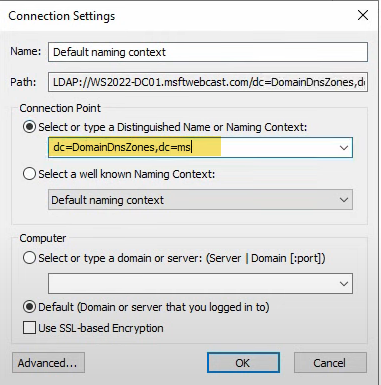
DC=DomainDnsZones,DC=<domain>,DC=<tld>. Application partitions are not in the well-known list because their names depend on the domain they live in.Inside DomainDnsZones, the actual DNS records appear as AD objects:
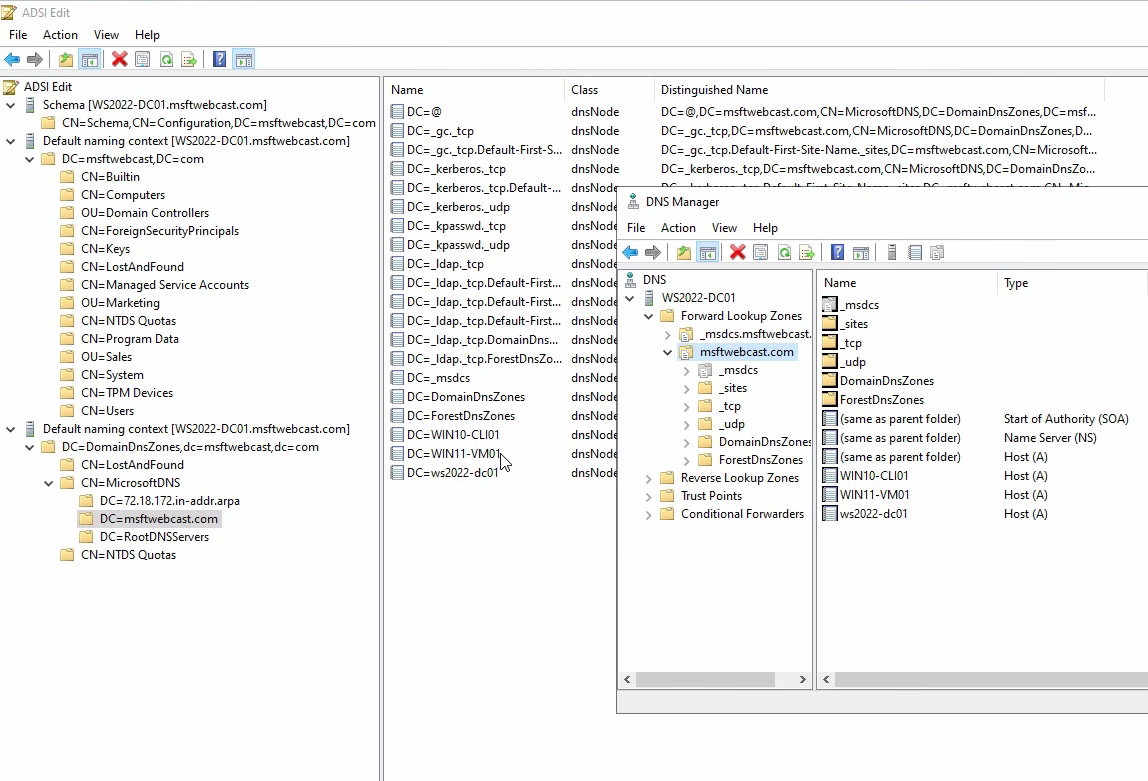
Compare with DNS Manager → Forward Lookup Zones › <zone>: the same A records (WIN10, WIN11, WS2022) are visible in both views. The DNS Manager UI is a friendly wrapper around the same data ADSI Edit shows raw.
The ForestDnsZones partition holds zones with forest-wide replication, including the critical _msdcs.<forest-root> SRV-record zone:
DC=ForestDnsZones,DC=<forest-root>,DC=<tld> is the second AD-integrated DNS application partition. Forest-wide replication scope — every DC in every domain in the forest carries a copy.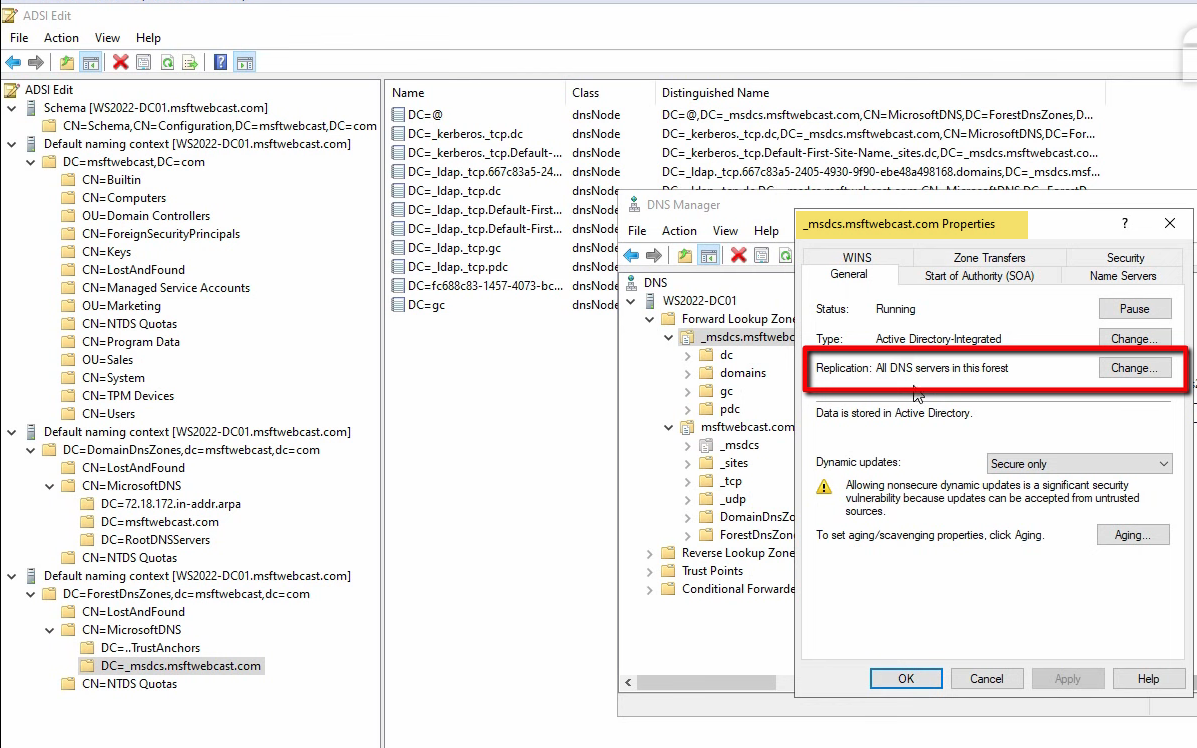
_msdcs.<forest-root> — the SRV-record zone every domain client uses for DC discovery. Forest-wide replication is essential here; child-domain clients rely on this zone to find any DC.The user-facing knob that decides which Application partition stores a zone is the zone’s Replication setting in DNS Manager properties:
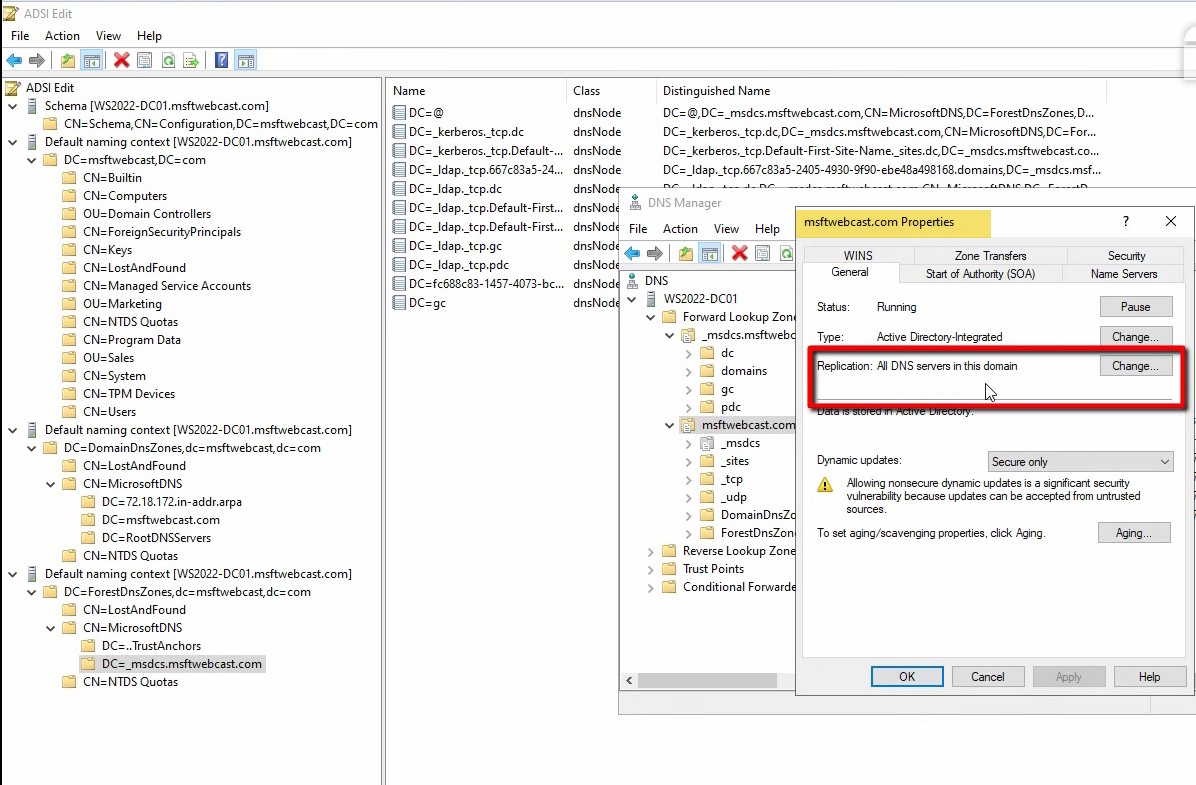
To all DNS servers running on domain controllers in this forest → ForestDnsZones; To all DNS servers running on domain controllers in this domain → DomainDnsZones; To all domain controllers in this domain (for Windows 2000 compatibility) → the legacy domain partition (no longer recommended). The replication scope you pick at zone-creation time determines which partition stores the zone.
The Replication Reach Matrix
Each DC carries different partitions depending on which forest and which domain it serves:
| Partition | Replication scope | Held by |
|---|---|---|
| Schema | Forest-wide | Every DC in the forest |
| Configuration | Forest-wide | Every DC in the forest |
| Domain | Domain-only | Every DC in the same domain (full copy); other domains’ GCs (read-only subset) |
| DomainDnsZones | Domain-only | Every DC in the same domain that runs DNS |
| ForestDnsZones | Forest-wide | Every DC in the forest that runs DNS |
The Global Catalog adds a sixth view: a read-only, partial-attribute copy of every Domain partition in the forest, used for cross-domain searches (UPN-to-account lookups, universal group membership, and the Outlook GAL). Any DC can be configured as a GC; in modern designs every DC is a GC by default.
The Global Catalog Partition (Briefly)
Some references call out a sixth “Global Catalog partition,” but it is not a separate partition in the same sense as Schema or Configuration. It is the GC’s read-only partial-attribute copy of every other domain’s Domain partition. It is created and replicated automatically when a DC is configured as a GC; you do not see it in CN=Partitions.
Common Pitfalls
- Trying to link GPOs to built-in containers. Computers and Users are containers, not OUs. Use
redircmpandredirusrto redirect new objects to real OUs you can target. - Extending the schema casually. Schema extensions are permanent. Application schema extensions (Exchange, SCCM) are well-tested; ad-hoc extensions are not. Restrict Schema Admins membership and require change-management for any extension.
- Putting AD-integrated DNS zones in the wrong partition. A zone in DomainDnsZones only replicates inside its own domain. Forest-wide zones (especially
_msdcs.<forest-root>) must be in ForestDnsZones, or child-domain DCs cannot resolve them. - Confusing forest with domain. The forest is the security boundary, not the domain. Cross-forest authentication needs explicit forest trusts; cross-domain inside the same forest is automatic. Production AD design treats the forest line as the hard boundary.
- Making more domains than you need. Multiple domains add operational overhead. Most environments are better served by one domain with OUs and fine-grained password policies for differentiation.
Conclusion
The five logical components — schema, OUs, forest, domain, AD DS database — plus the four partitions inside the database (Schema, Configuration, Domain, Application) are the entire conceptual surface of Active Directory’s logical design. ADSI Edit is the supported tool for inspecting any of them; CN=Partitions in the Configuration partition is the directory’s self-description of what exists. Anchor this model in your mental shorthand and the next time someone asks “why does my child-domain DC know about other domains?” the answer is “forest-wide Configuration partition”; “why does the _msdcs zone exist on every DC?”, “ForestDnsZones application partition”; “why doesn’t my GPO apply to new users?”, “they landed in the Users container, which is not an OU.”