
Why Stale DNS Records Pile Up
Every time you decommission a Domain Controller, change a server’s name, or move a service to a new host, you leave a trail of DNS records pointing at the old name and IP. AD-integrated DNS does have a built-in cleanup mechanism — scavenging — but it only deletes records that were dynamically registered, and only after a refresh+no-refresh interval has elapsed (7+7 = 14 days by default). Records created statically, records re-registered by a still-running peer with a stale view, and records sitting in zones with scavenging disabled all stay forever.
Stale DNS is not a cosmetic problem. Domain-joined clients pick a Domain Controller from the SRV records under _msdcs; if some of those records point at a DC that does not exist any more, clients spend timeouts trying to reach it before falling back to a working one. Symptoms: occasional logon timeouts, slow Outlook autodiscover lookups, intermittent “cannot reach a Domain Controller” errors. The fix is to remove every record — A, NS, SRV, CNAME — that names or points at the dead host, across every zone the DNS server hosts.
This article covers the manual review (DNS Manager) and the script-it-once-and-you-are-done PowerShell pattern.
The Record Types You Need to Clean
For a single demoted DC, the records that need removing are:
- A (Host) — the DC’s forward DNS entry. Resolves
dc01.infotechninja.localto its IP. There may be multiple if the DC was multi-homed. - NS (Name Server) — the entry that says “this DC is authoritative for this zone”. One per zone the DC hosted.
- SRV (Service Location) — the most numerous.
_ldap,_kerberos,_kpasswd,_gcrecords under_msdcsand under each site name. A typical DC contributes 8–12 SRV records spread across half a dozen subtrees. - CNAME — rare, but some replication-related aliases under
_msdcsreference the DC’s GUID. - PTR — the reverse-zone record. Less critical (most things resolve forward) but worth removing for completeness.
Manual Review in DNS Manager
Before you script it, walk the records once in DNS Manager so you know what you are about to delete.
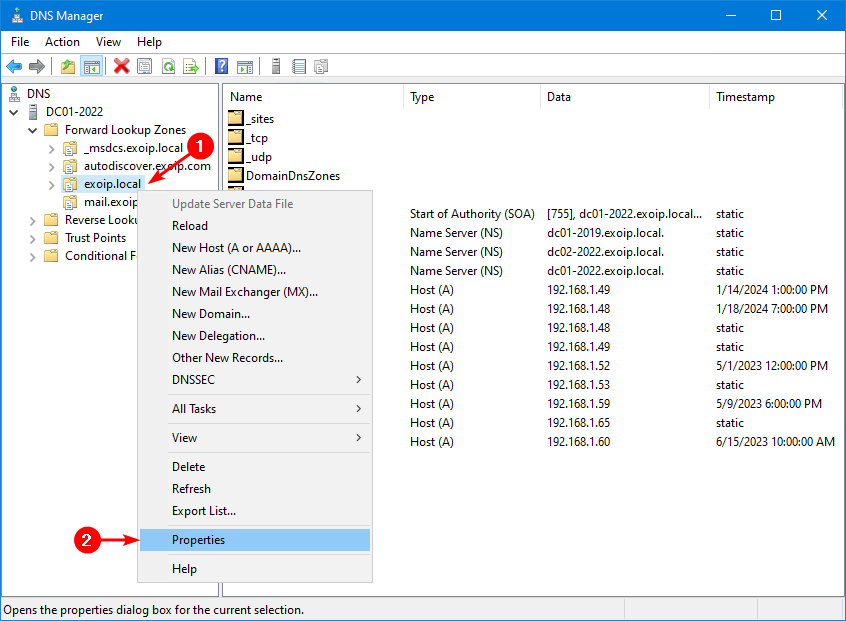
Open DNS Manager on a surviving DC (or any management box with DNS RSAT). Expand Forward Lookup Zones, right-click the zone (e.g. infotechninja.local), and choose Properties:
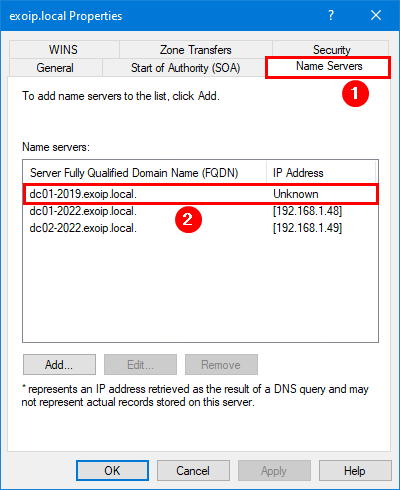
The Properties dialog opens. Click the Name Servers tab. The list shows every DC that has registered an NS record for this zone — if the demoted DC is still there, it shows up with an Unknown IP because the corresponding A record cannot resolve any more:
Close the Properties dialog. Expand the zone in the tree to see the rest of the records.
Inside DomainDnsZones (the AD-integrated container under the zone), the Host (A) records resolve the zone’s apex (@) to each DC’s IP. A demoted DC’s old IP shows up here:
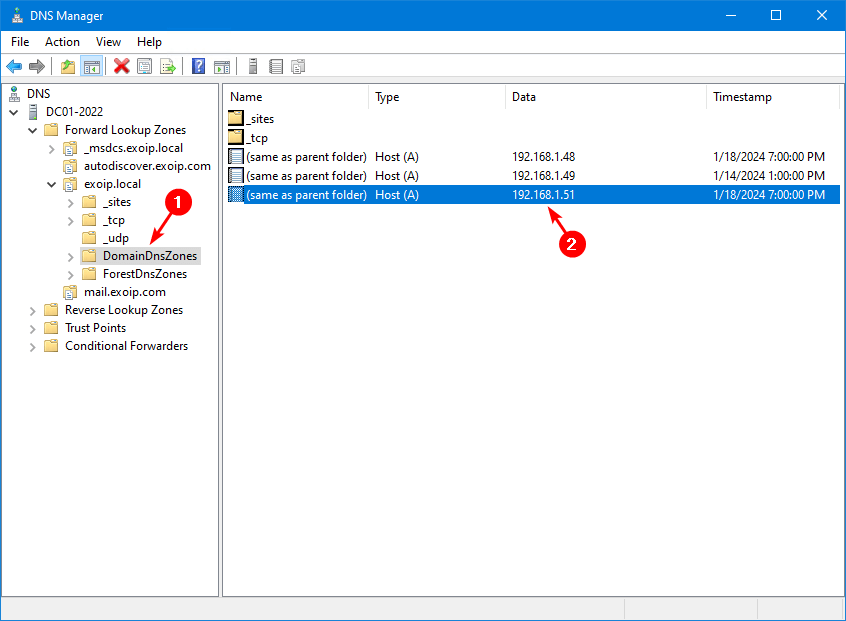
@ to each DC. The stale row points at the demoted DC’s old IP.Drill into _msdcs.infotechninja.local > dc > _sites > your site name > _tcp to find the SRV records. Each SRV row’s Data column ends with the FQDN of the DC that registered it. The demoted DC contributes one SRV per service:
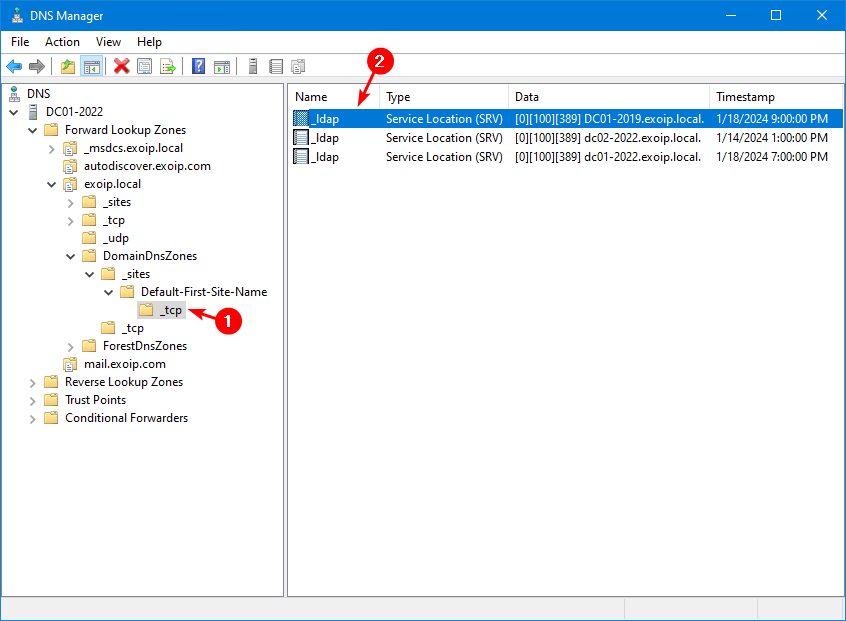
_tcp for the site — _ldap, _kerberos, _kpasswd, _gc all live here. Each demoted DC contributes a row that the script removes in one pass.Multiply that across every Active Directory zone, every site, the _msdcs tree, the reverse zones, and any non-AD zones the DNS server hosts — cleaning this up by hand for one DC takes 15–30 minutes of careful clicking. For three or four demoted DCs it is an afternoon. Hence the script.
The PowerShell Script
The script walks every Primary forward zone on the local DNS server, finds every record whose name or data points at the dead host (by hostname, by FQDN, or by IP), and removes them. Save as C:\scripts\Remove-DNSRecords.ps1:
# Remove-DNSRecords.ps1
# Remove every DNS record that names or points at a single (demoted) host
# from every Primary forward zone on the local DNS server.

[CmdletBinding(SupportsShouldProcess)]
Param(
    [Parameter(Mandatory)] [string] $ServerFQDN,        # e.g. dc01-2019.infotechninja.local.
    [Parameter(Mandatory)] [string] $ServerHostname,    # e.g. dc01-2019
    [Parameter(Mandatory)] [string] $IPAddress          # e.g. 192.168.1.51
)

$zones = Get-DnsServerZone | Where-Object {
    $_.ZoneType -eq 'Primary' -and -not $_.IsAutoCreated
}

foreach ($zone in $zones) {
    Write-Host "`n=== $($zone.ZoneName) ===" -ForegroundColor Cyan

    Get-DnsServerResourceRecord -ZoneName $zone.ZoneName | Where-Object {
        ($_.RecordType -eq 'A'     -and $_.HostName -eq $ServerHostname) -or
        ($_.RecordType -eq 'A'     -and $_.RecordData.IPv4Address.IPAddressToString -eq $IPAddress) -or
        ($_.RecordType -eq 'NS'    -and $_.RecordData.NameServer    -eq $ServerFQDN) -or
        ($_.RecordType -eq 'SRV'   -and $_.RecordData.DomainName    -eq $ServerFQDN) -or
        ($_.RecordType -eq 'CNAME' -and $_.RecordData.HostNameAlias -eq $ServerFQDN) -or
        ($_.RecordType -eq 'PTR'   -and $_.RecordData.PtrDomainName -eq $ServerFQDN)
    } | ForEach-Object {
        Remove-DnsServerResourceRecord `
            -ZoneName   $zone.ZoneName `
            -RRType     $_.RecordType `
            -Name       $_.HostName `
            -RecordData $_.RecordData `
            -Force `
            -WhatIf:$WhatIfPreference
    }
}
Use:
# 1. Dry-run first - see what would be removed without changing anything
.\Remove-DNSRecords.ps1 `
    -ServerFQDN     "dc01-2019.infotechninja.local." `
    -ServerHostname "dc01-2019" `
    -IPAddress      "192.168.1.51" `
    -WhatIf

# 2. Actually delete - run again without -WhatIf
.\Remove-DNSRecords.ps1 `
    -ServerFQDN     "dc01-2019.infotechninja.local." `
    -ServerHostname "dc01-2019" `
    -IPAddress      "192.168.1.51"
Notes on the parameters:
- The trailing dot on
ServerFQDNmatters. DNS Manager stores SRV / NS data with the trailing dot (FQDN root anchor). Without it, the equality match in the Where-Object will silently miss every record. ServerHostnameis the bare label (no domain) — that is the format theHostNamecolumn on Host (A) records uses.IPAddresscatches PTR records and any A records the script did not catch by hostname. Belt and suspenders.
Sample Output
Dry-run output on a forest with the typical zone layout:
=== _msdcs.infotechninja.local ===
What if: Performing the operation "Remove" on target "DnsServerResourceRecord (..._tcp)
   [0][100][389] dc01-2019.infotechninja.local.".

=== infotechninja.local ===
What if: Performing the operation "Remove" on target "DnsServerResourceRecord (NS @
   dc01-2019.infotechninja.local.)".
What if: Performing the operation "Remove" on target "DnsServerResourceRecord
   (A @ 192.168.1.51)".

=== DomainDnsZones.infotechninja.local ===
What if: Performing the operation "Remove" on target "DnsServerResourceRecord
   (A @ 192.168.1.51)".

=== ForestDnsZones.infotechninja.local ===
What if: Performing the operation "Remove" on target "DnsServerResourceRecord
   (A @ 192.168.1.51)".
Inspect the list. If the records named look correct (every one has the dead DC’s FQDN, hostname, or IP), re-run without -WhatIf. If the list contains a record you want to keep — for example a still-active DC happened to share an IP with the dead one because of a NAT translation — remove the IP-match rule from the Where-Object.
Verification
After the script runs, confirm cleanly:
# Confirm the FQDN no longer resolves on this DNS server
Resolve-DnsName "dc01-2019.infotechninja.local" -Server localhost
# Expect: NXDOMAIN / not found

# Confirm there are no remaining records anywhere
Get-DnsServerZone | Where-Object ZoneType -eq 'Primary' | ForEach-Object {
    Get-DnsServerResourceRecord -ZoneName $_.ZoneName | Where-Object {
        $_.RecordData -match "dc01-2019" -or
        $_.RecordData -match "192.168.1.51"
    }
} | Select-Object @{n='Zone';e={$_.PSParentPath -replace '.*::',''}}, HostName, RecordType, RecordData

# Run dcdiag on a surviving DC to confirm DNS health
dcdiag /test:dns
If dcdiag /test:dns reports passed on every check, the cleanup is complete. If anything still references the dead DC, the script may need a second pass with the matching tweaked — or the records may live in a non-Primary zone (Stub, Conditional Forwarder, Secondary) that the script intentionally skips.
Common Pitfalls
- Skipped
-WhatIfon the first run. A typo in$ServerFQDNcan match a still-active DC’s records. Always dry-run first; eyeball the output; then run live. - Forgot the trailing dot on the FQDN. SRV / NS data is always stored with the trailing dot. Without it the script silently matches zero records.
- The DC is in a non-Primary zone. Stub, Conditional Forwarder, and Secondary zones are read-only on this server — you can’t remove records from them. Check whether your reverse zones are Primary; if not, clean those records on the server that owns them.
- Reverse zone records left behind. The script handles PTR records inside Primary forward zones (rare). Real PTR cleanup happens in the x.x.x.in-addr.arpa reverse zones — run the script with the reverse zones in scope, or clean PTR records by IP manually.
- Scavenging would have done it eventually. True for dynamically-registered records, eventually being ≥ 14 days. For everything that was registered as a static entry or by a service that is no longer running, scavenging never runs — the script is the only thing that removes them.
- Ran the script on a downstream DNS server. If the records are AD-integrated, deleting them on one DC replicates to every DC. If your DNS server hosts a non-AD-integrated zone, deleting on one server only removes them locally; the master server still has them. Run on the zone’s master.
- Cached records on clients. After cleanup, clients still resolve the dead host until their local cache expires (default 24h for negative responses, less for positive). Force-clear with
ipconfig /flushdnson a sample client to confirm the DNS server returns NXDOMAIN.
Conclusion
One script, one set of three parameters (ServerFQDN, ServerHostname, IPAddress), and every record for a demoted host disappears across every Primary zone in one pass. Make this part of the demote-a-DC runbook so the cleanup happens in the same maintenance window as the demote — not three weeks later when someone notices a logon timeout.