
The series concludes with two related topics: the difference between intra-location and cross-location replication (very different schedules, very different protocols, very different failure modes), and how to take manual control of bridgehead-server selection so that cross-location traffic flows through the DCs you actually want it to flow through. The lab as left at the end of Part 3 is functional — all three DCs replicate, all five naming contexts converge — but the topology that the ISTG auto-picked is sub-optimal: cross-location inbound and outbound flows traverse different headquarters DCs. This post walks the diagnosis and the fix.
What you need before starting
- The full lab from Parts 1–4 — Surat-HO with two DCs (SRT22-DC01, SRT22-DC02), Delhi-BO with one DC (DEL22-DC03), and the router VM bridging the two subnets
- Replication confirmed working as of Part 3 —
repadmin /showreplon every DC reports successful replication for every partition - Domain Admin credentials for the bridgehead-server configuration step
dssite.mscopen from Server Manager → Tools → Active Directory Sites and Services on SRT22-DC01- Conceptual familiarity with the KCC and ISTG from Part 4 — the bridgehead picker is the ISTG; the connection objects are KCC-produced; this post is about constraining the ISTG’s bridgehead pick
Intra-location replication — the fast path
Intra-location replication runs between DCs that AD considers to be in the same location. It’s designed for fast convergence and assumes a high-bandwidth, low-latency network — what you typically have inside a single office or data centre.
How fast is “fast”
When a write lands on a DC, the DC waits 15 seconds before notifying its first replication partner. The 15 seconds isn’t arbitrary — it’s a debounce window so that a burst of changes (a script creating 50 users in a loop, for example) gets aggregated into one notification rather than 50. After notifying the first partner, the DC notifies subsequent partners at 3-second intervals, again to avoid storming all partners at once.
The partner that received the notification then opens an RPC connection back to the source DC and pulls the change. End-to-end intra-location convergence: usually under 30 seconds for a single change, well under a minute even for bursts.
Urgent replication — no waiting
A handful of changes bypass the 15-second debounce entirely and trigger immediate notification:
- Account lockouts — if a user gets locked out on one DC, every other DC needs to know NOW, not 30 seconds from now, or the user can keep failing to authenticate against the other DCs and accumulating more failed attempts before the lockout propagates.
- Account-lockout policy changes — same urgency reason.
- Password-policy changes — affects future authentication immediately.
- DC computer-account password changes — if a DC’s machine password rotates and partners don’t learn fast, they reject its authentication.
- Trust-relationship updates and LSA secret rotations — same security-immediate reason.
These are the only changes that bypass the debounce. Everything else — password resets for individual users, group membership changes, OU moves, attribute edits — takes the standard 15-second path.
Other intra-location characteristics
- Transport: RPC, uncompressed. Inside a location, the network is fast enough that compression isn’t worth the CPU cost on either end.
- Topology: ring. The KCC builds a topology where each DC has at least two upstream neighbours (an inbound “next” and an inbound “previous” in the ring) so that a single DC failure doesn’t partition the location.
- Configuration: automatic. No administrator action is needed to set up intra-location replication. Promote a DC into a location and the KCC adds it to the ring within 15 minutes.
Cross-location replication — the controlled path
Cross-location replication runs between DCs in different AD locations, over what AD assumes is a slower, more expensive link (a real WAN). The defaults reflect that assumption.
How fast is “not fast”
Default replication interval is 180 minutes (3 hours). The interval is set on the site link object, not per DC, so it applies uniformly to all cross-location relationships using that link. The minimum is 15 minutes (set in the site link properties); the maximum is 10080 minutes (a full week, useful only for satellite links).
Site links also have a schedule — a 24×7 grid of available windows. Default is “always available,” meaning the 180-minute interval can fire at any time. You can restrict it to specific windows (e.g., 22:00–06:00 only, leaving daytime WAN bandwidth for users) by editing the schedule grid in the site link’s properties.
The 180-minute default is a good baseline but is too slow for most modern environments. 60 minutes is a common production setting; 15 minutes is reasonable when the WAN can handle it and the business needs faster propagation. Set the interval based on the actual cost of the WAN traffic, not the default.
Other cross-location characteristics
- Transport: RPC, compressed. Cross-location replication compresses the payload to save WAN bandwidth, paid for by additional CPU on both the source and destination bridgehead servers. The compression ratio is good (typically 2:1 to 4:1 for directory data), so it’s worth the CPU on every link slower than gigabit.
- Topology: bridgehead-to-bridgehead. Instead of every DC in one location replicating with every DC in another location (which would multiply WAN connections), each location elects one bridgehead server, and only the bridgeheads talk across the link. The bridgeheads then re-replicate intra-location to their peers.
- Configuration: largely automatic, but the bridgehead pick is overridable. The ISTG (covered in Part 4) picks a bridgehead per location automatically. You can override the pick by manually flagging specific DCs as preferred bridgeheads, which is what we’re going to do.
The lab’s current sub-optimal topology
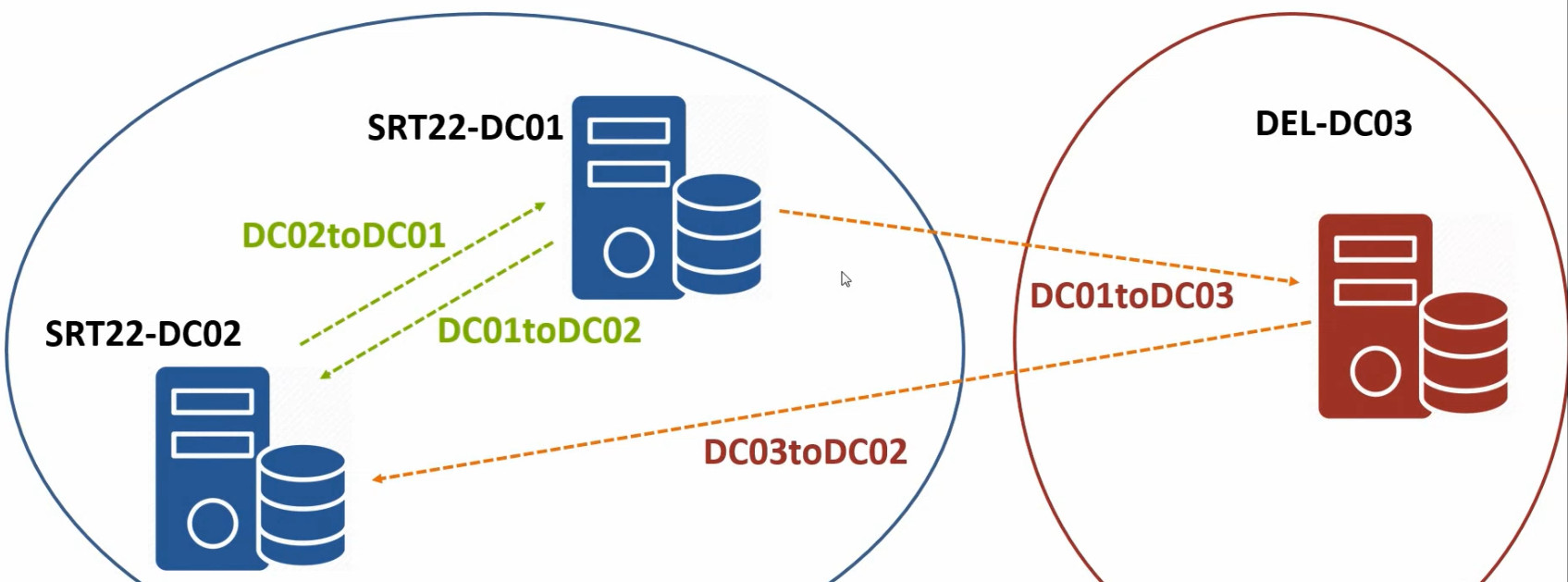
The lab works, but the cross-location topology is asymmetric: DEL22-DC03 sends updates to SRT22-DC02, and DEL22-DC03 receives updates from SRT22-DC01. Both Surat DCs are involved in cross-location replication when, ideally, only one of them should be (the dedicated Surat-HO bridgehead). The asymmetry isn’t broken — data still converges — but it splits the cross-location load across both Surat DCs in a way that makes the topology harder to reason about and unnecessarily exposes both DCs to WAN-link failures.
The fix: explicitly designate SRT22-DC01 as the Surat-HO bridgehead and DEL22-DC03 as the Delhi-BO bridgehead (DEL22-DC03 is the only DC in Delhi-BO, so it’s the bridgehead by default, but making it explicit is good practice for when a second Delhi DC arrives later).
Step 1 — Inspect the current topology
Before changing anything, confirm the current state.
- On SRT22-DC01, open
dssite.mscfrom Server Manager → Tools → Active Directory Sites and Services. - Expand Surat-HO > Servers > SRT22-DC01 > NTDS Settings. The right pane shows the inbound connection objects this DC has — one from SRT22-DC02 (intra-location) and likely none from Delhi (since the inbound-from-Delhi connection sits on SRT22-DC02 in this asymmetric layout, not on SRT22-DC01).
NTDS Settings on SRT22-DC01 expanded to show the connection objects the KCC built automatically.Force a topology refresh
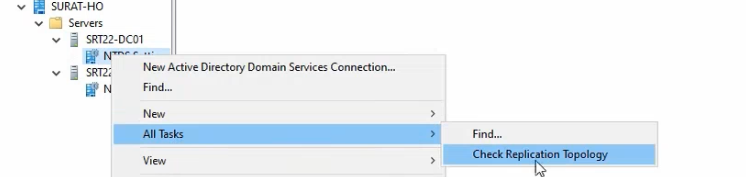
- Right-click the NTDS Settings node and pick All Tasks → Check Replication Topology. Click OK.
- Confirm the dialog reports the topology check completed successfully.
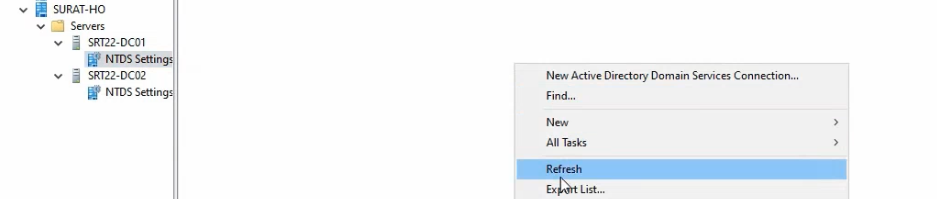
What this does: it asks the KCC to re-evaluate the topology immediately rather than waiting for the next 15-minute tick. Useful for getting a fresh view, but it doesn’t change anything until you actually modify the configuration.
Force a per-connection pull
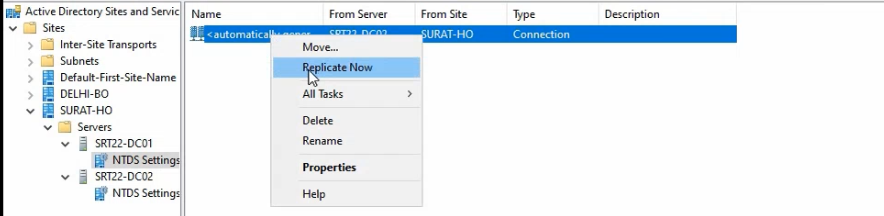
- Right-click the auto-generated connection object (the one from SRT22-DC02) and pick Replicate Now.
- Confirm the dialog reports “AD DS has replicated the connection.”
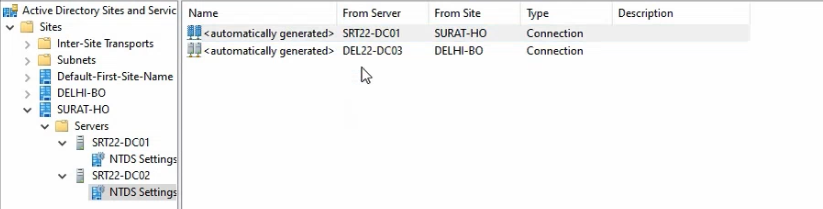

This pulls any pending changes from SRT22-DC02 immediately. Useful for verifying the connection is working without waiting for the standard 15-second debounce + scheduled pull.
Repeat the topology check + replicate-now on SRT22-DC02 and DEL22-DC03 to confirm everything is currently converged before making changes.
Step 2 — Designate the bridgehead servers
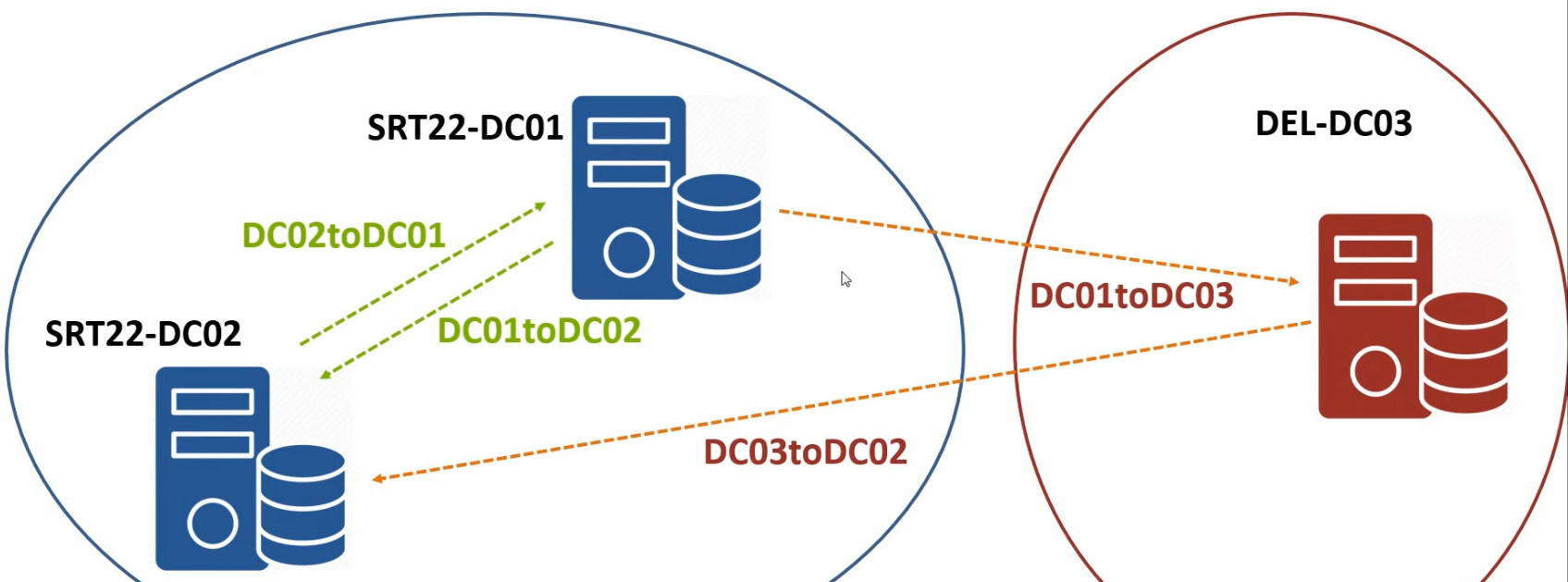
The fix is two changes — one on each side.
Configure SRT22-DC01 as the Surat-HO bridgehead
- In
dssite.msc, navigate to Surat-HO > Servers > SRT22-DC01. Right-click the server object (not NTDS Settings beneath it) and pick Properties. - The Properties dialog shows two transport types in the “Transports available for inter-site data transfer” list on the left: IP and SMTP. SMTP is rare in modern environments; IP is the right pick.
- Select IP and click Add to move it into “This server is a preferred bridgehead server for the following transports.”
- Click OK.
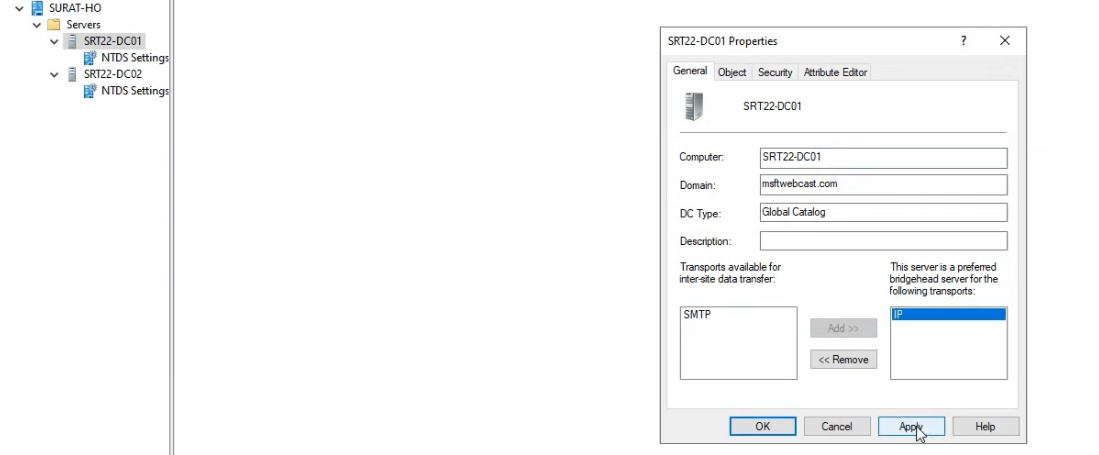
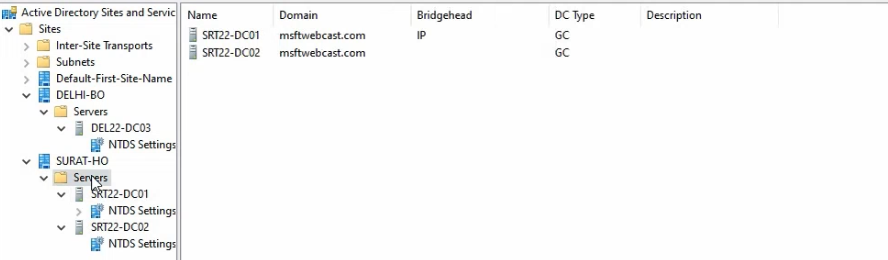
What this changes: the next time the ISTG runs (every 15 minutes by default, or forced with repadmin /kcc), its bridgehead-selection algorithm is constrained to the “preferred bridgeheads” list for IP transport in Surat-HO. Since SRT22-DC01 is the only entry, the ISTG MUST pick it. The cross-location connection from Delhi-BO will be re-pointed at SRT22-DC01 on both directions.
Configure DEL22-DC03 as the Delhi-BO bridgehead
Same flow, on DEL22-DC03 (or remotely from SRT22-DC01 if you have dssite.msc connected to the right location):
- Navigate to Delhi-BO > Servers > DEL22-DC03. Right-click the server object and pick Properties.
- Select IP from the available-transports list and click Add.
- Click OK.
For Delhi-BO this is mostly a declaration of intent — DEL22-DC03 is the only DC, so it’s the bridgehead by default. But making it explicit means that when you eventually add a second Delhi DC (you should, for HA), the ISTG won’t silently flip the bridgehead role to the new DC; it’ll stay on DEL22-DC03 unless you also flag the second one as preferred.
Step 3 — Force the topology rebuild
The ISTG runs every 15 minutes. To get the new bridgehead picks applied immediately rather than waiting:
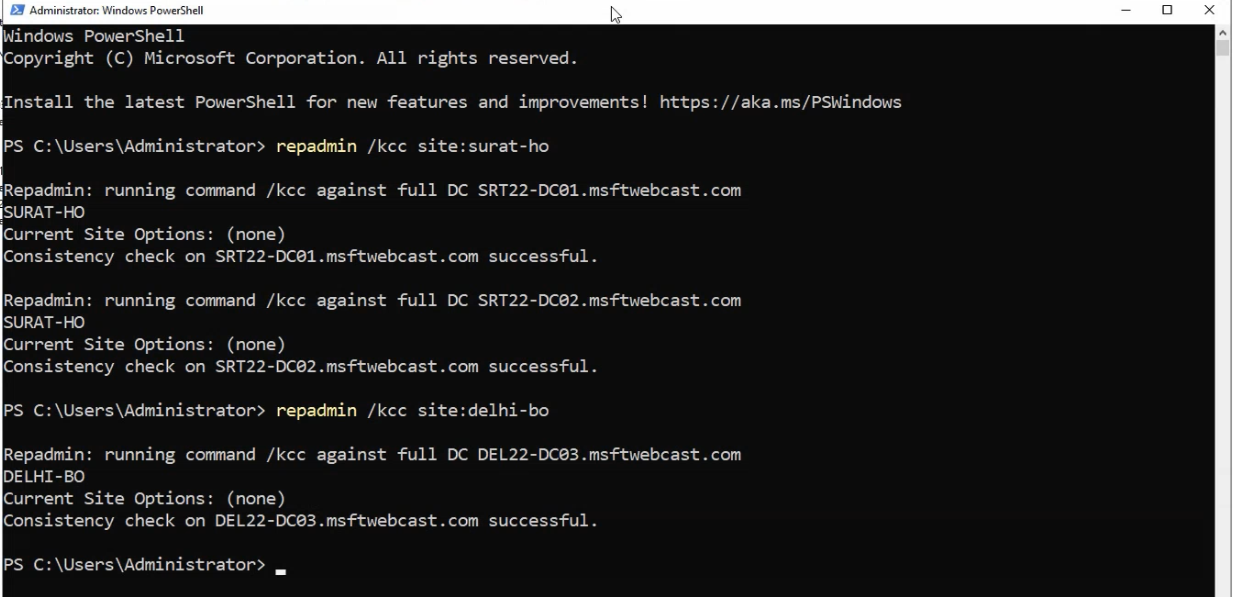
repadmin /kcc site:Surat-HORun from elevated PowerShell on any DC. repadmin /kcc forces a KCC + ISTG run; the site:Surat-HO qualifier scopes it to the named location. Repeat for Delhi-BO if needed:
repadmin /kcc site:Delhi-BOThe ISTG re-evaluates the topology, sees the new preferred-bridgehead constraints, and rebuilds connection objects. The cross-location connection that previously involved SRT22-DC02 is removed; a new connection from SRT22-DC01 to DEL22-DC03 (and back) is created.
Step 4 — Verify the new topology
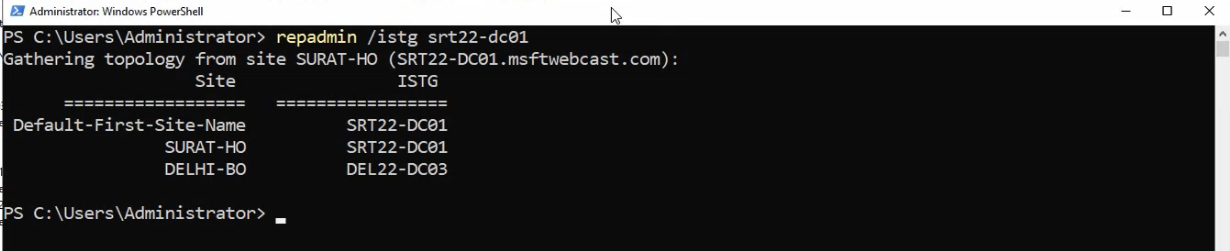
repadmin /istg SRT22-DC01 output — confirms SRT22-DC01 is the elected ISTG for Surat-HO and shows the new bridgehead-to-bridgehead inter-location connection objects the ISTG built after the Bridgehead-server toggle was set on both sides.Confirm the changes took effect.
Check the elected ISTG
repadmin /istg SRT22-DC01This reports which DC is the current ISTG for the location SRT22-DC01 belongs to (Surat-HO). Should report SRT22-DC01 itself in our case — it was promoted first into Surat-HO, so it’s the default ISTG. Same query against DEL22-DC03 should report DEL22-DC03 (only DC in Delhi-BO).
Verify connection objects
In dssite.msc, expand Surat-HO > Servers > SRT22-DC01 > NTDS Settings. The auto-generated cross-location connection from DEL22-DC03 should now sit here (rather than on SRT22-DC02). Same for the Delhi side — Delhi-BO > Servers > DEL22-DC03 > NTDS Settings should show an inbound connection from SRT22-DC01.
Run a full replication health check
repadmin /showreplon each DC — all five naming contexts replicating successfully via RPC, no errors. (See read repadmin /showrepl output for the section walkthrough.)dcdiag /test:replicationson each DC — PASS for every test.- Cross-location write test: create a test object on SRT22-DC01, query from DEL22-DC03 after a brief wait. Should appear within the cross-location replication interval (default 180 min, or sooner if you tune the site link in the next subsection).
Optional: tune the site-link interval
The default 180-minute cross-location interval is too slow for most environments. To tune it down to 60 minutes:
- In
dssite.msc, expand Inter-Site Transports > IP. - Right-click DEFAULTIPSITELINK and pick Properties.
- Change “Replicate every” from 180 to 60 (minimum 15, maximum 10080).
- Optionally set the “Cost” (default 100) to influence ISTG bridgehead selection in topologies with multiple inter-location paths. Lower cost = preferred path.
- Optionally edit the Schedule button to restrict replication to specific time windows (e.g., outside business hours).
- Click OK.
The change takes effect on the ISTG’s next run; force with repadmin /kcc if you don’t want to wait.
Things that bite people in production
Designating only one preferred bridgehead per location is a single point of failure
The whole point of preferred bridgeheads is to constrain the ISTG’s pick. If you list only one DC and that DC fails, the ISTG has no fallback within your preferred list and cross-location replication stalls. List at least two preferred bridgeheads per location with more than one DC; the ISTG will pick one and use the other as failover.
Tuning the interval below 15 minutes is unsupported
The site-link interval has a hard floor of 15 minutes. Setting a registry value to override it is technically possible but unsupported by Microsoft and rarely necessary — if your business needs sub-15-minute cross-location convergence, the right answer is usually to add another local DC at the destination location rather than trying to tune the WAN replication interval.
Schedule windows interact with intervals in non-obvious ways
The interval and the schedule are independent. A 60-minute interval with a 22:00–06:00 schedule means “replicate every 60 minutes within the 22:00–06:00 window only” — which gives you 8 replication cycles per night, not 24. If you want both faster intervals AND restricted windows, plan accordingly.
The ISTG runs on a 15-minute timer regardless of repadmin /kcc
Manual repadmin /kcc runs are additive, not exclusive — they don’t reset the 15-minute timer. The next scheduled ISTG run still happens 15 minutes after the previous scheduled run, regardless of how many manual forces you fire in between. Don’t expect manual forces to suppress automatic runs.
Bridgehead servers need CPU headroom for compression
Cross-location compression on the bridgehead is non-trivial CPU. On a busy DC that’s also serving authentication for hundreds of clients, the compression load can push CPU usage materially. Monitor the bridgehead’s NTDS Replication Queue performance counter and the Compressed Bytes/sec counter; if the queue keeps growing during replication windows, the bridgehead is CPU-bound and either needs more cores or you need to spread bridgehead duties across more DCs by listing multiple preferred bridgeheads.
SMTP transport for cross-location is deprecated
The IP/SMTP choice in the bridgehead-server dialog is historical — SMTP transport is supported only for the configuration and schema partitions (never the domain partition), works only over site links explicitly configured for SMTP, and is effectively unused in modern environments. Always pick IP. The SMTP option is in the dialog for backwards compatibility; ignore it.
Where this leaves you
The 5-part series is complete. The lab now has a properly-modelled multi-location AD: two AD locations (Surat-HO and Delhi-BO), each with subnet associations and at least one DC, explicit bridgehead servers controlling cross-location traffic, and tunable site-link interval and schedule. The same workflow scales from this lab to a 50-location enterprise — the operations are the same; the location count just multiplies.
For per-DC health monitoring, see read repadmin /showrepl output. For the broader AD pathway, see the Active Directory pathway. The previous parts of this series: Part 1 (why and lab), Part 2 (HQ build-out), Part 3 (branch DC via IFM), Part 4 (replication mechanics).